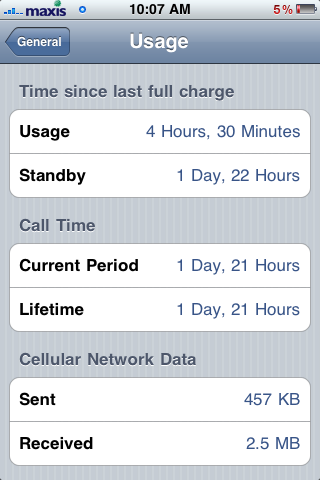
i suggest you turn of location services too. that really drains the battery.
Battery Drain/Usage on iPhone 2G/3G/3GS/4, What to do? How? Solution?
Battery Drain/Usage on iPhone 2G/3G/3GS/4, What to do? How? Solution?
|
|
 Aug 4 2009, 09:15 PM Aug 4 2009, 09:15 PM
|
 
Junior Member
23 posts Joined: Oct 2007 
|
i suggest you turn of location services too. that really drains the battery.
|
|
|
|
|
|
Aug 4 2009, 09:35 PM
|

Junior Member
237 posts Joined: Jul 2008
|
my i3g don have this battery problem except i m using tethering with my laptop. I also have use Push mail , but off notification. Just now morning i listen to song , around 1 hours, decrease 8% of battery.
|
|
|
Aug 4 2009, 10:28 PM
|

Senior Member
1,263 posts Joined: Aug 2005 
|
erm.. i have used my iphone for couple of days, i need to fully charge everyday == is that ab-normal, but everyday also i got play games, use wifi and test some application la.. btw i already JB my phone d
the longest can tahan is yesterday until 6pm, that's the best i had, i haven't tried before 1 day or 1.5days... will it drain the battery life span if i full charge everyday? since apple said only got 400 cycle == |
|
|
Aug 5 2009, 12:08 AM
|
|
Junior Member
25 posts Joined: Aug 2009
|
I dont think my Fring was the cause. I just did a restore for my iPhone and started it as a new phone as it was a suggested solution earlier and I haven't open Fring since then. I haven't even entered any mail to Fring, therefore, Fring is still not running so no push notification from Fring. As for apps being the culprit to this problem, the first day I got my iPhone, I was still having problem with my iTune account so I couldnt get any apps on the first day and if I recall correctly, the battery depletes very fast from the very first day as well. So, I dont think app's the problem.
So anyone who solved his/her battery problem, could you all share your solutions? It's sad to charge my phone twice a day while waiting for the new OS patch and hope that they would fix the problem. |
|
|
Aug 5 2009, 02:27 AM
|

Junior Member
204 posts Joined: Dec 2006
|
maybe there's something that runs in the background drains the battery.
|
|
|
Aug 5 2009, 04:00 AM
|
|
Junior Member
25 posts Joined: Aug 2009
|
Well, how do I check if anything is running in the background? Anyhow, I dont think that I was running anything in the background eventho I dont know how to check, lol .
|
|
|
|
|
|
Aug 5 2009, 08:59 AM
|
|
All Stars
11,308 posts Joined: Feb 2008
|
After your restore to new phone you should have not install back all your apps. If not then how to confirm whether the problem is still there or not? Just not using Fring doesnt mean its not doing anything
I just confirmed mine is due to fring last night. This is what I did - I installed back fring before I went to bed and also charge up the phone. I did logon to fring and then go back to home screen. Notifications On. This morning - cannot turn on iPhone. Now I am going to charge up again and turn off Notification This post has been edited by idoblu: Aug 5 2009, 09:02 AM |
|
|
Aug 5 2009, 09:19 AM
|
|
Junior Member
237 posts Joined: Jul 2008
|
QUOTE(Jasie @ Aug 5 2009, 04:00 AM) Well, how do I check if anything is running in the background? Anyhow, I dont think that I was running anything in the background eventho I dont know how to check, lol . U need to jailbreak and install SBSettings, then u go to "Process" and can see all the process running. I personally think jailbreak have more or less effect battery life, if u play hard on your phone theme, but not a critical point of battery drain fast la. |
|
|
Aug 5 2009, 09:35 AM
|

Senior Member
2,012 posts Joined: Dec 2007 From: Malaysia
|
Ok folks here is my story.I have solved my battery drain issue.i am on 2g.I hacked and installed mms for 2g via cydia and that was my problem.So i uninstalled that and also uninstalled winterboard as well and reinstall to remove the carrier icon.I also reset network settings once.I also uninstalled all push app and reinstalled im + and before using the app go to settings and off all push notification for im+ and also in the im + app as well go to push settings and set keep im services active on exit to off.
Also kill all processes via sb settings often after apps usage,off location service,bluetooth and off push mail service as well,brightness set to half and off auto brightness Apple battery sucks....have to do all that just to get more juice.It limits the phone's capabilities i also SSHed in my iPhone and moved the APSD file from start up in: /System/Library/LaunchDaemons/com.apple.apsd.plist and moved it into a dummy file somewhere else.. and reset the iPhone (iphone still worked). ever since after doing all that battery last more than a day. IF ALL ELSE FAILS OFF THE PHONE MUA HA HA  Try it guys This post has been edited by hussain: Aug 5 2009, 09:57 AM |
|
|
Aug 5 2009, 09:43 AM
|
|
Senior Member
719 posts Joined: Dec 2006
|
Hi,
I used to have battery issue after upgrading my 3G from fw 2.2.1 to Fw 3.0. Battery would be down to 30% by lunch time. My settings then was PUSH mail ON, Location Services ON, Bluetooth ON, IM+ after exit stays online with push notification on for another hour. It was rather frustrating and I find that I have to charge it up before I leave the office. Now with these changes made 1. PUSH mail OFF, I now configure fetch mail every 15 minutes 2. Location Services OFF 3. Bluetooth - ON 4. IM+ goes offline after exit with home button. 5. Push notification OFF 6. Brightness 40% 7. 3G on all the time 8. Wifi OFF 9. ALMOST LEFT THIS OUT. I disable MMS and this seems to make a lot of different. I find that with these changes made, with moderate usage I still have 30 - 40% of battery at night and I charge my iPhone every night with the charger on my bed side table as it is my alarm clock. So everyday I have a fresh 100% battery when I leave the house  . And I just purchase a FastMac Truepower IV as a backup charger that I keep in my bag, this Truepower iV has 3100maH and a nice flash . And I just purchase a FastMac Truepower IV as a backup charger that I keep in my bag, this Truepower iV has 3100maH and a nice flash  This is how I solve my Battery issue on my 3G FW 3.0 jackdon *** using Facebook with iPhone while driving is definitely an OFFENCE and asking for trouble *** This post has been edited by jackdon: Aug 5 2009, 09:52 AM |
|
|
Aug 5 2009, 02:54 PM
|
|
Junior Member
25 posts Joined: Aug 2009
|
QUOTE(hussain @ Aug 5 2009, 09:35 AM) Ok folks here is my story.I have solved my battery drain issue.i am on 2g.I hacked and installed mms for 2g via cydia and that was my problem.So i uninstalled that and also uninstalled winterboard as well and reinstall to remove the carrier icon.I also reset network settings once.I also uninstalled all push app and reinstalled im + and before using the app go to settings and off all push notification for im+ and also in the im + app as well go to push settings and set keep im services active on exit to off. Care to elaborate more on the bold text? I dont quite understand that part. Also kill all processes via sb settings often after apps usage,off location service,bluetooth and off push mail service as well,brightness set to half and off auto brightness Apple battery sucks....have to do all that just to get more juice.It limits the phone's capabilities i also SSHed in my iPhone and moved the APSD file from start up in: /System/Library/LaunchDaemons/com.apple.apsd.plist and moved it into a dummy file somewhere else.. and reset the iPhone (iphone still worked). ever since after doing all that battery last more than a day. IF ALL ELSE FAILS OFF THE PHONE MUA HA HA Try it guys Also, I did everything that jackdon and hussain did regarding turn those services off etc, still no luck. That's why I was wondering. |
|
|
Aug 5 2009, 03:09 PM
|
|
Senior Member
2,012 posts Joined: Dec 2007 From: Malaysia
|
QUOTE(Jasie @ Aug 5 2009, 02:54 PM) Care to elaborate more on the bold text? I dont quite understand that part. Apparently com.apple.apsd.plist function is to ensure push works and always checks servers to find things to push.(This is what i read from another forum) so if u move it out from the launch daemons folder it will stop doing that.However newbies who do not know how to ssh u have to really read up how to do it and not mess the files in the phone or u may have more problems.... Also, I did everything that jackdon and hussain did regarding turn those services off etc, still no luck. That's why I was wondering.  Added on August 5, 2009, 3:11 pm QUOTE(Jasie @ Aug 5 2009, 04:00 AM) Well, how do I check if anything is running in the background? Anyhow, I dont think that I was running anything in the background eventho I dont know how to check, lol . To check if any processes are running in the background install sb settings and use the processes icon to delete background appsThis post has been edited by hussain: Aug 5 2009, 03:18 PM |
|
|
Aug 5 2009, 04:29 PM
|
|
Junior Member
25 posts Joined: Aug 2009
|
I'm already using SBsettings to disable 3G,EDGE,push, etc. So far, under my processes, only "Phone" is running. I tried closing "Phone" but it'll reappear everytime I check my processes so I assume it's set to have it running no matter what. I dont think that would be the problem right? So my only solution now would be read up on SSH and try to take off the function of push notification? I'm not really a computer or phone wiz so all those terms may be a lilttle bit hard for me to absorb
|
|
|
|
|
|
Aug 5 2009, 04:35 PM
|
|
All Stars
11,308 posts Joined: Feb 2008
|
just delete Fring to try. you can always install it back with iTunes once you confirmed its not the problem
|
|
|
Aug 5 2009, 08:58 PM
|
|
Junior Member
25 posts Joined: Aug 2009
|
I tried deleting fring. No other messenger problem in my phone. So I guess my only solution now is wait for the patch from apple
 |
|
|
Aug 5 2009, 09:20 PM
|
|
Junior Member
47 posts Joined: Jul 2009
|
last nite after full charged 100%, me unplug de cable and went to sleep.... to my surprised, my iphone alarm didn't work... when i check my battery, it was dead ==1 brand new phone, battery drain from 100% to 0% in less then 8 hours ==1
i suspect its the tap tap revenge, coz i had played it before i charged the phone and everytime i play the game, my phone get quiet hot after a few games... this morning me also notice the phone battery drain very fast, almost 1% every 5mins... but after i reboot the phone, then things sort off turn normal again... so, guys take note if you have install tap tap revenge... |
|
|
Aug 5 2009, 09:25 PM
|
|
Junior Member
237 posts Joined: Jul 2008
|
@zdongdongz,
ur case are damm serious...tap tap revenge wont cause the battery drain , I installed before and many users played since last year, so far no complaint. I duno this battery issues exist on every i3gs users , or only random users. We cant assume the quality of every units of i3gs is the same, some might get better, some might unlucky. |
|
|
Aug 5 2009, 09:41 PM
|
|
All Stars
11,308 posts Joined: Feb 2008
|
The exact problem with mine. Fully discharge overnight but mine due to fring
Added on August 5, 2009, 9:46 pm QUOTE(Jasie @ Aug 5 2009, 08:58 PM) I tried deleting fring. No other messenger problem in my phone. So I guess my only solution now is wait for the patch from apple Do you know how many percent down in one hour?This post has been edited by idoblu: Aug 5 2009, 09:46 PM |
|
|
Aug 5 2009, 10:02 PM
|

Senior Member
3,239 posts Joined: Oct 2006 From: Sydney, NSW
|
Here's what I've been able to achieve lately.
» Click to show Spoiler - click again to hide... « 1) Push Notifications - OFF 2) Location Services - ON 3) EDGE - ON 4) 3G - ON 5) Wifi - OFF 6) Brightness - 50% (Auto brightness OFF) 7) Mail - Fetch new data OFF 8) Bluetooth - OFF 9) SSH - OFF 10) Background Processes - Phone ONLY (except Mail which pops up occassionally) 11) Vibrate - ON 12) Jailbroken - YES Note: - Occasional WiFi, surfing on Safari, IM, Cydia - Minimal gaming - On iPod occassionally - 2-3 hours of total phone calls duration in the last 36 hours - Constant SMS - Apps with Push Notifications installed: Beejive IM, Tap Tap Revenge This post has been edited by teikwing: Aug 5 2009, 10:13 PM |
|
|
Aug 5 2009, 11:12 PM
|
|
Junior Member
25 posts Joined: Aug 2009
|
QUOTE(geo-milano @ Aug 5 2009, 09:25 PM) @zdongdongz, Hmmm, your reply kinda worries me, lol. Yes, we couldn't clarify if every 3Gs user is having this problem but why only "unlucky" ones get em? I thought Apple uses the same hardwares in putting the phone together? and after all the debates and discussions, we're safe to say that the problem is from the software but not the hardware, no? However like I mentioned in my earlier post, I downloaded an apps called "BatteryStatus" from the apps store and when I have my phone fully charged, the Battery Status shows my estimated duration of my battery at different kind of usage and I found out that the duration is same as 3G but not 3Gs from what Apple displayed at their site. So I'm puzzled here. Battery Status not being accurate or did I get an iPhone 3Gs with an iPhone 3G battery? ur case are damm serious...tap tap revenge wont cause the battery drain , I installed before and many users played since last year, so far no complaint. I duno this battery issues exist on every i3gs users , or only random users. We cant assume the quality of every units of i3gs is the same, some might get better, some might unlucky. QUOTE(idoblu @ Aug 5 2009, 09:41 PM) The exact problem with mine. Fully discharge overnight but mine due to fring As for your question idoblu, I'm still using my iPhone quite often now with wi-fi on. So I can't really tell ya the result yet but later before I sleep, I check the battery and have everything turned off while letting it idle. Will update you with my finding later. Added on August 5, 2009, 9:46 pm Do you know how many percent down in one hour? @teikwing I had number 1~5,7,8 off from your list and it's same for me for number 6,10,11,12 like yours. The only different is that I still have SSH on as I still haven't read up on SSH so I don't dare to turn it off. Haha and you got to nearly 2 days of battery lifespan, mine barely go over half a day. Sad |
| Change to: |  0.0320sec 0.0320sec
 0.18 0.18
 6 queries 6 queries
 GZIP Disabled GZIP Disabled
Time is now: 3rd December 2025 - 03:52 AM |
 Quote
Quote