

 Jun 25 2009, 03:28 AM, updated 17y ago


Welcome! On this thread, we talk about headsets that work with the iPhone, after the introduction of iPhone OS3.0. I'll start myself with the units I have in hand and how they perform on my iPhone 3G.
For the mono telephony BT headsets, I have tested and own these:-

Sony Ericsson HBH-660
Pairs and discovered by the iPhone without much fuss, well...since the iPhone 2.0 days. IIANM, Caller ID is not passed to the little LCD screen on the set itself. Size is the second largest in the mono/single-ear headsets in my collection, but plenty comfy. Occasional call drops, but call when connected, is clear. Volume rocker switch is easy to access and press.

Jabra BT125
Pairs and discovered by the iPhone without much fuss too since the 2.0 days. The smallest of the single-ear headset I have. But because of its size, the circular part that clings to your ear tend to not clutch nicely to ears and tend to pop off. Volume rocker switch is small as well, making it hard to adjust on the fly.
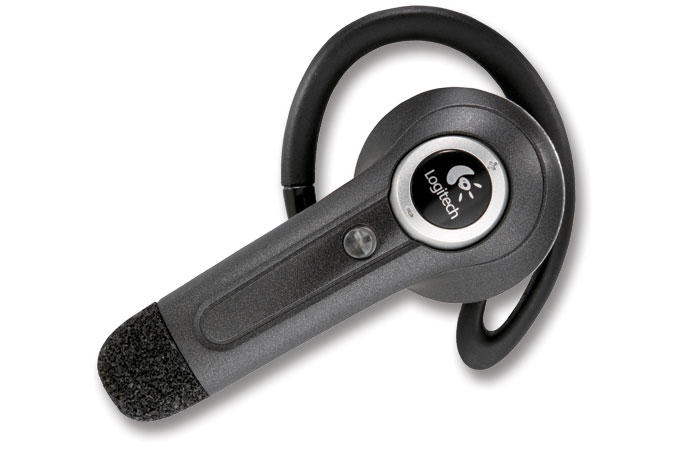
Logitech Mobile Freedom
Initially having difficulty pairing with the iPhone. Had to reinitiate pairing a couple of times before the pairing sticks. Audio pickups are below average, and sound received on the other side is poor. Headset is largish, hence tend to droop or weigh down on your ear after a while. Foam covering tend to crumble after long usage, probably because of sweat absorption. Volume rocker is in the form of that circular symbol around the Logitech logo, and stiff/hard to press. AVOID AT ALL COST!

Logitech Mobile Express
Pairs and discovered by the iPhone without fuss, a welcome change from the crappy Mobile Freedom. Small in design but feels nice on the ear. Build quality is cheapish however. TWO-button control instead of the traditional 3 may confuse user (volume up, volume down, pair/power button now has its own unique combination presses on these two buttons). Great audio reception and sound comes out great as well on the other side. Fits the ear comfortably with that earplug.

Playstation Bluetooth Headset
Pairs and discovered by the iPhone without fuss. Elegant design. Glows red around the mic mute ring. Comfortable on the ears. Great audio reception and sound comes out nice on the other side as well. A good fit into the ears thanks to its design. Not too heavy and feels just right on the ears. You may want to save this for the PS3 alone, as the headset is more worthwhile using it on the PS3 with its High Quality setting, unavaillable other than on the PS3 itself.
Now let's dive into the STEREO side of the Bluetooth headset/headphones. First up:-

iTech clip R35
Versatile in the sense that you can use the provided earphones or supply your own. Pairs and discovered by the iPhone with no fuss. The blinking blue light may be a tad annoying. And since the sound quality is dependent on the earphones you use, it varies. As for the quality of the transmission itself, compared with the other two I'm about to list, shrill and tinny. Built like a cheap oversized clip. Buttons hard to push and tiny. AVRCP function on the iPhone works only for Play/Pause/Stop and answering calls.

Sony DR-BT140Q
Lightweight and clips onto your ears. Pairs and discovered by the iPhone with no fuss. Great build quality and looks exceptionally sleek. Comfortable as well, you tend to forget it is there. Price RM269. Audio quality transmission is excellent. AVRCP functions on the iPhone works only for the Play/Pause/Stop and answering calls. Audio/tunes fades out as calls comes in. Sound quality is full and equivalent to Sennheiser PX series. Volume up/down buttons as well as pressing the toggle In to pause/stop may takes getting used to, but using these babies in public and look like an almost normal person (not like a dork!:p) is worth the hassle. Call quality is excellent and sound received on the other side is great as well, receiver did not realise I'm talking on a BT headset at all.

Sony DR-BT50
The headphone to get for the uncompromising audiophile out there. Sounds awesome and full body, surprising on a BT headphone. Pairs and discovered by the iPhone with no fuss. Awesome build quality. AVRCP works only for the Play/Pause/Stop and answering calls. Price RM699. Volume up/down buttons as well as the pause/stop button may take getting used to for its size, but for the audio quality it gives, I'll learn it!
 May be a little too obvious/showy in public when worn because of its size. Call quality is excellent as well, and sound received is great, receiver did not think I was on a BT headphone. LEd blinking on the side may annoy others.
 If there is anything else I remember, I'll edit them in later. Please add your experiences with your own Bluetooth headsets/headphones, but for me, for the day of light travel and remaining inconspicuous, the Sony DR-BT140Q is my choice. For the days of not wanting any audio compromises, BT50 is the way to go. For days where I would need to answer calls hands-free, I still use the wired iPhone cable I have, but if I had to choose between the single-ear mono headsets, I'd go for the Aliph Jawbone.
 But since it is not in my possession right now, I'll pick the Mobile Express. But most if not all the time, I tend to have and use the wired hands-free cable to my iPhone
This post has been edited by stringfellow: Jun 25 2009, 03:32 AM
 Quote
Quote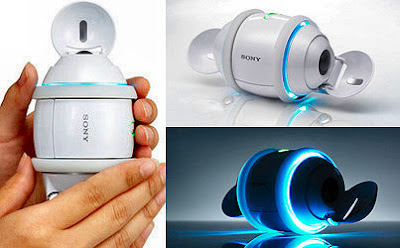


 Lucky it was free, I used leftover points in my Sony Membership card for that from my Z purchase.
 0.0201sec
 0.48
0.48
 7 queries
 GZIP Disabled