Welcome Guest ( Log In | Register )

Outline · [ Standard ] · Linear+

 [02/02] FAQs about Optical Media (DVD), thanks !! enjoy reading ~ (CHN/ENG)

views
     
TSyangxi
post Nov 26 2004, 11:53 PM, updated 21y ago

Violinist ^.^ å›§ å›§
*******
Senior Member
4,189 posts

Joined: Jan 2003
From: Age Quod Agis


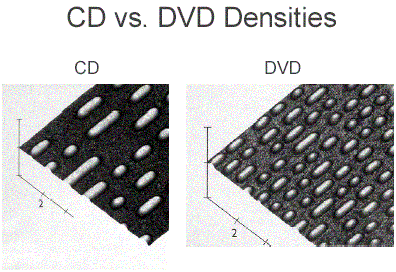
1.) How can DVDs hold more if they're the same size as CDs?

.Although the discs are the same physical size and shape, there are more tracks and smaller pit sizes on a DVD.
user posted image


2.) What's the difference in a DVD 5 versus a DVD 9? How many versions are there?

.A DVD 5 is a single-sided, single layer DVD disc holding 4.7GB of information. A DVD 9 is a single-sided, double layer disc holding almost twice as much.

. DVD 5 4.7 GB single side single layer
. DVD 9 8.5 GB single side dual layer
. DVD 10 9.4 GB double side single layer
. DVD 18 17.0 GB double side double layer


*The enormous capacity of the Digital Video Disc attracted CD-ROM users who wanted encyclopedias on one disc instead of 6 or more CD-ROMs and audiophiles who wanted higher resolution audio than CDs provided. So the DVD acronym was officially changed to mean "Digital Versatile Disc."


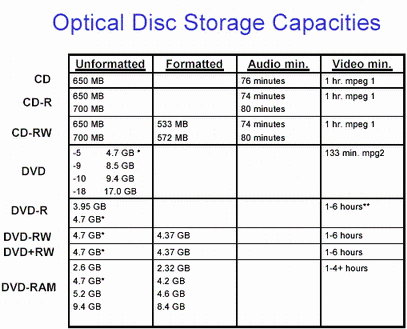
3.) What's the storage capacity of a DVD?

.The storage capacity can vary depending on the number of sides used and the number of layers on the disc.
user posted image

*This figure is actually 4.377GB because the DVD Forum defined 1 GB as a billion bytes in the decimal system instead of the conventional binary system of 1,073,741,824 bytes (230) that computers recognize.
** Windows 95 will only allow a file up to a maximum of 2.0 GB; Windows 98 allows a maximum of 4.0 GB; XP has removed limits on file sizes. These numbers generally correlate with the 4.377GB capacity of a DVD disc, but inconsistencies remain in both software and operating systems.


4.) My DVD player won't play CD-Rs but it plays music recorded on a CD-RWs! How can that be?

.Some newer models of DVD players follow a "multi-read" standard so that they can play most types of DVDs as well as CDs, CD-Rs, and CD-RWs. Earlier versions of DVD players were limited to DVDs, but often the circuits designed for the low reflectivity of DVDs were compatible with the low reflectivity of CD-RWs. If those types of DVD players could read CDs, they could often read CD-RWs, too.

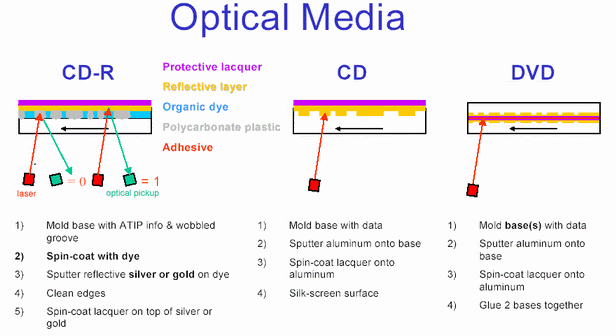
5.) Now people can record on DVD, but there are 3 different types? Why?

.There are three different types because of a combination of different design objectives and conflicting corporate interests.
user posted image


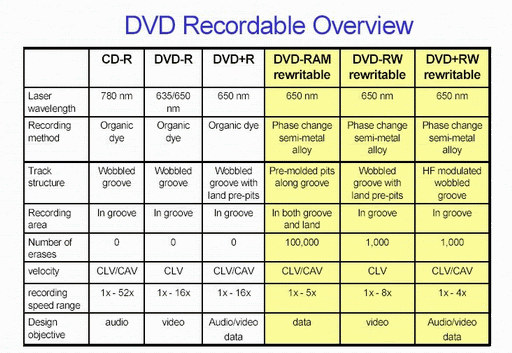
6.) What's the difference between the types?
user posted image


7.) What's DVD-R?

.A DVD-R is a recordable DVD similar in design to a CD-R. It is not erasable.

8.) Can I copy rented DVDs onto DVD recordable discs to build my own library?

.No, for two reasons. First, it is wrong to take the work of others without compensating them for their efforts-and it's illegal. The second point is that there are copy protection schemes built into DVDs, drives, and software that prevent such illegal copying.

9.) What's DVD-RW? How is it different from DVD-R?

.A DVD-RW is the erasable companion to the DVD-R. Use of a semi-metal alloy instead of a permanently altered dye makes the DVD-RW erasable.

10.) What's DVD-RAM?

.A DVD-RAM is a DVD designed for random access memory, for the quick and easy storage and retrieval of data. It is distinguished by its protective cartridge, but some versions come with a bare disc and without a cartridge.

11.) What's DVD+RW? There's a DVD+R, too. Does the plus mean it's better than the minus?

.A DVD+RW is a rewritable DVD designed to work well with both video and data recording. The DVD+R is the write-once companion. The plus in their name distinguishes them from the earlier DVD-R/-RW.

12.) Will any of these recordable DVDs play in my DVD player?

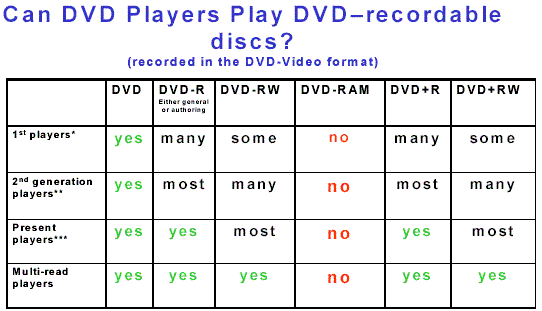
.Whether a recorded DVD will work in a DVD player depends on the player. Multi-format DVD players will likely play all formats except the DVD-RAM cartridges. Older players may have the fewest problems with DVD-R or DVD+R if they play the discs at all. The lower reflectivity of DVD-RW and DVD+RW sometimes poses problems for older players.
user posted image

*. Of the first players introduced into the market, 95% will play the DVD-R 3.95 GB discs (the first DVD-Rs and the present authoring DVD-R, but only half are likely to play the 4.7 GB general purpose version DVD-R or the DVD+R. Few of these players may be able to play the DVD-RW.

**. Almost all of the second generation players will play the 3.95 GB DVD-R discs, and roughly 95% will play the 4.7GB DVD+R and DVD-R discs. DVD+RW and DVD-RW performance improves with the number of players that recognize them, but those players are still far fewer than those that successfully play DVD+R and DVD-R.

***. Almost all DVD players sold after November 1999 should play DVD+R and DVD-R discs, and most will also play DVD+RW and DVD-RW also.


13.) I have a 12X CD-R recorder. What speeds are there for DVD recorders?

.DVD 1X speed is already nine times faster than a CD 1X speed; so "high-speed" DVD recording is going to be limited. All present drives can record at 1X. DVD-RAM records at a maximum of 3X; DVD-R at a maximum of 4X; DVD-RW, 2X; and both DVD+R and DVD+RW at a maximum of 4X. 8X writing is next increase in DVD recording speeds, and it will come first to DVD+R, then DVD-R, and then DVD+RW. The fastest DVD writing speed possible is 16X or just slightly faster.

14.) I've heard that if I use the wrong speed disc in my DVD drive, it can be destroyed? Is that true?

.Yes, but the whole story is not quite as dramatic. The early DVD-R/-RW drives that could write at a maximum of 2X would not recognize 4X DVD-R discs and could possibly damage their laser diodes trying in vain to identify the discs unless the user intervened and stopped the drive. Pioneer provides a firmware fix to the drives so that they will recognize 4X discs and record them at 2X. See www.pioneerelectronics.com/hs/ to download the fix for their drives. In the DVD+R/+RW camp, 4X discs in early 2.4X drives will appear to behave normally, but the write strategy will create irregular marks in the discs and the discs will fail.

15.) I tried to record a 4.5GB file onto a 4.7GB DVD+RW but it wouldn't fit. How come?

.The problem is that computers and DVD drives and media count the numbers differently. The computer counts according the base two in its binary system. The DVD camp decided to count bytes in the decimal system. A 4.7GB DVD+RW actually only holds 4.377GB in computer terms minus any capacity taken up by formatting.

a. 1GB = 1 gigabyte = 1,073,741,824 bytes = 2 exp 30 in computer terms
b. 1GB = 1 gigabyte = 1,000,000,000 bytes in DVD terms


16.) My DVD drive won't record DVDs. Is the quality that bad?

.There are often two reasons a disc will not record in a drive: 1) it is the wrong format, or 2)the drive lacks the firmware to recognize the disc. In the first case, a DVD-R recorder will not be able to record on a DVD+R or DVD+RW disc unless the recorder is a "dual format" recorder that can record on both. The same is true of DVD+R/RW recorders-they will not record DVD-R/-RW discs. The second case is more common, but less obvious. Drives rushed to market with the latest speed as its chief feature often limit the testing done on various discs in order to save development time. The drives work with a limited number of discs whose ID codes are in the drive memory so that the drive selects the proper write strategy-the amount of laser power required and the timing of the light pulses-to record on them. Discs whose codes and write instructions are not in the drive memory, its firmware, will not work or work very badly. In time the drive manufacturers develop new instructions for additional disc ID codes, and these are added to the drive's firmware by means of an update that is "flashed" to the drive's memory bank. Internet forum groups often make ignorant claims about discs or drives when the problems are due to incompatibilities, not any flaws in either the discs or the drives.

17.) I have a choice of CBR or VBR in my video capture. What are they?

.CBR stands for "constant bit rate," and VBR means "variable bit rate." The CBR means the computer assigns the same number of bits for every second of video while VBR may alter the rate depending on how complex the video is. VBR can often be more efficient and allow a little more capacity on a disc if the video is not tough to encode.

18.) What are VR formats?

.VR stands for Video Recording. That's the easy part-there are two incompatible VR formats: -VR and +VR. The -VR format is used by the DVD-R/-RW camp to record video in real-time onto a DVD-R or DVD-RW disc in a set-top recorder so that TV programs can be recorded from the built-in TV tuner. Unfortunately, -VR formatted discs will play only on the recording device that recorded video onto them. -VR recording allows playlists and chapter markers to be added to a recording on a DVD-RW and some editing ability. The +VR mode is used by DVD+R and DVD+RW discs for the same type of real-time recording as well as some limited editing. Unlike -VR formatted discs, +VR formatted discs will also play in DVD players that play DVD+R and DVD+RW discs.

19.) I captured my tapes at the highest "MPEG-2 quality." Why can't I make a DVD?

.MPEG-2 encoding has a number of bit rate settings, the highest of which exceed the standard for DVD-video. A DVD cannot have a bit rate higher than 9.8 Mbps (megabits per second), including both audio and video. Some video capture/editing software allows higher rates for MPEG-2, but the higher rates will not allow DVD recording, which is what most people are trying to accomplish. Other software picks a lower rate by default. The "highest quality" for some is only 6 Mbps because it is much easier to encode and more likely to work than a higher rate. Other software limits the bit rate to 8 Mbps to offer high quality at a safer rate than the maximum of 9.8 Mbps.


PIE/POE

DVDs have double error correction. Drives put 16 sectors (sector = 2,048 bytes of usable data + 308 bytes of error correction + 4 bytes for the sector ID + 6 bytes for copyright management = 2,366 bytes) of usable data into an ECC (Error Correction Code) matrix. The rows of the matrix are checked for accuracy according to "inner parity" while the columns are checked for "outer parity." This two-dimensional error correction is nearly 10 times more efficient than that for CDs and can correct severe flaws caused by scratches or debris as large as 6 mm. The DVD specification requires that the sum of PIE in 8 sequential ECC sectors (PI sum 8) be less than 280.

DVD+R specifications require that after the first PI correction no more than 4 errors remain in the ECC sector for the sum of Parity Inner Failure. These should be corrected by the second error correction so that no errors remain for Parity Outer Failure. If POF is >0, the errors will be noticeable.


Jitter

The lengths of the lands and pits should be kept as exact as possible-perfect multiples of IT signals. In reality, the lengths show variations in their actual lengths that translate into timing variations referred to as jitter. DC jitter (data-to-clock jitter) is a measure of the length of each pit and land against the precise measure of a clock pulse time signal. DC jitter is measured over the entire disc and should measure below 9.5%. Bottom jitter is the value at three different points on the disc as seen by the laser. If bottom jitter is quite different from DC jitter, that is an indication that the disc has mechanical distortions.
DC jitter is also dependent on the write strategy of the burner. If the incorrect write strategy is applied, DC jitter increases as well as PI sum 8 values and the uncorrectable POF errors.


=====================================================

CARE AND HANDLING OF OPTICAL DISCS nod.gif

The estimated lifetimes of optical discs can only be reached if reasonable care is taken of them during handling and storage. Most people are familiar with handling these discs, but even a cursory glance at the bottom of discs in public libraries or from DVD rental stores indicates that the discs are subjected to far greater abuse than their designers planned. That almost all of these discs still play properly is a testament to their built-in durability, but accumulated damage will hasten the day that even good players will refuse to read them.


The most important points in their care and handling are:

. Handling
-Hold the discs on the outer edge or through the center hole only to avoid fingerprints on the bottom of the disc.

-Avoid flexing the discs when removing them from a player or recorder or a storage case. Flexing will distort the disc's flat design and can even damage the inner recording and mirror layers.

-Do not put excessive pressure on the center hub when inserting the disc in its case. The center hub area, particularly on DVDs, is fragile. A crack in the hub area can lead to shattering of the disc in a high-speed drive.

-Pick discs straight up from a flat surface; do not slide them.
�� Some discs have a special protective coating of extremely fine silicone dioxide power mixed with the lacquer that offers very good resistance to scratches.

This post has been edited by yangxi: Jun 3 2005, 10:35 AM
TSyangxi
post Nov 26 2004, 11:53 PM

Violinist ^.^ å›§ å›§
*******
Senior Member
4,189 posts

Joined: Jan 2003
From: Age Quod Agis


DVD-R and DVD-RW

DVD-R was the first DVD recording format released that was compatible with standalone DVD Players.
DVD-R is a non-rewriteable format and it is compatible with about 93% of all DVD Players and most DVD-ROMs.
DVD-RW is a rewriteable format and it is compatible with about 80% of all DVD Players and most DVD-ROMs.
These formats are supported by DVDForum.


DVD-R

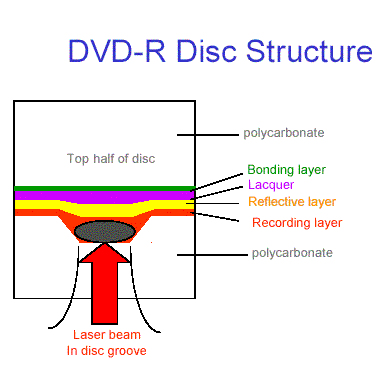
DVD-R is very similar to the CD-R in its design and function. The original design objective was to provide a recordable disc that could hold enough video information to compete with VHS video cassettes in terms of capacity. Like CD-Rs, information is recorded in a groove filled with an organic dye; and once the laser alters the dye, the information cannot be changed. The disc rotates at different speeds so that the data pass under the laser at a constant rate. This rate is called CLV, or "constant linear velocity," meaning that the groove travels as a steady line no matter whether it is located toward the inside of the disc or toward the outer edge. If the data are on the outer edge, the disc slows down to keep the rate of reading the data the same as the reading rate toward the center because, like a wheel, the outer edge turns faster than the inner edge around the spindle. CDs and CD-Rs also use the CLV design. Figure 23 shows a cross section of a disc groove with the laser mark fitting in the groove itself.

user posted image


In order to provide copy protection for copyrighted video programs, the developers of the DVD-R offer two different versions. One is for "general" use, and it uses a 650 nm laser wavelength for recording. This wavelength is identical to that used in DVD players; so consumers who record home videos can transfer them to general use DVD-Rs and play them in their DVD players. "Authoring" DVD-Rs are those used to make video masters on sophisticated hardware unencumbered with copy protection schemes that could present software conflicts during video programming. The authoring discs use a 635 nm laser wavelength to distinguish them from the general use versions. These discs can also be played on DVD players, but they cannot be recorded in general use drives.

The first "consumer" DVD-R drives could record at 2X for only a few DVD-R discs. All others were restricted to 1X speeds. By the time 4X drives appeared, the number of disc suitable for 4X recording had increased dramatically, but these 4X discs posed a larger problem for older drives: unless the drives' firmware is updated, a 4X disc is likely to lock the drive in a recording cycle that could burn out the recording laser unless the user intervenes to stop it. Pioneer and suppliers of 4X discs warned users about the potential problem and offered a firmware update to resolve the problem. Shortly after 4X DVD-R discs appeared, most DVD-R drive manufacturers, including Pioneer, introduced "dual" DVD recorders that could record on both DVD-R/RW and DVD+R/RW.

The general purpose DVD-R discs offered in the U.S. (version 2.0*) have a pre-formatting address scheme in the form of "land pre-pits" between the grooves to identify data blocks, a pre-recorded control area that prevents bit-for-bit copying of CSS encrypted movies, Content Protection for Recordable Media (CPRM), and the possibility of double-sided discs. One reason for the use of the 650 nm laser is its lower cost so that "general" use drives do become more affordable. The latest version of the authoring DVD-Rs, version 2.0 /4.7GB, reserve space in their lead-in area for DDP (Disc Description Protocol) header information that is commonly used on DLT master tapes for DVD replication. This feature, known as CMF for cutting master format, allows the authoring DVD-R discs to become direct replacements for DLT masters. General-purpose discs cannot be recorded on authoring drives, and the authoring discs will not work on general-purpose drives. Once recorded, however, the discs can be played on each other's drives and on most recent DVD players or DVDROM drives.

*Version 1.0 was only 3.95GB when it first appeared in 1997. Version 1.9 in 1999 increased capacity to 4.7GB, and the next year DVD-R split into the authoring version 2.0 and the general use version 2.0 common today.


DVD-RW

The erasable and rewritable DVD is similar to the CD-RW version in its basic design, and its operating parameters are directly related to the DVD-R. The marks the recording laser leaves reflect the light at a different angle from the unmarked portion so that the marked reflection misses the optical sensor just as if no light came back at all. This design is known as a "phase change" of the light, and all of the rewritable DVD systems use this method. Like CD-RW alloys, the alloy used in
DVD-RW may have trouble reacting predictably to the laser power after 1,000 cycles; so that figure is used as the upper limit of record/erase times. The lower reflectivity of the DVD-RW can cause confusion in some DVD players and DVD-ROM drives that mistake the disc for a dual-layer DVD and struggle to read it. Other drives may not recognize the disc format code of the DVD-RW and refuse
to play it. Drives that may accept the DVD-R may not accept the DVD-RW unless their firmware can be brought up to date. The latest DVD players are becoming more compatible with DVD-R and DVD-RW discs.

The DVD-RW was introduced as a video alternative to the rewritable DVD-RAM. Video recordings on DVD-RAM cannot be played on regular DVD players even if the discs are removed from their cartridge (see below); so DVD developers wanted an erasable DVD medium that could be reused just as video tape can be. The DVD-RW works well in that role; but when used for data, its video parentage becomes a problem. Video recordings are generally sequential: new video as added at the tale end of earlier recordings. The sequential design, however, prevents data from being erased from the DVD-RW to allow more room in their place. Deleting files from a DVD-RW will not increase 41 the disc's capacity. The only capacity available is that at the end of the last section of recorded information. This is a handicap only for data, not for video; but some DVD developers were dissatisfied with this limitation and wanted a format that worked equally well with video and data. Their solution was the DVD+RW below.

This post has been edited by yangxi: Nov 27 2004, 07:17 PM
TSyangxi
post Nov 26 2004, 11:53 PM

Violinist ^.^ å›§ å›§
*******
Senior Member
4,189 posts

Joined: Jan 2003
From: Age Quod Agis


DVD+R / +RW

DVD+R and DVD+RW
DVD+R is a non-rewritable format and it is compatible with about 89% of all DVD Players and most DVD-ROMs.
DVD+RW is a rewritable format and is compatible with about 79% of all DVD Players and most DVD-ROMs.

These formats are supported by the DVD+RW Alliance.

Why the "PLUS"

Customer Benefits

DVD+R/+RW
Simple - Compatible - Creative

user posted image

No other format can match DVD+R/+RW's functionality, simplicity and compatibility. DVD+R/+RW was designed from the beginning with both data and video recording uses in mind. Compatibility with existing DVD players and DVD-ROM drives is a major strength of the DVD+R/+RW format. Because there are no confusing recording modes, you don't have make trade-offs between compatibility and flexibility.

DVD+RW video recorders allow users to add, delete or divide titles, overwrite titles in whole or in part, create or modify play lists and make other changes without losing compatibility with existing DVD players, unlike other formats. DVD+R/+RW also allows instant use and instant eject - you don't have to wait for the disc to format or finalize. And DVD+R/+RW recorders offer the same type of operation you're used to seeing on DVD players.

For PC users, DVD+RW offers direct editing on disc, background formatting so you don't have to wait before you can use the disc, built-in defect management, multi-session writing, and other unique recording features. DVD+R/+RW uses the same disc for both video and data. You can share recordings between your home electronics and computer equipment, add new recordings or even edit directly on the same disc. Furthermore, DVD+R Double Layer technology allows for storage of up to 8.5 GB of data on a single sided disc.

Supported by leading companies such as Dell, HP, Philips, Sony, Ricoh and close to one hundred other hardware and software leaders, DVD+R/+RW is the smart format for beginners and experts alike.

user posted image

DVD+R/+RW Video Recorders

user posted image

.No different recording modes: Always DVD-Video compatible, always all features available
.From 1 up to 8 hours recording per (single sided) disc
.Create playlists of your favourite scenes, and play them on other players
.Index Picture Screen gives you a visual overview of the recordings, even on other players
.Easy to understand operation, including VCR-like direct partial overwriting of recordings
.No finalization for DVD+RW: no waiting time, the disc is always immediately compatible

This post has been edited by yangxi: Nov 27 2004, 09:16 AM
TSyangxi
post Nov 26 2004, 11:54 PM

Violinist ^.^ å›§ å›§
*******
Senior Member
4,189 posts

Joined: Jan 2003
From: Age Quod Agis


DOUBLE-LAYER DVD RECORDABLE DISCS


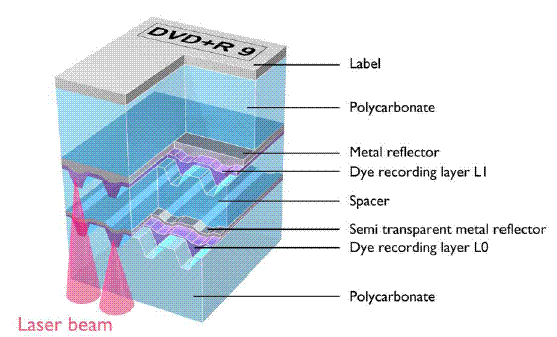
Capacities beyond the standard 4.7GB can be increased in one of two ways: double-sided DVD discs or double-layer discs. Despite the fact that double-sided discs are easier to manufacture (All DVD discs have two halves, and the top half is just a blank.), disc manufacturers decided to introduce double-layer discs before double-sided discs. Like double-layer DVD discs, the technique uses a semi-transparent silver alloy metal mirror layer between two layers of organic dye. This metal reflector layer has a reflectivity of 18%, similar to that of double-layer DVD discs. The middle dye layer itself (L0 in Figure 30 below) has a light transmission value of 50% to allow the laser to penetrate it to the L1 dye layer above it. L1 is much more sensitive to the laser power than L0 is because so much laser light is scattered and absorbed passing through both the semi-transparent silver layer and the first dye layer. The reflectivity of the metal layer for L1 is greater than 50%, but it ends up at about 18% also after the reflected light passes through both dye layers and the semi-reflective alloy layer. Careful tuning of the dyes, metal deposition, and groove geometry has resulted in a dual-layer disc with 8.55GB of storage capacity, but not without some tradeoffs.

user posted image


Double-layer discs require double-layer drives in order to be recorded, but these drives will be slower than those that write to single-layer discs. The initial double-layer drives will be 2.4X for DVD+R and 2X for DVD-R, but their lasers have power ratings equivalent to those for 8X discs because more power is required for the light to penetrate the semi-transport layer and the spacer layer. Since a laser reading or writing a dual-layer DVD starts from the inside and works outward on the "outer" layer (layer 0) to a transition point where it switches to the "inner" layer (layer 1), both layers have to have data signals matching in their total length in order to prevent DVD players from seeing errors. Dividing fixed files into two equal sizes is not a problem for computer systems, but recording video broadcasts that are not exactly defined can pose a problem for set-top recorders. One proposal is to record dummy data on the second layer to fill it to match the file size of the upper layer, but that adds time to the recording process. The transition point of double-layer DVDs is often noticeable as a momentary freeze of the picture. The transition point of recorded double-layer DVDs poses a greater problem for DVD players because the level of reflectivity of both layers is nearly the same, unlike that of regular double-layer

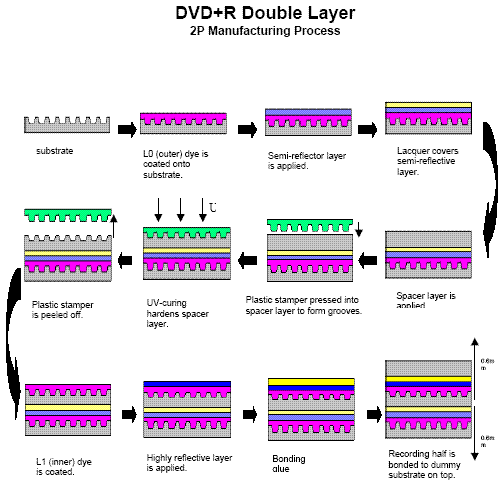
DVDs where one layer is significantly more reflective than the other. Concerns about compatibility with DVD players, particularly older DVD players, are the major issue with this latest development in DVD recording. The manufacturing process for DL discs is much more complicated than that for ordinary recordable DVDs and involves many more steps.

user posted image

The first row shows how the first steps are identical to those for regular DVD+R or DVD-R discs. The main difference is the materials used. The first dye layer has to be transparent enough to allow laser light through to mark the inner dye layer. The reflective layer also has to allow laser light through it, too, to reach the inner layer. The second row shows the first new steps in manufacturing: a malleable spacer layer is applied to the first, or outer, layer; and a plastic stamper impresses this spacer with the wobbled groove for the laser to track during recording. The spacer hardens under the curing effect of an ultra-violet light and is peeled off after hardening sufficiently. The next step is coating the inner dye layer (L1) on top of the hardened stamper. A very highly reflective inner layer covers the L1 dye layer. The rest of manufacturing is similar to that for regular DVDs: the recording half is bonded to the upper dummy blank to complete what is referred to as a DVD9 disc. The critical steps in manufacturing are assuring that the dye layers and the internal spacer are as flat and even as possible with no air bubbles trapped between them.


This post has been edited by yangxi: Dec 7 2004, 10:08 AM
TSyangxi
post Nov 27 2004, 09:13 AM

Violinist ^.^ å›§ å›§
*******
Senior Member
4,189 posts

Joined: Jan 2003
From: Age Quod Agis


DVD Write types

user posted image


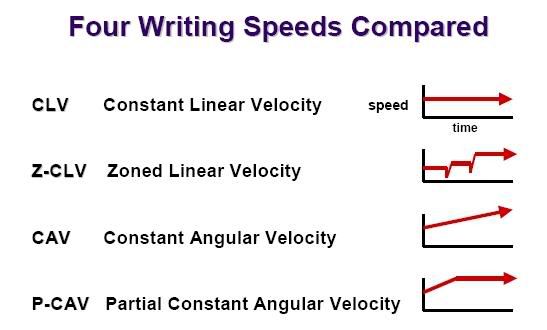
CLV

Constant Linear Velocity. A DVD (other than DVD-RAM) is composed of a spiral track of tiny pits. The player reads the track of pits by focusing a laser beam on the track, and scanning along the track at a constant linear velocity, measured in meters per second. As the disc reads along the spiral track, the radius of the track gradually increases, or in the case of layer 1 of a OTP DVD-9, decreases. Therefore, the rotation speed (angular velocity) must change in order to maintain a constant linear velocity.

Modern players are able to increase or decrease this speed as necessary. DVD-ROM drives are able to increase the reading speed to multiples of the original standard speed (1x, 2x, 4x, 6x, 8x, 12x, etc). DVD Burners are also able to write at faster multiples of the standard linear velocity. Nonetheless, the linear velocity is constant. Compare to Constant Angular Velocity.


CAV

Constant Angular Velocity. This is used to describe something that is rotating at a steady rate. DVD-RAM discs are written and read with a variation of this technique, called zoned CAV. Compare to Constant Linear Velocity (CLV).


ZCLV


Zoned Constant Linear Velocity. A disc format standard that uses constant linear velocity within zones, but uses a number of zones in order to reduce the variation in the angular velocity. This technique is a compromise between CAV which enables faster seek times, and CLV, which enables greater storage capacity.


PCAV

Partial-Constant Angular Velocity, the disc(CD/DVD) is being read/written at an increasing speed until a certain point (speed). After this point the speed will not increase anymore and remain at this speed.

====================================================

DVD (4.7GB) write speeds

1x (CLV) = about 58 minutes
2x (CLV) = about 29 minutes
2.4x (CLV) = about 24 minutes
4x (CLV) = about 14.5 minutes
6x (CLV/ZCLV) = about 10-12 minutes
8x (PCAV/ZCLV) = about 8-10 minutes
12x (PCAV/ZCLV) = about 6.5-7.5 minutes
16x (CAV/ZCLV) = about 6-7 minutes


DVD Double Layer(8.5GB) write speeds

1x CLV = about 105 minutes
2.4x CLV = about 44 minutes
4x CLV = about 27 minutes


DVD (4.7GB) read speeds

6x CAV (avg. ~4x) read speed is max 7.93MB/s = ~14 minutes
8x CAV (avg. ~6x) read speed is max 10.57MB/s = ~10 minutes
12x CAV (avg. ~8x) read speed is max 15.85MB/s = ~7 minutes
16x CAV (avg. ~12x) read speed is max 21.13MB/s = ~5 minutes


This post has been edited by yangxi: Dec 7 2004, 01:28 AM
TSyangxi
post Dec 7 2004, 01:02 AM

Violinist ^.^ å›§ å›§
*******
Senior Member
4,189 posts

Joined: Jan 2003
From: Age Quod Agis


What is the difference between DVD-R and DVD+R? Which DVD burner should I buy? huh.gif

DVD-R (DVD dash R) was developed by Pioneer. It is designed to be a recordable format compatible with DVD Video players and DVD ROM drives. This standard was approved by the DVD Forum and has been adopted by many DVD equipment manufacturers.

Due to the fact that such standards are based on numerous patents, where the licensing of these patents costs manufacturers who do not own the patents substantial royalties in order to produce compatible equipment or media, a separate consortium of manufacturers decided that their financial interests would be best served by developing a competing recordable format. This format is known as DVD+R. The consortium is known as the DVD+RW alliance.

It is hard to say that one format is better than the other. Neither has significant advantages over the other. Both are good but not perfect in terms of their ability to create discs that are playable in most set-top DVD players. The bottom line is that you should pick a burner that suits your requirements, and buy media designed for your burner. The good news is that there are new burners that now support both -R and +R.


This post has been edited by yangxi: Dec 7 2004, 01:07 AM
TSyangxi
post Dec 14 2004, 10:33 AM

Violinist ^.^ å›§ å›§
*******
Senior Member
4,189 posts

Joined: Jan 2003
From: Age Quod Agis


How about Multisession on DVD-R/DVD+R?


Incremental Recording (Multisession)

DVD-R: Incremental Recording (Multi-Border)
DVD+R: Incremental Write (Multi Session)


If you want to partially record a DVD-R(W) disc and use it immediately, but also want to be able to record more data later, border zones are used, which are meant to make this partially recorded disc compatible with standard DVD-ROM players. So every -R(W) recording session has to start with a border-in area (except the first one, which starts with the lead-in) and stop with a border-out area.

However, the size of these border zones is quite amazing : 32 to 96 MB for the first zone, then 6 to 18 MB for the next ones. This means that a disc containing 3 recorded sessions can require up to 132 MB (more than 2% of the complete storage capacity) just for separating these regions. Furthermore, the border-out and border-in areas have to be linked together, using one of the 3 methods (and the possible associated problems) explained previously. Note also that for some unknown reason a border-out is needed before the lead-out, while the first border-in is replaced by the lead-in.

On the other hand, when multiple recording sessions are used on a DVD+R(W) disc, Intro and Closure zones are used (the counterpart of border-in and border-out), but they are always 2 MB large : therefore, with + format, a 3 sessions disc always uses only 4 MB to delimit the regions (the lead-out replaces the last Closure zone). Also a nice feature of multi-sessions implementation on DVD+R(W) is that one can use a session to reserve space, i.e. sectors which are left unrecorded (this blank area is called Reserved Fragment). Thus, additional data can be recorded in next sessions while the first one will only be written later : this can be useful for instance when a precise location on the disc has to contain file system tables, which can only be filled after all the files have been written to the disc.


This post has been edited by yangxi: Dec 14 2004, 10:34 AM
TSyangxi
post Dec 14 2004, 10:37 AM

Violinist ^.^ å›§ å›§
*******
Senior Member
4,189 posts

Joined: Jan 2003
From: Age Quod Agis


QUOTE(cco_ @ Dec 14 2004, 07:25 AM)
And for the 4.7GB capacity, how many data can store if using the formula 1MB = 1024KB.
*
Max capacity DVD+R/-R show in NERO is "4.482GB"
TSyangxi
post Dec 14 2004, 10:53 AM

Violinist ^.^ å›§ å›§
*******
Senior Member
4,189 posts

Joined: Jan 2003
From: Age Quod Agis


Why DVD+R(W) is superior to DVD-R(W)

Article Why DVD+R(W) is superior to DVD-R(W)
Date June 2003
Author Michael Spath

from: http://www.cdfreaks.com/article/113


Since the war between DVD+R(W) and DVD-R(W) started, several comparisons of the two formats have been published, but none of those I read did contain really accurate technical information. Instead, journalists relied on public press releases and white papers provided by vendors to write their articles, resulting in the end into superficial explanations and sometimes contradictory conclusions.

The main problem here is that getting DVD+R(W) and DVD-R(W) standards require money and NDAs, so that little detailed technical information about these formats can be found on the Internet. This is very unfortunate, as it prevents both journalists and techies from all over the world to independently review, compare and choose the best format by themselves.

Because they cannot access the technical details (or simply due to laziness), some people prefer to carefully conclude that there's no real technical difference between the two formats, and that if you forget all the marketing propaganda + and - are equally good. To me this is an evidence that such people have not understood (or more probably not even read) the format specifications.

After having studied the two formats I found that there are several fundamental differences between them, and I concluded that + is superior to -. The goal of this paper is to present the technical details from the specifications that led me to this conclusion, so that anyone with basic engineering knowledge can make his own opinion. This article is by no mean exhaustive, and some exclusive + and - features (e.g. CAV writing or copyright management) are not tackled here because I considered them less significant. Note that this article is pretty technical, so some understanding of optical storage technologies is required.


Conclusion

During my study of rewritable DVD formats it seemed very clear to me that DVD-R(W) standard was not as well designed as DVD+R(W) (or even DVD-RAM). And although some serious efforts have been put in the latest revisions of the - format to fix some of the original problems (at the cost of a much increased complexity), it still remains technically inferior to +, due to some intrinsic weaknesses (e.g. pre-pits). This is not very surprising, as Sony and Philips have a much longer experience at defining standards than Pioneer (and several key patents), and they also had the advantage to publish their standards after their competitors.

Although the arguments presented in this document might look like technical details to most readers, disc format is what defines the limits of what drives can do with a given medium, both in terms of performances and features. Therefore, the technical advantages of the DVD+R(W) format will with time turn into faster, more powerful and more reliable drives for end users. This is already the case today, and the gap will continue to increase as DVD+R(W) drives will exploit more and more of the advantages of the + format. However, as history showed, the best ideas are not guaranteed to win on technology markets, and only time will tell which format becomes the new standard.

TSyangxi
post Dec 15 2004, 11:43 AM

Violinist ^.^ å›§ å›§
*******
Senior Member
4,189 posts

Joined: Jan 2003
From: Age Quod Agis


QUOTE(cco_ @ Dec 15 2004, 10:08 AM)
How to define a good media acording to the Media code/Manufacturer ID
*
Check Media code/Manufacturer ID

www.dvdinfopro.com

Attached Image

This display gives various information about the media loaded in the currently selected drive.

There are some speed lines of data displayed by this button. Three for minus media and two for plus media that require further explanation.

1. Media Code Speed. This media speed rating is determined by comparing the loaded media id code against an internal database of known codes and speeds.

2. Write Strategy Speed. This media speed rating is determined by examining the data on the media looking for write strategies specific to certain media speeds.

3. Current Drive Speed.

a. If a media is currently loaded, and it is a media the drive can write to, the speed rating is that returned by the drive for maximum speed.

b. If no media is loaded, then the speed rating is that returned by the drive for its current speed setting.

The above three speed ratings allow you to determine the true media speed and the speed seen by the drive. This is especially useful for those drives with hacked firmware to increase the speed of some media. It allows you to easily see the true speed for the media should you wish to write at its true speed.

There is a BG Format Status line of data displayed by this button that requires explanation. There are four possibilities.

1. Not Formatted - The media is not formatted and a background format process has not been started.

2. Suspended - The format is not complete, the background format process was suspended and is currently not running.

3. In Progress - The background format process is currently running and not yet complete.

4. Completed - The format is complete. A fully formatted DVD+RW was found mounted.

Write Strategy and OPC data.

Newer DVD-R/RW have write speed data contained on them that inform the drive the laser power and other settings to burn this particular media at a particular speed. Older media required the drive to 'know' the media which of course required users to constantly update firmware. This new approach allows the media itself to inform the drive how to burn it at particular speeds without the firmware needed to know the media. The 'Write Strategy" and "OPC" settings are lines of data showing these various settings. The meaning of them is beyond the scope of this article. They are provided because I can, and to allow comparison.

CD-R/RW Media

Media info can give limited information on CD-R/RW media. There are over 100 manufacturers of CD media known by the program and this is displayed if a match is found. The available write descriptors are also shown.


=================================================
www.cdspeed2000.com

Nero CD-Speed to check PIE/PIF errors as well as jitter.

user posted image

Another useful feature if you are using CD-Speed to record the test disc is that you will also get the recording result shown. On this image you could see the recording speed of this disc as a white graph in the upper window as well as info on the drive used to record it. The result on the image is quite average, to demonstrate how the result from a poor disc will be we have included the following result as well.

example of BAD DISC !!

user posted image

Things to look close at: PO Failures, means uncorrectable errors and uncorrectable errors make the disc unreadable. As we could see there are a lot of PO failures on this disc indicating that it's completely unreadable. And both PI Errors and PI Failures are way off as we could see, and thus CD-Speed correctly gives it a quality score of 0. If anyone wonders: The disc is an Infosmart 8x DVD-R using a stolen Taiyo Yuden media code.

To keep it straight:

There should never be PO Failures on a disc, after some testing we have found that for PI Failures a good guideline is that the maximum value should not exceed 10 and for PI Errors it should not exceed 100. Also keep an eye on the quality score reported by CD-Speed, the higher the better .

PI Error/PI Failures the lower the better

Jitter cannot more than 15% ...else cannot play in dvdplayer

*only BENQ and LITEON can test disc quality

This post has been edited by yangxi: Dec 15 2004, 12:02 PM
TSyangxi
post Dec 17 2004, 01:53 PM

Violinist ^.^ å›§ å›§
*******
Senior Member
4,189 posts

Joined: Jan 2003
From: Age Quod Agis


Chinese :

为什么DVD+R(W)优越于DVD-R(W)

为了刻录方便,空白盘片通常给驱动器提供3 种信息:轨道(这样刻录点可以准确的沿着轨道刻录),地址(这样驱动器可以写到正确的位置),速度(这样盘片可以以正确的速度旋转)。在CD-R(W)方式中轨道和速度信息是记录在wobble*(螺旋型抖动轨道)中的,地址信息是包含在ATIP 数据中的(凹槽下降沿绝对时间,wobble 的一种频率调制)。

DVD-R(W)格式使用一种较慢的wobble(140.6kHz)来记录轨道和速度,地址(和其他)信息是记录在凸起的预刻坑(预先在凹槽之间的小坑)。在凹槽信号之上,预刻坑形成了振幅的尖刺。

DVD+R(W)格式使用了更高频率的wobble(817.4kHz),并且地址(和其他)信息是包含在wobble的相位调制中的,叫做ADIP(凹槽下降沿地址)从信号的理论可以知道,相位调制的抗干扰能力比预刻坑方式更强。抛开刻录机中通常的干扰不谈,这种干扰的情况也会出现。比如说当DVD-R(W)正在写数据的同时要读取预刻坑的信息的时候,由于激光头发出的光将影响读取光束,正确的检测预刻坑将会困难得多,这样能够危害到连接的准确性。

但是抗干扰并不是预刻坑技术的唯一弱点,同时这种技术限制了盘片速度的提升。因为在高速情况下,检测预刻坑比检测相位反转更困难。实际上,在预刻坑的信息仅仅只存在预刻坑所在的那一点上,然而相位反转却存在于反转的整个阶段(准确的说是一直持续到下一次反转)。根据详细说明知道,DVD-R(W)预刻坑的最小长度为1T(1/26.16e6 s),但是DVD+R(W)的频率周期为32T,这样就更加容易检测了。
另外一个DVD-R(W)比DVD+R(W)更加难实现的是母盘刻录。因为这需要在凹槽和预刻坑之间更加精确的切割。为此通常是双光头的设计。
预刻坑的方式不仅比相位调制更容易出错,而且保护的措施更少。一个ECC 块信息位有192 位。在这192位中,48 位没有任何纠错机制保护,24 位有24 位奇偶效验(A 奇偶),最后56 位也是有24 位奇偶效验(B 奇偶)(译者注:48+24+24+56+24 不等于192,没搞明白)。总之,这种奇怪的非统一机制的结构最终将导致一个相当脆弱的数据保护机制。

另一方面对应的DVD+R(W)结构只有其1/4 大小:一个ADIP 字是52 位,包括1 位同步,31 位数据和20 位奇偶效验。一个ECC 块包括4 个ADIP 字,这样总共204 位信息。同时ADIP 字包括完全ECC 块地址,同时要解压出这个地址要有4 倍大小的空间。这样将显著加快速度。


错误管理和刻录质量

另外一个DVD+RW 格式主要优势是硬件错误管理(但是现在还没有刻录机支持),由DVD+MRW 标准定义(Mt. Rainier)。在一张DVD+MRW 盘片上,当在读取和写入ECC 块出错,这个块将被标识位坏块并且将不再使用。要写入这些坏块的数据将被重新写到其他地方;相反的,当这些数据被读取的时候,将从新地址读出。这些操作对软件来说都是透明的,最初对连续的扇区的访问最终将会从不同的地方读取。这个抽象的层叫做逻辑到物理地址转换。

另外,通常认为错误管理只是在刻录新盘的时候有作用(在刻录的同时读取数据,检查并按照需要把数据移动到另外位置),而对于已经损坏的的刻录盘没用。这是错误的,因为当一个ECC 块部分损坏的时候就需要对其多次的读取,这些数据可以在媒体完全不能读取之前移动到另外一个干净的区域。当然,当ECC 块损坏的程度超过了错误修复的能力,数据肯定就会丢失了;然而只有当非常严重的的损伤才会造成这样的情况,因为PI/PO 纠错可以处理大于6mm 的突发错误。

在格式化的时候,DVD+RW 标准可以进行后台效验。例如,当驱动器空闲的时候就在检测盘片的错误。当然,用户可以在任何时候读、写光盘,或者弹出盘片;在上述过程结束后后台效验将继续进行。这些特性就组成了一个非常强大的系统,可以不断的提高盘片的寿命;当用户执行正常操作的同时,驱动器可以检测盘片,把数据从损坏区域移动到空白区域。这种高级错误管理已经在DVD+MRW进行了说明,例如监视分析程序和报告技术。最后,即使播放器没有MRW 技术也可以完全兼容DVD+MRW。

尽管DVD-R(W)也支持一些错误管理(Persisten-DM and DRT-DM),但是这些主要的是基于软件的并且都需要特定的程序进行初始化。此外,因为DVD-RW 缺少必须的数据结构,地址转换也必须通过软件来完成,同时根据较高水平的要求,翻译数据必须存储在盘片的使用区域内。这样会使DVD-RW 盘片不能更好地进行简单的文件存储和图形完整。因为计算机完整的系统文件有利于保护管理。尽管DVD-RW 盘片不能使用+MRW 技术,但是DVD+RW 能更好地使用UDF2.0 技术。

同时DVD+R(W)盘片可以使刻录机达到更好的刻录质量,因为DVD+R(W)盘片相对DVD-R(W)盘片而言给驱动器提供更多的信息。实际上,就像是CD-R(W)一样,最佳的刻录设置是记录在OPC(最佳能量控制)算法中。在这个算法中使用包含在预刻块中的信息。DVD+R(W)的最佳能量控制不仅提供更多的信息(例如依靠于波长的能量)而且更加精确的信息(例如初始激光强度)。此外,这些信息对4 种不同的速度区间(主要、高速、正常、4x 模式)都有效,然而-格式只提供其中的一种数据。这是非常重要的,因为最佳的刻录设置对于刻录速度来说非常敏感。同时DVD+格式的OPC 的测试区域有32768 个扇区,然而DVD-格式只有7088 个扇区。
连接

对于在任何情况下要从停止刻录的地方再继续刻录的时候,新数据必须要和老数据进行连接。连接是一个非常重要而且谨慎的工作,因为其可能产生各种各样的物理或者逻辑问题。首先,简单介绍一下两种格式所使用的连接方法。

在DVD-R(W)方面,能够使用三种连接方法:2K 连接、32K 连接和无损连接。在所有的情况下刻录停止在一个ECC 块的第一个扇区的第一个同步信号之后的16 个字节,新的数据就必须在同一段的第15 个和第17个字节之间开始。所以连接的精确度就是2 个字节,同时空间浪费就是2KB、32KB 或着没有中的一种(注意:无损连接不能用于DVD-R 的母盘)。在DVD+R(W)方面,连接是在一个ECC 块的最后8 个通道位(4 个数据位)的位置进行的。这样连接的准确性是原来的4 倍,并且标准中只规定了无损连接,这样保证了没有空间浪费。

即使使用无损连接技术,刻录的点并不能完美的与老数据相邻,同时因为一些PI/PO 错误会经常发生。为了把这些影响减小到最低,连接的区域就非常的重要了。-RW 中连接区域在用户数据区,所以存储在这里的有用数据将被破坏。并且因为连接区域在第一个同步之后,所以第二个同步将会丢失(第三个也有可能丢失)。+RW 的连接区域在PI 修正的最后一个字节,这样就可以不破坏用户数据。连接的位置也保证了在接下来的ECC 块的同步信息能够准确的分割开。

连接会在物理层导致各种各样的问题,由PUH 读取连接区域的HF 信号如下:限幅水准是区分0 和1 的数字极限,因此为达到高质量它必须始终在HF 信号的中间。当限幅水准背离标准位置太远的时候,会错误的识别周期长度(run-lengths),导致解码错误。但是如前所述连接不可能完全精确,所以在两段刻录段中间始终会有一个间隙存在。间隙越长,限幅水准偏离可能越大。更进一步,两段连接的区域的限幅水准也可能是不一样的。这是由于在这两段刻录的时候的各种物理参数(激光功率、媒体性质、刻录速度等等)可能是不同的;如果这种差别太大的话,同样会出现错误。因此越小的间隙和限幅跳跃,刻录质量和兼容性就会越好:-RW 允许32T 的连接间隙并且对限幅跳跃没有限制,+RW 允许8T 的连接间隙并且对这种跳跃有一个最大限制。所有这些使得+RW 无损连接在物理层上功能更加强大。

如果用户希望部分刻录一张DVD-R(W)的盘片并且立刻使用它,同时希望以后再刻录数据,这样就需要使用到边缘区域。使用边缘区域的目的是为了使盘片与标准的DVD-ROM 驱动器兼容。所以每一个-R(W)的刻录段都由一个border-in 区域(除了第一个开始于一个lead-in)并且结束于一个border-out 区域。
但是,边缘区域的大小相当的大:第一个区域大小在32 到96MB 之间,接下来在6 到18MB 之间。这就意味着如果一张盘中包括3 个刻录段就需要最大132MB(大于全部容量的2%)的空间仅仅用来作为这些区域的分割。同时,border-out 和上一个border-in 区域必须连接在一起。请注意,有时候因为一些不能确定的原因border-out 先于border-in,例如第一个border-in 区域被lead-in 所取代。

在另一方面,如果在一张DVD+R(W)盘上多次刻录,将会使用到Intro 和Closure 区域(与border-in 和border-out 对应),它们的大小始终是2MB。所以在+标准的盘上,同样是3 个刻录段只需要4MB 的空间来分割这些区域。还有一个非常好的特性就是可以用一个刻录段来保留空间,也就是把扇区空出来不刻录。这样可以先刻录后面的数据,前面的可以稍后再写入。这种方法可以用来刻录文件系统表,因为这些表记录了文件在盘上的准确位置,只能在所有的文件写入盘片之后才能确定。
兼容性也是比较两种标准的一个比较直接的项目。这里不考虑材料、驱动器和播放器的质量,只考虑那些引起不兼容的逻辑问题。实际上,两种刻录标准都使用了lead-in 结构。这个结构在最早的DVD-ROM 的说明中是被禁止使用或着是保留的。所以这样做后果是与一些老型号的和一些特别苛刻的播放器不兼容。

一个著名的兼容性问题的例子是"Book Type"字段,这个字段是用来指示盘片类型的。在最早的DVD-ROM说明中这个字段只能是0,但是所有的刻录标准都定义了自己的值;不幸的是有些播放器不能读取非零的盘片。为了解决这个问题,在最新的DVD+R 标准中允许在Book Type 字段写入0。现在许多驱动器制造商都使这个字段可改变。但是DVD-R(W)不能做这些,Book Type(连同在lead-in 中的其他信息)是被预先写入空盘中的。虽然这样降低了兼容性,但是加强了版权保护,播放器可以容易识别出DVD-R(W)盘片。
另外一个DVD-R(W)的兼容性问题在数据区域,前面介绍过的2K/32K 连接模式。在这种模式下要使用一些与普通数据不同的特殊数据结构,在最初的DVD-ROM 说明中不能使用这些数据。现在还没有关于这个对兼容性影响的研究,但是通常扇区的开始部分对解码来说是非常关键的,因此严格的讲对完整兼容性肯定有影响。

结论

以我的研究可以非常清楚的看到DVD-R(W)标准从设计上来讲不如DVD+R(W)(甚至不如DVD-RAM)。尽管已经为修正原来的问题做出了一系列的努力,但是技术上还是次于+标准。这并不奇怪,因为Sony 和Philips 在制定标准上比Pioneer 更加有经验,同时在标准推广上也比竞争对手更有优势。
但是,历史不只一次的证明了不是光有好的想法就能保证在技术市场上获得胜利,只有时间才能告诉我们哪一种格式能够变成新的标准。

名词解释:
*wobble:
我们知道只读的CD 和DVD 的数据是记录在一个螺旋型的轨道中的。但是可刻录的CD 和DVD 的轨
道不是严格意义上的螺旋型的,而是以正弦方式偏离的。Wobble 就是指这种轨道。

**ADIP
这就是把地址信息以相位调制的方式调制到wobble 中。真实的ADIP 的每一位由4 个连续的wobble 组成。两个正常后面两个反转表示0;两个反转后面两个正常表示1。
每两个ADIP 位之间间隔89 个wobble。每个ADIP 字包含52 位,其中32 位数据和附加信息,20 位的纠错位。

This post has been edited by yangxi: Dec 17 2004, 01:56 PM
TSyangxi
post Dec 17 2004, 02:03 PM

Violinist ^.^ å›§ å›§
*******
Senior Member
4,189 posts

Joined: Jan 2003
From: Age Quod Agis


"+" , "-" 的含意 --DVD刻录规格看清楚


DVD的全称是Digital Video Disk,即数字视频光盘。有4种物理结构:单面单层、单面双层、双面单层和双面双层,分别被命名为DVD-5(容量为4.7GB)、DVD-9(容量为8.5GB)、DVD-10(容量为9.4GB)和DVD-18(容量为17GB)。

相对于传统CD刻录来说,DVD有两大优势:1.容量巨大。即使按照容量最小的DVD-5规格来算,4.7GB的数据存储容量也是普通CD-R的7倍多;2.一机多能。大多数的DVD刻录机都能进行向下兼容刻录,也就是说它们不但能刻录DVD±R/RW,而且能刻录普通的CD-R/RW,还能够看DVD/VCD,因此你可以把它看成是一台真正意义上的全能"康宝"。另外,随着高倍速产品的上市,曾经困扰DVD刻录的速度问题已不复存在,就以目前主流的4倍速DVD-RW刻录机为例,刻满一张4.7GB的DVD-R光盘耗时才15分钟左右,这个时间相信大部分人都是可以接受的。

我们在选购CD刻录机的时候从来都无需关心它采用的规格,因为其规格是单一的(或者说各种规格之间互相兼容),但如果你在选购DVD刻录机时仍旧依样画葫芦,则往往会在买回去实际刻录的时候被拒之门外。这里所指的"规格"并非上文提到的物理结构规格,而是技术规格。

目前常见的DVD规格有三种:分别是先锋领衔的DVD-RW阵营、飞利浦领衔的DVD+RW联盟和松下领衔的DVD-RAM阵营。当前市场上流行的主要是DVD+R/RW及DVD-R/RW这两种规格标准,但由于技术阵营上的壁垒,这两种主流规格之间并不兼容,这给消费者造成了很大的麻烦。DVD-R/RW标准与原有的DVD-ROM完全兼容,但速度容易受到限制,其盘片的价格相对较为便宜;DVD+R/RW在兼容性上与DVD-R/RW基本相同,虽然出道最晚,但其联盟中的厂商巨头众多,格式之争的天平格逐渐向DVD+R/RW阵营倾斜,业界普遍认为DVD+R/RW会最终胜出。

另外,在规格前景未完全明朗之前,整合各种规格也是目前的一种趋势,例如索尼提出的DVD Dual技术(也有一些厂商称之为DVD±R/RW技术)。简单地说,就是通过DVD Dual这项技术,DVD刻录机可以同时兼容DVD+R/RW和DVD-R/RW这两种规格,从而无需考虑碟片的兼容性问题。这种做法目前得到了很多厂商响应,并纷纷推出了相应产品;而松下提出的DVD Multi技术能同时同时支持DVD-RAM和DVD-R/RW等所有DVD刻录格式。笔者认为这类整合型的产品属于过渡性质,因为DVD Dual和DVD Multi只是厂商的个别行为,还算不上是一种规格标准,这样一来在价格方面就没有任何优势可言,因为第三方厂商生产DVD+RW或DVD-RW两种标准的DVD刻录机,都需要向飞利浦或先锋交纳专利费,生产整合的产品就必须交纳两次费用,成本很难大幅度降下来。更有甚者,推出了通吃3种规格的DVD Super Multi。


【小知识】
DVD Dual="DVD-R/RW"+"DVD+R/RW"
DVD Multi="DVD-R/RW"+"DVD-RAM"
DVD SuperMulti="DVD-R/RW"+"DVD+R/RW"+"DVD-RAM"

This post has been edited by yangxi: Dec 17 2004, 02:18 PM
TSyangxi
post Dec 25 2004, 02:18 AM

Violinist ^.^ å›§ å›§
*******
Senior Member
4,189 posts

Joined: Jan 2003
From: Age Quod Agis


Which color of recordable DVD is best?

Different colors of recordable CDs and DVDs come from the combination of the reflective metal layer (gold or silver) and the dye used in the recording layer (cyanine [blue], phthalocyanine [clear], azo [dark blue], formazan [green], etc.). Judging DVD quality by color is like judging bell pepper quality by color (is yellow better than red or green?). You may find that some color discs seem to work better in some players, but you'll also find that there is little correlation between color and readability across multiple brands of disc. Other factors such as manufacturing quality and chemical formulation have much more of an effect on how well a disc records and plays back.

Color does indicate longevity, since some dyes (such as phthalocyanine and azo) are more stable and last longer.


How long do DVDs last?

DVDs are read by a laser, so they never wear out from being played since nothing touches the disc. Pressed discs (the kind that movies come on) will probably last longer than you will, anywhere from 50 to 300 years.

Expected longevity of dye-based DVD-R and DVD+R discs is anywhere from 20 to 250 years, about as long as CD-R discs. Some dye formulations (such as phthalocyanine and azo) are more stable and last longer, 100 years or more, compared to 20 or 30 years for less stable dyes.

The phase-change erasable formats (DVD-RAM, DVD-RW, and DVD+RW) have an expected lifetime of 25 to 100 years.

In all cases, longevity can be reduced by poor quality. Poor quality pressed DVDs may deteriorate within a few years, and cheap recordable DVDs may produce errors when recording or may become unreadable after a while.

For more info see Lifetime of KODAK CD-R Ultima Media and <www.ee.washington.edu/conselec/CE/kuhn/otherformats/95x9.htm>.

For comparison, magnetic media (tapes and disks) last 10 to 30 years; high-quality, acid-neutral paper can last 100 years or longer; and archival-quality microfilm is projected to last 300 years or more. Note that computer storage media often becomes technically obsolete within 20 to 30 years, long before it physically deteriorates. In other words, before the media becomes unviable it may become difficult or impossible to find equipment that can read it.


This post has been edited by yangxi: Dec 25 2004, 02:24 AM
TSyangxi
post Dec 25 2004, 02:23 AM

Violinist ^.^ å›§ å›§
*******
Senior Member
4,189 posts

Joined: Jan 2003
From: Age Quod Agis


Can DVDs have "laser rot"?

Before DVDs there were laserdiscs , which were occasionally subject to what was commonly called laser rot: the deterioration of the aluminum layer due to oxidation or other chemical change. This usually results from the use of insufficiently pure metal for the reflective coating created during replication, but can be exacerbated by mechanical shear stress due to bending, warping or thermal cycles (the large size of laserdiscs makes them flexible, so that movement along the bond between layers can break the seal -- this is called delamination). Deterioration of the data layer can be caused by chemical contaminants or gases in the glue, or by moisture that penetrates the plastic substrate.

Like laserdiscs, DVDs are made of two platters glued together, but DVDs are more rigid and use newer adhesives. DVDs are molded from polycarbonate, which absorbs about ten times less moisture than the slightly hygroscopic acrylic (PMMA) used for laserdiscs.

DVDs can have delamination problems, partly because some cases or players hold too tightly to the hub. Delamination by itself can cause problems (because the data layer is no longer at the correct distance from the surface) and can also lead to oxidation. Delamination may appear as concentric rings or a "stain" around the hub.

So far DVDs have had few "DVD rot" problems. There have been reports of a few discs going bad, possibly due to delamination, contaminated adhesive, chemical reactions, or oxidation of the reflective layer (see mindspring.com/~yerington/ and www.andraste.org/discfault/discfault.htm). The most likely explanation for DVD deterioration is that during the early days of DVD (1997-2000), disc manufacturing processes and materials were not as good as they should have been. Many improvements have been made since then, so the minuscule problem has probably become even more minuscule.

There are also occasional reports of "cloudiness" or "milkiness" in DVDs, which can be caused by improper replication. An example is when the molten plastic cools off too fast or isn't under enough pressure to completely fill all the bumps in the mold (see this archived article from TapeDisc Business for more). Minimal clouding doesn't hurt playback and doesn't seem to deteriorate. If you can see something with your naked eye it is probably not oxidation or other deterioration.

The result of deterioration is that a disc which played perfectly when it was new develops problems later, such as skipping, freezing, or picture breakup. If a disc seems to go bad, make sure it's not dirty, scratched, or warped . Try cleaning it and try playing it in other players. If the disc consistently has problems, it may have deteriorated. If so, there's nothing you can do to fix it, so you should try to get a replacement from the supplier.

TSyangxi
post Dec 31 2004, 01:35 AM

Violinist ^.^ å›§ å›§
*******
Senior Member
4,189 posts

Joined: Jan 2003
From: Age Quod Agis


What are the features and speeds of DVD drives?


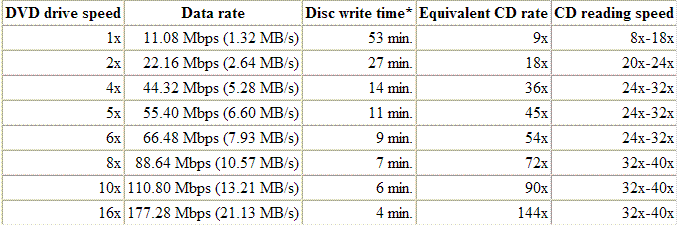
Unlike CD-ROM drives, which took years to move up to 2x, 3x, and faster spin rates, faster DVD-ROM drives began appearing in the first year. A 1x DVD-ROM drive provides a data transfer rate of 1.321 MB/s (11.08*10^6/8/2^20) with burst transfer rates of up to 12 MB/s or higher. The data transfer rate from a DVD-ROM disc at 1x speed is roughly equivalent to a 9x CD-ROM drive (1x CD-ROM data transfer rate is 150 KB/s, or 0.146 MB/s). DVD physical spin rate is about 3 times faster than CD (that is, 1x DVD spin ~ 3x CD spin), but most DVD-ROM drives increase motor speed when reading CD-ROMs, achieving 12x or faster performance. A drive listed as "16x/40x" reads a DVD at 16 times normal, or a CD at 40 times normal. DVD-ROM drives are available in 1x, 2x, 4x, 4.8x, 5x, 6x, 8x, 10x, and 16x speeds, although they usually don't achieve sustained transfer at their full rating. The "max" in DVD and CD speed ratings means that the listed speed only applies when reading data at the outer edge of the disc, which moves faster. The average data rate is lower than the max rate. Most 1x DVD-ROM drives have a seek time of 85-200 ms and access time of 90-250 ms. Newer drives have seek times as low as 45 ms.

Likewise, DVD recordable drives have steadily increased in write speed. 16x DVD writers began to be widely available in 2004. Note that recordable discs have different speed ratings .

Current thinking is that DVD drive speeds have topped out at 16x, since disc wobbling and other physical factors become a problem at faster speeds.


user posted image

* "Disc write time" is the approximate theoretical time it takes to write a DVD-5, which doesn't include software overhead, time to write leadout, etc. In practice, writing will take longer.

====================================================

Why can't I play movies copied to my hard drive?


Almost all movies are encrypted with CSS copy protection . Decryption keys are stored in the normally inaccessible lead-in area of the disc. You'll usually get an error if you try to copy the contents of an encrypted DVD to a hard drive. However, if you have used a software player to play the movie it will have authenticated the disc in the drive, allowing you to copy without error, but the encryption keys will not be copied. If you try to play the copied VOB files, the decoder will request the keys from the DVD-ROM drive and will fail. You may get the message "Cannot play copy-protected files".
TSyangxi
post Feb 2 2005, 09:23 PM

Violinist ^.^ å›§ å›§
*******
Senior Member
4,189 posts

Joined: Jan 2003
From: Age Quod Agis


解读DVDR染料


DVDR染料

CD-R和DVDR中,起记录作用的是一种名叫"染料"的物质。染料是一种特殊的有机物,这种有机物具有光敏性质,并且只对特定波长的激光敏感;染料具有极强的光热转换能力,转换效率接近于1;染料还具有很低的热导率,有利于形成信息凹坑。刻录时,被激光照射到的染料部分产生大量热能,这些热能促使染料自身产生变异,形成一个个凹坑,同未被照射到的染料层区分开来,激光中所附带的信息也随之保存在了染料层上,这就是刻录光盘记录数据的原理。

  光盘中的染料层的厚度大约是0.2微米左右,相当于光盘总厚度的1/6000,这六千分之一的厚度,决定了光盘90%的性能!由于用量少,制备不易,染料的价格非常昂贵。早些年CD-R的染料价格远高于黄金的价格,现在CD-R染料的价格虽然已经下来了,但是DVDR染料的价格仍然是黄金价格的5倍!

  染料是光盘的核心,全球的CD-R,不论其外观、形状如何,究其本质,它们采用的记录核心--染料--基本上都是一样的。不是P-Cyanine,就是AZO,早期的Cyanine则由于性能问题逐渐退出了市场。对于P-Cyanine染料,日本三菱化学和瑞士CIBA两家跨国公司是其最大供应商;AZO染料,日本三菱化学是唯一的供应商;DVDR采用的染料大都是DYN-AZO,看名字就知道DYN-AZO是AZO染料的改型,所以也只有三菱化学一家供应商。

  Cyanine是第一代CD-R染料,由太阳诱电发明,CD-R发展到高倍速以后,Cyanine由于不能适应高倍速刻录需求逐渐退出市场;P-Cyanine是第二代染料,由三肼公司发明,由于价格低廉,现在已经发展到52x,使用最为广泛;AZO染料是第三代染料,由三菱公司发明,现在也已经发展到52x。由于52x 已经是CD-R刻录硬件的极限,所以CD-R染料基本上已经进入了成熟期。

  DVDR染料市场由于被一家公司独占,利润丰厚,所以包括日本、欧洲,中国包括台湾的很多公司也在积极研发新染料,以打破三菱的垄断。DYN-AZO染料在DVDR成本里比例很高,基本上占到了30%,一旦有新的染料诞生,将直接导致DVDR光盘价格大幅下降,对DVDR行业的影响是深远的。我们祝愿国内的染料研发团队早日研发出性能更加优异的DVDR染料,占领行业的制高点,彻底摆脱核心部件受制于人的被动局面,使我国不仅成为光盘生产大国,而且要成为光盘生产强国

This post has been edited by yangxi: Feb 2 2005, 09:27 PM
TSyangxi
post Feb 2 2005, 09:26 PM

Violinist ^.^ å›§ å›§
*******
Senior Member
4,189 posts

Joined: Jan 2003
From: Age Quod Agis


from: CDFREAKS
http://www.cdfreaks.com/article/150


Increased compatibility: DVD bitsetting - Explanation


Compatibility is an important issue when it comes to DVD recording. Because there are three rivalling formats (DVD+RW, DVD-RW and DVD-RAM) not every DVD player is compatible with each disc. Even discs within each format do not always work on every player. In this article we will explain how to make some discs more compatible, why you need it and how it works.

Compatibility

In the past not every CD worked with every player and even nowadays people report that some bad discs do not work with every player (E.g. car audio players are known to be more picky). The DVD format didn't change the compatibility, it even made it worse. At the moment there are three different DVD recordable formats and all of them are different and require the DVD player to do different things. However the compatibility is still improved and the chance of a non working DVD recordable / DVD player combination is relatively small (think about 10-20%).

We will focus on DVD-R and DVD+RW as DVD-RAM is hardly used and uses a technique that is totally different from DVD-R and DVD+R. The DVD-R format is the oldest DVD recordable format and its original compatibility was good and is probably the best out of the box. Although the DVD-R format is marketed as the oldest and most compatible DVD recordable format, this isn't necessarily the case.


Difference between DVD-R and DVD+R

Physically there is a difference between a DVD-R disc and a DVD+R disc that is made during the production process. During the production of a DVD-R disc the lead-in is pre-embossed (pre-written). This overwrites parts of the DVD that contains information about the disc. E.g. the CSS key (part of the copy protection) is in this part on commercial movie discs (This is why you can't make a 1:1 copy of a DVD). But in this space there is also room reserved for the so called 'booktype' field.


Changing the booktype field

This booktype field identifies the disc as either a DVD-ROM, DVD+R(W) or a DVD-R(W) disc and is for a big part responsible for the compatibility. Because this setting is overwritten during the DVD-R production process it can't be modified afterwards, the laser of your DVD recorder simply can't write to that part of the disc. During the production of DVD+R discs the space is untouched. Still CSS keys can't be written to DVD+R discs because every DVD recorder and DVD player has a limit in its firmware to write or read to this space. However, there is no limit for writing the booktype field. Therefor a DVD+R(W) recorder will be able to modify this field by sending a command to the DVD recorder and fool the DVD player.

When the booktype field (bitsetting) is changed to DVD-ROM then DVD players are fooled and will think the user has put in a DVD-ROM disc instead of a DVD+R disc and will read it accordingly. This results in an increased chance that the player is able to read the disc and that's why the ability to change the booktype field (bitsetting) is essential to a lot of users. Certainly owners of a DVD player that requires this field to be set to DVD-ROM, in order to work properly, will prefer a DVD recorder that supports setting the booktype field.


DVD-R bitsetting

Although you will understand that it's not possible to change the booktype field for DVD-R discs there still excists a DVD-R bitsetting. Some claim that this increases the compatibility but this has not been independently confirmed by anyone and as it's technically impossible to change the booktype field it will still be possible for the hardware to find out that a disc is a DVD-R. The booktype setting for DVD-R discs seems to be based on a workaround that has not been proven to be working.

According to Michael Spath who studies both the +R and -R format and is known as an expert on technical DVD recording issues; "the trick is based on the fact that some drives read the booktype from the last border-in and not from the lead-in. Therefore if you create a second session on the disc you will create after the first session a new border-in, where you should normally copy the informations from the lead-in (including
the book type). With this trick, you instead write a DVD-ROM booktype in this second session, which violates the - standard. Also drives which read the booktype from the lead-in will not be fooled by this method (eg. some Pioneer drives".


Tools

The booktype field can be modified by several applications. Best known is Nero which allows you to modify field the booktype field for several brands of DVD recorders. Companies such as Lite-On, BTC, NU-Tech, Ricoh and BenQ have released tools to modify the booktype field. Firmware hacks (E.g. NEC) also are able to set the default booktype to DVD-ROM. Other companies such as LG have announced it will add support and Philips automatically changes the booktype using the firmware of the drive. Plextor has till now said it will not support it because it's not according to the DVD+R specifications.

This post has been edited by yangxi: Feb 2 2005, 09:28 PM
cheehing
post Apr 10 2005, 04:04 AM

Enthusiast
*****
Senior Member
891 posts

Joined: Oct 2004
what brand of dvd burner is the best??
ijan
post Apr 10 2005, 01:23 PM

The one with a boring life...
*******
Senior Member
3,448 posts

Joined: Jan 2003
From: Sarawak


nice werk YanXi smile.gif respect yo you dude!! not like sum fella who made a thread bout gals pic..desperado.
mystvearn
post Apr 11 2005, 01:04 AM

...
*******
Senior Member
6,639 posts

Joined: Jan 2003
From: "New Castle"


The smartbuy DVD+R says 1-8x, but nero detects as 12x. Is it ok burning at 12x?
solitarycross
post Apr 25 2005, 01:55 PM

Casual
***
Junior Member
380 posts

Joined: Feb 2005
From: JB/MMU Melaka
Whoalao....I'm only halfway thru and my eyes are already blink.gif blink.gif blink.gif
Seriously...Alot to understand man...Nice thread....
8tvt
post May 26 2005, 09:51 AM

Peace Lover
*******
Senior Member
8,753 posts

Joined: Jan 2003
i don't have DVD-RW drive, can they burn normal CDs?
TSyangxi
post May 26 2005, 11:27 AM

Violinist ^.^ å›§ å›§
*******
Senior Member
4,189 posts

Joined: Jan 2003
From: Age Quod Agis


YAP!! DVDwritter can burn dvd-r/+r and cdr.
super macgyver
post May 27 2005, 04:12 PM

★~13k Spam Club~★
********
All Stars
19,324 posts

Joined: Jan 2003


QUOTE(mystvearn @ Apr 11 2005, 01:04 AM)
The smartbuy DVD+R says 1-8x, but nero detects as 12x. Is it ok burning at 12x?
*
burn t 8x speed better safer.
Oxigen
post May 28 2005, 02:20 AM

Need Help Newbie®
******
Senior Member
1,532 posts

Joined: Jan 2003
From: -Kopend @ Anfield-
erm..can anyone advise on dvd disc regions?
furtheremore, are most dvd players in the market able to play all regions discs?

-regards-
Fields
post May 28 2005, 09:17 AM

On my way
****
Senior Member
570 posts

Joined: Mar 2005
From: The land that practices "democrazy"


What about CR-ROM? What is that?
super macgyver
post May 28 2005, 02:24 PM

★~13k Spam Club~★
********
All Stars
19,324 posts

Joined: Jan 2003


QUOTE(Fields @ May 28 2005, 09:17 AM)
What about CR-ROM? What is that?
*
cd-rom or cr-rom? u type wrong or ..............?
Fields
post May 28 2005, 04:05 PM

On my way
****
Senior Member
570 posts

Joined: Mar 2005
From: The land that practices "democrazy"


CR-ROM, its one of the media supported by PS3.


Change to:
| Lo-Fi Version
0.0338sec    1.09    6 queries    GZIP Disabled
Time is now: 17th December 2025 - 05:46 AM