


 Nov 26 2004, 11:53 PM, updated 21y ago


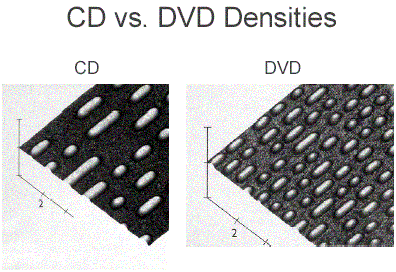
.Although the discs are the same physical size and shape, there are more tracks and smaller pit sizes on a DVD.
2.) What's the difference in a DVD 5 versus a DVD 9? How many versions are there?
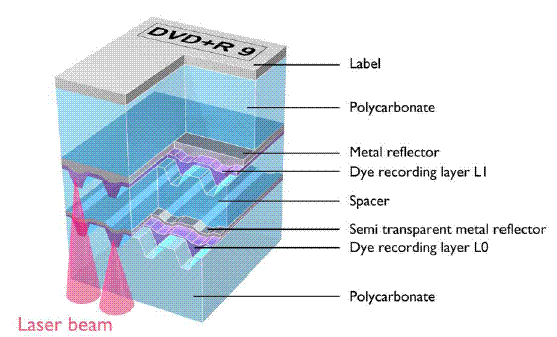
.A DVD 5 is a single-sided, single layer DVD disc holding 4.7GB of information. A DVD 9 is a single-sided, double layer disc holding almost twice as much.
. DVD 5 4.7 GB single side single layer
. DVD 9 8.5 GB single side dual layer
. DVD 10 9.4 GB double side single layer
. DVD 18 17.0 GB double side double layer
*The enormous capacity of the Digital Video Disc attracted CD-ROM users who wanted encyclopedias on one disc instead of 6 or more CD-ROMs and audiophiles who wanted higher resolution audio than CDs provided. So the DVD acronym was officially changed to mean "Digital Versatile Disc."
3.) What's the storage capacity of a DVD?
.The storage capacity can vary depending on the number of sides used and the number of layers on the disc.
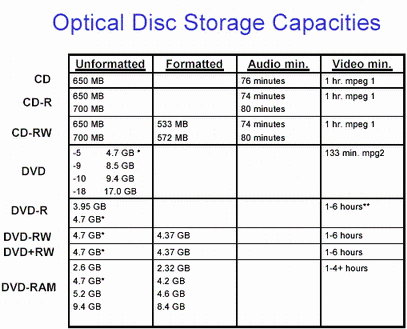
*This figure is actually 4.377GB because the DVD Forum defined 1 GB as a billion bytes in the decimal system instead of the conventional binary system of 1,073,741,824 bytes (230) that computers recognize.
** Windows 95 will only allow a file up to a maximum of 2.0 GB; Windows 98 allows a maximum of 4.0 GB; XP has removed limits on file sizes. These numbers generally correlate with the 4.377GB capacity of a DVD disc, but inconsistencies remain in both software and operating systems.
4.) My DVD player won't play CD-Rs but it plays music recorded on a CD-RWs! How can that be?
.Some newer models of DVD players follow a "multi-read" standard so that they can play most types of DVDs as well as CDs, CD-Rs, and CD-RWs. Earlier versions of DVD players were limited to DVDs, but often the circuits designed for the low reflectivity of DVDs were compatible with the low reflectivity of CD-RWs. If those types of DVD players could read CDs, they could often read CD-RWs, too.
5.) Now people can record on DVD, but there are 3 different types? Why?
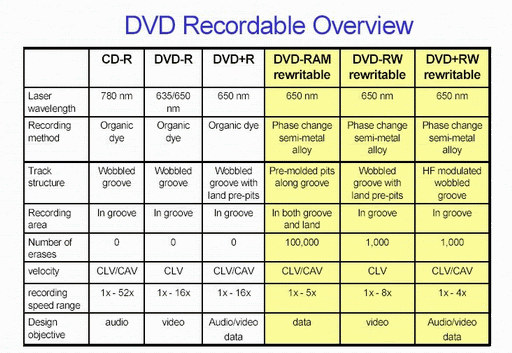
.There are three different types because of a combination of different design objectives and conflicting corporate interests.
6.) What's the difference between the types?
7.) What's DVD-R?
.A DVD-R is a recordable DVD similar in design to a CD-R. It is not erasable.
8.) Can I copy rented DVDs onto DVD recordable discs to build my own library?
.No, for two reasons. First, it is wrong to take the work of others without compensating them for their efforts-and it's illegal. The second point is that there are copy protection schemes built into DVDs, drives, and software that prevent such illegal copying.
9.) What's DVD-RW? How is it different from DVD-R?
.A DVD-RW is the erasable companion to the DVD-R. Use of a semi-metal alloy instead of a permanently altered dye makes the DVD-RW erasable.
10.) What's DVD-RAM?
.A DVD-RAM is a DVD designed for random access memory, for the quick and easy storage and retrieval of data. It is distinguished by its protective cartridge, but some versions come with a bare disc and without a cartridge.
11.) What's DVD+RW? There's a DVD+R, too. Does the plus mean it's better than the minus?
.A DVD+RW is a rewritable DVD designed to work well with both video and data recording. The DVD+R is the write-once companion. The plus in their name distinguishes them from the earlier DVD-R/-RW.
12.) Will any of these recordable DVDs play in my DVD player?
.Whether a recorded DVD will work in a DVD player depends on the player. Multi-format DVD players will likely play all formats except the DVD-RAM cartridges. Older players may have the fewest problems with DVD-R or DVD+R if they play the discs at all. The lower reflectivity of DVD-RW and DVD+RW sometimes poses problems for older players.
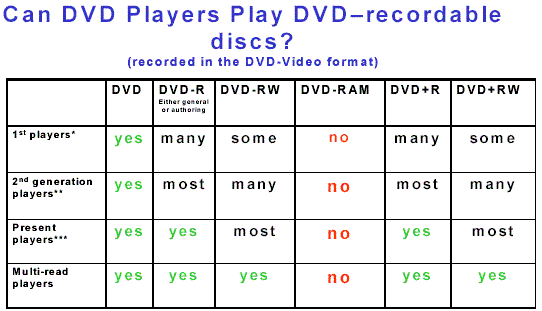
*. Of the first players introduced into the market, 95% will play the DVD-R 3.95 GB discs (the first DVD-Rs and the present authoring DVD-R, but only half are likely to play the 4.7 GB general purpose version DVD-R or the DVD+R. Few of these players may be able to play the DVD-RW.
**. Almost all of the second generation players will play the 3.95 GB DVD-R discs, and roughly 95% will play the 4.7GB DVD+R and DVD-R discs. DVD+RW and DVD-RW performance improves with the number of players that recognize them, but those players are still far fewer than those that successfully play DVD+R and DVD-R.
***. Almost all DVD players sold after November 1999 should play DVD+R and DVD-R discs, and most will also play DVD+RW and DVD-RW also.
13.) I have a 12X CD-R recorder. What speeds are there for DVD recorders?
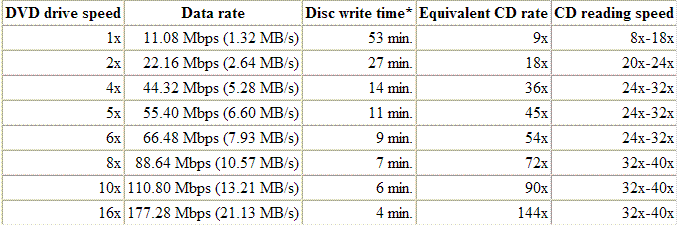
.DVD 1X speed is already nine times faster than a CD 1X speed; so "high-speed" DVD recording is going to be limited. All present drives can record at 1X. DVD-RAM records at a maximum of 3X; DVD-R at a maximum of 4X; DVD-RW, 2X; and both DVD+R and DVD+RW at a maximum of 4X. 8X writing is next increase in DVD recording speeds, and it will come first to DVD+R, then DVD-R, and then DVD+RW. The fastest DVD writing speed possible is 16X or just slightly faster.
14.) I've heard that if I use the wrong speed disc in my DVD drive, it can be destroyed? Is that true?
.Yes, but the whole story is not quite as dramatic. The early DVD-R/-RW drives that could write at a maximum of 2X would not recognize 4X DVD-R discs and could possibly damage their laser diodes trying in vain to identify the discs unless the user intervened and stopped the drive. Pioneer provides a firmware fix to the drives so that they will recognize 4X discs and record them at 2X. See www.pioneerelectronics.com/hs/ to download the fix for their drives. In the DVD+R/+RW camp, 4X discs in early 2.4X drives will appear to behave normally, but the write strategy will create irregular marks in the discs and the discs will fail.
15.) I tried to record a 4.5GB file onto a 4.7GB DVD+RW but it wouldn't fit. How come?
.The problem is that computers and DVD drives and media count the numbers differently. The computer counts according the base two in its binary system. The DVD camp decided to count bytes in the decimal system. A 4.7GB DVD+RW actually only holds 4.377GB in computer terms minus any capacity taken up by formatting.
a. 1GB = 1 gigabyte = 1,073,741,824 bytes = 2 exp 30 in computer terms
b. 1GB = 1 gigabyte = 1,000,000,000 bytes in DVD terms
16.) My DVD drive won't record DVDs. Is the quality that bad?
.There are often two reasons a disc will not record in a drive: 1) it is the wrong format, or 2)the drive lacks the firmware to recognize the disc. In the first case, a DVD-R recorder will not be able to record on a DVD+R or DVD+RW disc unless the recorder is a "dual format" recorder that can record on both. The same is true of DVD+R/RW recorders-they will not record DVD-R/-RW discs. The second case is more common, but less obvious. Drives rushed to market with the latest speed as its chief feature often limit the testing done on various discs in order to save development time. The drives work with a limited number of discs whose ID codes are in the drive memory so that the drive selects the proper write strategy-the amount of laser power required and the timing of the light pulses-to record on them. Discs whose codes and write instructions are not in the drive memory, its firmware, will not work or work very badly. In time the drive manufacturers develop new instructions for additional disc ID codes, and these are added to the drive's firmware by means of an update that is "flashed" to the drive's memory bank. Internet forum groups often make ignorant claims about discs or drives when the problems are due to incompatibilities, not any flaws in either the discs or the drives.
17.) I have a choice of CBR or VBR in my video capture. What are they?
.CBR stands for "constant bit rate," and VBR means "variable bit rate." The CBR means the computer assigns the same number of bits for every second of video while VBR may alter the rate depending on how complex the video is. VBR can often be more efficient and allow a little more capacity on a disc if the video is not tough to encode.
18.) What are VR formats?
.VR stands for Video Recording. That's the easy part-there are two incompatible VR formats: -VR and +VR. The -VR format is used by the DVD-R/-RW camp to record video in real-time onto a DVD-R or DVD-RW disc in a set-top recorder so that TV programs can be recorded from the built-in TV tuner. Unfortunately, -VR formatted discs will play only on the recording device that recorded video onto them. -VR recording allows playlists and chapter markers to be added to a recording on a DVD-RW and some editing ability. The +VR mode is used by DVD+R and DVD+RW discs for the same type of real-time recording as well as some limited editing. Unlike -VR formatted discs, +VR formatted discs will also play in DVD players that play DVD+R and DVD+RW discs.
19.) I captured my tapes at the highest "MPEG-2 quality." Why can't I make a DVD?
.MPEG-2 encoding has a number of bit rate settings, the highest of which exceed the standard for DVD-video. A DVD cannot have a bit rate higher than 9.8 Mbps (megabits per second), including both audio and video. Some video capture/editing software allows higher rates for MPEG-2, but the higher rates will not allow DVD recording, which is what most people are trying to accomplish. Other software picks a lower rate by default. The "highest quality" for some is only 6 Mbps because it is much easier to encode and more likely to work than a higher rate. Other software limits the bit rate to 8 Mbps to offer high quality at a safer rate than the maximum of 9.8 Mbps.
PIE/POE
DVDs have double error correction. Drives put 16 sectors (sector = 2,048 bytes of usable data + 308 bytes of error correction + 4 bytes for the sector ID + 6 bytes for copyright management = 2,366 bytes) of usable data into an ECC (Error Correction Code) matrix. The rows of the matrix are checked for accuracy according to "inner parity" while the columns are checked for "outer parity." This two-dimensional error correction is nearly 10 times more efficient than that for CDs and can correct severe flaws caused by scratches or debris as large as 6 mm. The DVD specification requires that the sum of PIE in 8 sequential ECC sectors (PI sum 8) be less than 280.
DVD+R specifications require that after the first PI correction no more than 4 errors remain in the ECC sector for the sum of Parity Inner Failure. These should be corrected by the second error correction so that no errors remain for Parity Outer Failure. If POF is >0, the errors will be noticeable.
Jitter
The lengths of the lands and pits should be kept as exact as possible-perfect multiples of IT signals. In reality, the lengths show variations in their actual lengths that translate into timing variations referred to as jitter. DC jitter (data-to-clock jitter) is a measure of the length of each pit and land against the precise measure of a clock pulse time signal. DC jitter is measured over the entire disc and should measure below 9.5%. Bottom jitter is the value at three different points on the disc as seen by the laser. If bottom jitter is quite different from DC jitter, that is an indication that the disc has mechanical distortions.
DC jitter is also dependent on the write strategy of the burner. If the incorrect write strategy is applied, DC jitter increases as well as PI sum 8 values and the uncorrectable POF errors.
=====================================================
CARE AND HANDLING OF OPTICAL DISCS

The estimated lifetimes of optical discs can only be reached if reasonable care is taken of them during handling and storage. Most people are familiar with handling these discs, but even a cursory glance at the bottom of discs in public libraries or from DVD rental stores indicates that the discs are subjected to far greater abuse than their designers planned. That almost all of these discs still play properly is a testament to their built-in durability, but accumulated damage will hasten the day that even good players will refuse to read them.
The most important points in their care and handling are:
. Handling
-Hold the discs on the outer edge or through the center hole only to avoid fingerprints on the bottom of the disc.
-Avoid flexing the discs when removing them from a player or recorder or a storage case. Flexing will distort the disc's flat design and can even damage the inner recording and mirror layers.
-Do not put excessive pressure on the center hub when inserting the disc in its case. The center hub area, particularly on DVDs, is fragile. A crack in the hub area can lead to shattering of the disc in a high-speed drive.
-Pick discs straight up from a flat surface; do not slide them.
�� Some discs have a special protective coating of extremely fine silicone dioxide power mixed with the lacquer that offers very good resistance to scratches.
This post has been edited by yangxi: Jun 3 2005, 10:35 AM
 Quote
Quote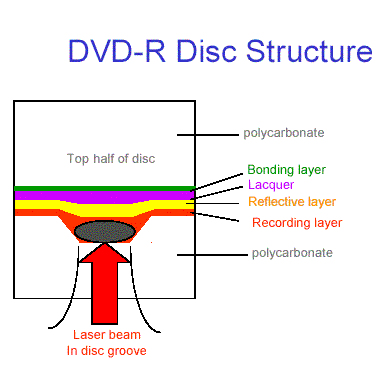






 respect yo you dude!! not like sum fella who made a thread bout gals pic..desperado.


 0.0274sec
 0.65
0.65
 6 queries
 GZIP Disabled