QUOTE(xaw5126 @ Sep 17 2010, 03:42 PM)
@jonny_doe
is your iPhone running iOS4?
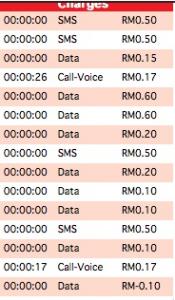
YES > then just go to Settings > general > network > Cellular Data (On/Off) .
NO > call the maxis hotline for help, cos you should have 500MB free data.
If you bought the Hotlink separately from the iPhone, PM me.
yep, got the same suggestion from a couple of other sites too.. since i dont use MMS or gprs for internet surfing or anything else, I turned the cellular data off.. can still make calls and sms.. which is basically all i do.. only use the internet when i am at home or at another wifi zone..
cheers for the heads up, guys

but i really hope that the november release of ios 4.2 fixes this issue..
Added on September 17, 2010, 6:17 pmAlso, did any of you guys notice that the WIFI connection randomly acts up after 5-10 minutes.. you have to turn the WIFI off and on again for it to work.. this sucks..
i checked around and found a remedy, (at least temporarily for my case)
just went to:
settings > general settings > reset > reset network settings..
after that, its been 2days and i havent had any major problems.. its still not completely bug free.. but its bearable.. and works great most of the time..
this happens with all the wifi networks i tried, MCd's Starbucks, one at my Uni, one at home and at a friends place too.. so it cant be router specific in my opinion.. but as i am not an IT specialist or networking expert, thats not for sure either...
let us know if any others have had similiar experiences with WIFI connections acting up on the iphone 4...
This post has been edited by johnny doe: Sep 17 2010, 06:17 PM 

 Sep 16 2010, 10:54 PM


 Quote
Quote

 0.0165sec
 0.58
0.58
 7 queries
 GZIP Disabled