

 Jul 14 2009, 02:08 PM


I have found 1 bug. For the volume. I've always set my speaker to quite a loud value and I just adjust the software's volume to proper hearing value. And I have adjusted as such for your software. But each time I changed station, the volume is somehow reset to normal 100% even though the volume level is still in its reduced state. I have to click and adjust a little the volume to get it to the volume state I wanted, each time I change stations.
One thing I like to suggest is get yourself a graphic designer. Your UI is friendly. No problem in getting around. But as a graphic student myself, I find the UI somewhat 'ugly'. Before releasing a version 1, I believe a UI makeover is needed to attract people. After all, as humans are, they do judge by 1st impression. By just looking at a screenshot and finding it somewhat well to put it nicely; not nice, they might just turn away and thought that
'Dem its ugly. The functions might be terrible as well'.
But as they look at nicer interface;
'Wow it looks amazing. If they've gone and did a good job on the UI, it must not be lacking in function and feature department as well. I'll give it a try'.
After all in this days of age, people seem to demand beauty quite frankly a lot. Long gone are the days of let say simplicity of Win 98 as people are gawking the effects of Win 7 or Mac OS X. Even Linux has gone wild with its effects to attract people.
Currently you might still want to concentrate on getting the software in proper working shape, however do try and fit in some makeover as well.
As I see, BETA 4 was released in 11 July (according to your post there). It has just been release so no need to rush out version 1 so hastily. Take your time and solve whatever problem or bugs currently affecting the software. Best of luck to you.

Oh, another note is, create a logo. I've been to your forum, site, looked at the software and I just can't find that one logo that represents your software. Please do remember, a logo is important for a software as it represent the software itself.
People don't need to look at the name already will be able to determine what software the logo belongs to. Take windows logo for example, by just looking at it people will already know its Windows even though there's no windows name attached to it. That is how an important a logo is.
Added on July 14, 2009, 2:37 pmI just notice something while going through the software. Its the Info page. I noticed you put UTAR's logo there. is UTAR related in any way to this software? Contribution? Support? Because if there is none, I believe you're not allowed to put it there.
One more thing I found is, when I clicked minimize when the Radio Database window is opened, the Radio Database window does not follow the main window to minimize. It stays there and I have to close it to get it out of the way.
Well seems like a lot has been said so lemme just summarize it:
Some more feature that I would like to request which I believe will increase the user-friendliness / Suggestions:
- On the list (Radio Database), by clicking an alphabet on the keyboard, it will highlight the first entry matching the key pressed. Much like in explorer where you need to press 'E' for example to find an entry starting with an 'E'
- UI Makeover
- A logo (is the water splash from the software your logo? Cause I don't see you using it anywhere on the forum or web)
- For the open menu/close menu, I believe it will be much better if its done in right clicks. Means right click anywhere on the interface, those list of stuff will pop-up much like any kind of right-click for any software.
- Alphabetically listing radio station list. Right now its pretty much messy.
- Volume will reset if changing station. Have to change the volume each time.
- Database window won't follow if minimizing main window
- Weird problem with status text in main window

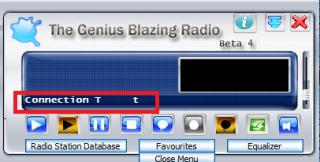
- If I clicked the system tray icon to bring the window in front of the other window (it was at the back previously, not minimized), the main window position is reset to the middle which I find annoying because I usually positioned on the left because it was overlapping the Radio Database. I have to repositioned it each time I clicked the system tray icon to bring it into focus.
- What is that yellow arrow icon on the left of X icon on the Radio Database window? I hovered it and it doesn't have any tooltip nor anything happens when I clicked them.

UPDATE: I clicked it after saving a station and it clears the list. Is that what it suppose to do? Anyways, right now I can't save anymore. I click the Save button and nothing happens. - What is the refresh driver for?
This post has been edited by exentric_nova: Jul 14 2009, 03:44 PM
 Quote
Quote

 0.0202sec
 0.62
0.62
 7 queries
 GZIP Disabled