Welcome Guest ( Log In | Register )

Outline · [ Standard ] · Linear+

 Solution On Scaling Problem In Windows 7 (UPDATED), Gaming With Windows 7 Common Problem

views
     
TSsyahpian
post May 7 2009, 03:01 AM, updated 16y ago

Enthusiast
*****
Junior Member
813 posts

Joined: Jul 2008
From: Kota Kinabalu <-> Kuala Lumpur


guys... i just got the solution for scaling problem in windows 7 .. after googling for hour.. huhu tongue.gif tongue.gif

here the step for display scaling in windows 7 using ati radeon base GC...

please use driver from this website

http://www.donotargue.com/page.php?id=1104 (Currently Not Working)

Collection of ATI Modded Driver (New Link)

download the latest driver available

1. first uninstall you installed driver

2. start the installation using DNA.bat

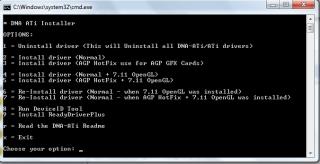
3. that you will see a option like this.
Attached Image

select option number 6 and wait untill it done.

4. reboot.

5 go back to DNA.bat and install option 9 for driver ReadyDriverPlus and use the default option.

6. open the resolution windows

7. Change your monitor resolution to 1280x768 or any res below the native one (Under Display Properties)

8. Open up ATI Control Panel

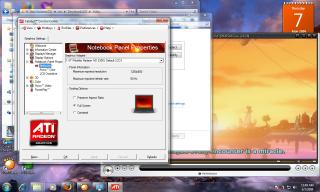
9. go to Notebook Panel Properties

10. select "Full Screen Scaling Options" (2nd option)

11. Click on the "Apply" button

12. In the confirmation window click "Apply"

13. Enjoy Full Screen Stretched For Games and Desktop brows.gif

NOTE : im using ati mobility radeon HD 2300 and custom driver version 9.2 from do not argue (DNA)

for nvidia im not yet test this method cause i dont have any nvidia gc now.. but i think its quite similar..

try select "Use NVIDIA scaling with fixed-aspect ration" (2nd option)

hope this help you guys that have problem with games on windows 7.. icon_rolleyes.gif icon_rolleyes.gif rclxms.gif rclxms.gif
Attached Image Attached Image Attached Image


UPDATE ON SOLUTION FOR SCALING PROBLEM IN WINDOWS 7 USING NEWEST DRIVER FROM ATI ( version 9.9 and above)

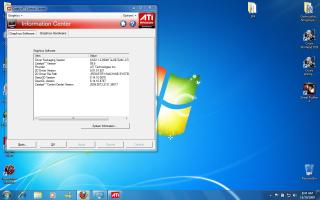
1. Install the latest ATI driver from ati website HERE and ATI Mobility Modder from HERE

Attached Image

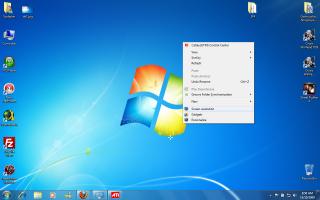
2. Right click the desktop and click on the SCREEN RESOLUTION

Attached Image

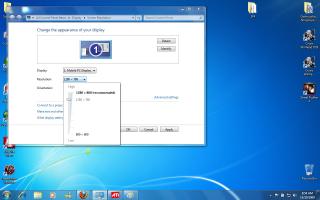
3. Change you desktop resolution below your recommended screen resolution and click apply

Attached Image

4. open your ATI catalyst control panel, go to Desktop and display, and then, click on your display configuration.

Attached Image

5. at scaling option, select full screen and click apply and the click ok

Attached Image

6. after done, set back you screen resolution to the one that recomended

Attached Image

7. Enjoy you game at full sreen scaling.. rclxm9.gif rclxm9.gif

This post has been edited by syahpian: Dec 12 2009, 03:50 PM
unequalteck
post May 8 2009, 10:39 AM

Custom member title
*******
Senior Member
2,690 posts

Joined: Dec 2008
From: Kota Kinabalu Current: Wangsa Maju


lol i tried ady but i not really know how to use..
after installed the readydriverplus...it will come out in bootloader
then if i choose to boot readydriver...it will ask me to repair my window...
if i choose window 7...i cant see any ati driver
TSsyahpian
post May 8 2009, 11:00 AM

Enthusiast
*****
Junior Member
813 posts

Joined: Jul 2008
From: Kota Kinabalu <-> Kuala Lumpur


QUOTE(unequalteck @ May 8 2009, 10:39 AM)
lol i tried ady but i not really know how to use..
after installed the readydriverplus...it will come out in bootloader
then if i choose to boot readydriver...it will ask me to repair my window...
if i choose window 7...i cant see any ati driver
*
actually readydriverplus main function is to disable Driver Signature Enforcement (DSE) on both windows vista and windows 7, sometime windows will block modded driver. you just install using default setting.. when it boot, it will automatically select readydriverplus first when select windows 7 and select disable Driver Signature Enforcement and its done automatically.

firstly, uninstall you old driver first, then install using DNA 9.2 driver. cause from my past experience, you have to use both driver and readydriverplus
cannot use any other driver.. that the driver supply with the package.

P.S: unequalteck, can i know what model of ati GC u are using now? is it using pci-e or agp interface?

This post has been edited by syahpian: May 8 2009, 11:08 AM
unequalteck
post May 8 2009, 11:09 AM

Custom member title
*******
Senior Member
2,690 posts

Joined: Dec 2008
From: Kota Kinabalu Current: Wangsa Maju


i uninstalled the old 1 ady..
using laptop..
ati mobility radeon hd 4570
TSsyahpian
post May 8 2009, 11:16 AM

Enthusiast
*****
Junior Member
813 posts

Joined: Jul 2008
From: Kota Kinabalu <-> Kuala Lumpur


QUOTE(unequalteck @ May 8 2009, 11:09 AM)
i uninstalled the old 1 ady..
using laptop..
ati mobility radeon hd 4570
*
ok.. do not install readydriverplus (skip step number 5) but have to manually select "disable Driver Signature Enforcement" on boot option

if you dont mind.. can i ask you.. are you using dual boot windows or just singel boot?

cause in many situation.. readydriverplus have difficulty to boot on dual boot windows environment..

This post has been edited by syahpian: May 9 2009, 07:27 AM
Demonic Wrath
post May 8 2009, 11:33 AM

My name so cool
******
Senior Member
1,667 posts

Joined: Jan 2003
From: The Cool Name Place

If you want to enter the boot option menu, press F8 before the Windows starts to load. Then select Disable DSE.
TSsyahpian
post May 8 2009, 11:38 AM

Enthusiast
*****
Junior Member
813 posts

Joined: Jul 2008
From: Kota Kinabalu <-> Kuala Lumpur


QUOTE(Demonic Wrath @ May 8 2009, 11:33 AM)
If you want to enter the boot option menu, press F8 before the Windows starts to load. Then select Disable DSE.
*
thanks Demonic Wrath biggrin.gif biggrin.gif


ultimaweaponx
post May 9 2009, 04:42 PM

Casual
***
Junior Member
359 posts

Joined: Sep 2007
From: Negara Dua Dimensi


is there anyway to disable DSE without need to push F8 everytime?
u might forgot it and i found this is quite annoying...
TSsyahpian
post May 9 2009, 06:28 PM

Enthusiast
*****
Junior Member
813 posts

Joined: Jul 2008
From: Kota Kinabalu <-> Kuala Lumpur


QUOTE(ultimaweaponx @ May 9 2009, 04:42 PM)
is there anyway to disable DSE without need to push F8 everytime?
u might forgot it and i found this is quite annoying...
*
you can use this method to automatically disable DSE..


"This method works from within Vista and windows 7 so the instructions are the same whether single or multiple operating systems are present.

Click Start, then in the Search box type "cmd". You will see an icon for the command prompt appear in the Programs section. Now right click it and click "Run as administrator".

Attached Image

You will now be presented with a DOS window and command prompt. At the prompt, type the following:

"bcdedit -set loadoptions \DDISABLE_INTEGRITY_CHECKS”

Attached Image

and press enter. Notice there are 2 D's for disable, this is intentional. Now reboot the PC and try to install the driver again. "

please comment on this method.. its it work for you or not... cause i just remove my readydriverplus and test this method. its work very well for me..

laugh.gif laugh.gif

This post has been edited by syahpian: May 9 2009, 07:29 PM
ultimaweaponx
post May 10 2009, 03:59 PM

Casual
***
Junior Member
359 posts

Joined: Sep 2007
From: Negara Dua Dimensi


QUOTE(syahpian @ May 9 2009, 06:28 PM)
you can use this method to automatically disable DSE..
"This method works from within Vista and windows 7 so the instructions are the same whether single or multiple operating systems are present.

Click Start, then in the Search box type "cmd". You will see an icon for the command prompt appear in the Programs section. Now right click it and click "Run as administrator".

Attached Image

You will now be presented with a DOS window and command prompt. At the prompt, type the following:

"bcdedit -set loadoptions \DDISABLE_INTEGRITY_CHECKS”

Attached Image

and press enter. Notice there are 2 D's for disable, this is intentional. Now reboot the PC and try to install the driver again. "

please comment on this method.. its it work for you or not... cause i just remove my readydriverplus and test this method. its work very well for me..

laugh.gif  laugh.gif
*
unfortunately sir, it didnt work
im using ReadyDriverPlus instead
well, as long its working, i shouldnt bother
thanks anyway wink.gif


Added on May 10, 2009, 4:08 pmoops, i take it back, installing ReadyDriverPlus didnt help
it create another boot option and never load to windows 7 OS sad.gif

This post has been edited by ultimaweaponx: May 10 2009, 04:08 PM
TSsyahpian
post May 10 2009, 04:32 PM

Enthusiast
*****
Junior Member
813 posts

Joined: Jul 2008
From: Kota Kinabalu <-> Kuala Lumpur


QUOTE(ultimaweaponx @ May 10 2009, 03:59 PM)
unfortunately sir, it didnt work
im using ReadyDriverPlus instead
well, as long its working, i shouldnt bother
thanks anyway  wink.gif


Added on May 10, 2009, 4:08 pmoops, i take it back, installing ReadyDriverPlus didnt help
it create another boot option and never load to windows 7 OS sad.gif
*
can you give me you screenshot for the newest method? i mean the cmd windows.. i just want to conform what message you get after you press enter

nod.gif hmm.gif and if posible.. i want screen shot for ReadyDriverPlus..

maybe there some error i need to know.

and can you tell me more about problem and error you get?


This post has been edited by syahpian: May 10 2009, 04:36 PM
ultimaweaponx
post May 10 2009, 04:37 PM

Casual
***
Junior Member
359 posts

Joined: Sep 2007
From: Negara Dua Dimensi


ok sorry
heres the update
after i uninstalled the ReadyDriverPlus and put the command like u did, it get through

btw, ReadyDriverPlus was working fine on Build7000 on my lappy, not on this desktop (Build 7100)
TSsyahpian
post May 10 2009, 04:44 PM

Enthusiast
*****
Junior Member
813 posts

Joined: Jul 2008
From: Kota Kinabalu <-> Kuala Lumpur


QUOTE(ultimaweaponx @ May 10 2009, 04:37 PM)
ok sorry
heres the update
after i uninstalled the ReadyDriverPlus and put the command like u did, it get through

btw, ReadyDriverPlus was working fine on Build7000 on my lappy, not on this desktop (Build 7100)
*
i see.. laugh.gif laugh.gif very happy to hear that.. rclxm9.gif rclxm9.gif

what i know is.. ReadyDriverPlus only work when u are using single boot and clean install windows..

cause when you using dual boot, ReadyDriverPlus dont know which windows to boot .. huhuhu.. that really painful to me at first.

when i discover the second method. i test and its work very well for me brows.gif

can i know which GC are you using now? are u already test you windows 7 with games?

This post has been edited by syahpian: May 10 2009, 05:12 PM
ultimaweaponx
post May 10 2009, 05:34 PM

Casual
***
Junior Member
359 posts

Joined: Sep 2007
From: Negara Dua Dimensi


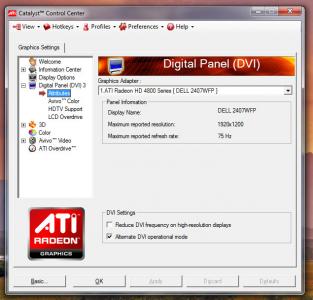
here biggrin.gif
Attached Image

actualy i just got this 4670 G/C very cheap last month
so far only with GRID, with 8XAA 1680px without lag
now waiting a proper driver that can unleash Hybrid Crossfire with my 780G chipset mobo thumbup.gif


Added on May 10, 2009, 5:35 pmoh yeah, btw thanks wink.gif

This post has been edited by ultimaweaponx: May 10 2009, 05:35 PM
TSsyahpian
post May 10 2009, 05:56 PM

Enthusiast
*****
Junior Member
813 posts

Joined: Jul 2008
From: Kota Kinabalu <-> Kuala Lumpur


QUOTE(ultimaweaponx @ May 10 2009, 05:34 PM)
here biggrin.gif
Attached Image

actualy i just got this 4670 G/C very cheap last month
so far only with GRID, with 8XAA 1680px without lag
now waiting a proper driver that can unleash Hybrid Crossfire with my 780G chipset mobo  thumbup.gif


Added on May 10, 2009, 5:35 pmoh yeah, btw thanks  wink.gif
*
WOW!!!! drool.gif drool.gif

great GC you have there.. Bump for you.. icon_rolleyes.gif icon_rolleyes.gif

im only using mobility radeon HD 2300.. its allready okey for me.. laugh.gif

now playing the last remnant at medium setting, with full screen scaling and 1280*800 resolution.. huhuhu no lag for me so far.. huhuu
toonny
post May 11 2009, 11:43 PM

Getting Started
**
Junior Member
185 posts

Joined: Jan 2007
From: Puchong Perdana, Selangor


hi all, do you guys face the problem windows 7 shutdown automatically..?

i'm playing grid with medium setting only.. but dono why the computer will shutdown itself...

TSsyahpian
post May 12 2009, 12:21 AM

Enthusiast
*****
Junior Member
813 posts

Joined: Jul 2008
From: Kota Kinabalu <-> Kuala Lumpur


QUOTE(toonny @ May 11 2009, 11:43 PM)
hi all, do you guys face the problem windows 7 shutdown automatically..?

i'm playing grid with medium setting only.. but dono why the computer will shutdown itself...
*
have you check you cpu, memory, gc or mobo? i guessing that your cpu is overheating or you get memory error or you have problem wit you mobo..

care to tell me you full pc spec?
toonny
post May 12 2009, 03:48 PM

Getting Started
**
Junior Member
185 posts

Joined: Jan 2007
From: Puchong Perdana, Selangor


i guess it might be overheat.. coz this few weeks also very hot and spicy weather..

my PC spec:
intel q9450
gigabyte ep45-ud3r
his hd4850 iceq4
corsair gamming ram 2 x 2gb
200gb maxtor hdd(4 yrs old)
enermax modular 620w PSU

this is my setup.
all using stock cooler, casing side panel opened, with a table fan blowing beside..
TSsyahpian
post May 12 2009, 04:47 PM

Enthusiast
*****
Junior Member
813 posts

Joined: Jul 2008
From: Kota Kinabalu <-> Kuala Lumpur


smile.gif

This post has been edited by syahpian: May 12 2009, 06:47 PM
TSsyahpian
post May 12 2009, 04:48 PM

Enthusiast
*****
Junior Member
813 posts

Joined: Jul 2008
From: Kota Kinabalu <-> Kuala Lumpur


QUOTE(toonny @ May 12 2009, 03:48 PM)
i guess it might be overheat.. coz this few weeks also very hot and spicy weather..

my PC spec:
intel q9450
gigabyte ep45-ud3r
his hd4850 iceq4
corsair gamming ram 2 x 2gb
200gb maxtor hdd(4 yrs old)
enermax modular 620w PSU

this is my setup.
all using stock cooler, casing side panel opened, with a table fan blowing beside..
*
have you try to configure you power option setting?


go to start -----> control panel ------> power option ------> any plan you use ( im using high performance plan) -----> change plan setting -----> change advance plan setting

and after that you will see option like this

Attached Image

set both on the system cooling policies to active..

some note for system cooling policies

"System Cooling Policy lets you change the cooling mode of your system. There are 2 options available here. Active increases the fan speed before slowing the processor to maintain cooling, while Passive slows down the processor before cooling the fan speed. Passive saves a lot more power as it reduces the clock on your processor, hence giving your more battery time."

if this method dont work, maybe you have you clean you casing from dust or put on new Thermal Paste for you processor..

This post has been edited by syahpian: May 12 2009, 06:48 PM
iRonTech
post May 22 2009, 11:53 AM

Access Denied
*******
Senior Member
8,621 posts

Joined: Nov 2004
syahpian


I din't use the DNA 9.2 (as I only use default win 7 ATI & upgrade to official ATI 9.5, both facing the full image scaling black bars), instead I use some 'magic' allow the full screen.


1 - reduce & apply screen resolution down to 1024 x 768

2 - go to ATI CCC scaling options select Centered

3 - go to ATI CCC scaling options select Full Screen

4 - now run ur games & quit (full screen at this stage but win 7 still 1024 x 768)

5 - apply screen resolution back to max (on my laptop max is 1280 x 800) now, run ur games again... see the full image scaling?


I believe this same apply to NVidia. Later will try out on NVidia 9100M G biggrin.gif
TSsyahpian
post May 22 2009, 10:05 PM

Enthusiast
*****
Junior Member
813 posts

Joined: Jul 2008
From: Kota Kinabalu <-> Kuala Lumpur


wow.. good for you.. rclxms.gif rclxms.gif

i have tried using driver version 9.3 and 9.4. all okey but the real problem in windows 7 is scaling problem not yet supported

example like this.. when i using my ati mobility radeon HD 2300 using driver version 9.2.. scaling option is available..


Attached Image


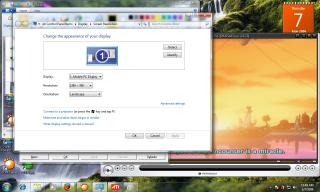
but when using driver version 9.3 and 9.4, its hard to install and when it done, scaling option in unavailable..

Attached Image

weird right?

that why i recommended D.N.A driver version 9.2.. its compatible for most user and have many option you can select. tongue.gif tongue.gif

" this is only example.. i cannot provide my real screen shot cause i already using back my vista right now.. i want to play my online games.. i so sad cause online games with game guard security cannot be play with win 7.. "


Added on July 26, 2009, 11:47 pm-edited-

This post has been edited by syahpian: Jul 26 2009, 11:47 PM
LEO1989
post Nov 7 2009, 05:52 PM

Casual
***
Junior Member
430 posts

Joined: Oct 2008
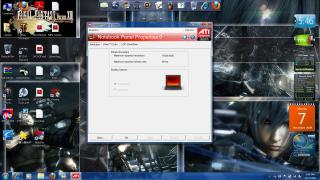
i try install new ati driver 9.9,but still like tat,i cannot modify my options,here is a pic


Added on November 7, 2009, 5:55 pmsry,my prob solve ady,tanks

This post has been edited by LEO1989: Nov 7 2009, 05:55 PM


Attached thumbnail(s)
Attached Image
annoymous1234
post Nov 7 2009, 08:09 PM

Look at all my stars!!
*******
Senior Member
7,614 posts

Joined: Mar 2009

what about for intel display? does anyone know how to slove it? im still getting black boarders on both side even with the latest driver. hmm.gif
kunyit_kampung
post Nov 10 2009, 10:53 PM

Casual
***
Junior Member
483 posts

Joined: Jul 2006


im using ccc 9.10 and it got no scalling option,wtf,god dam it
iRonTech
post Nov 11 2009, 08:16 AM

Access Denied
*******
Senior Member
8,621 posts

Joined: Nov 2004
QUOTE(kunyit_kampung @ Nov 10 2009, 10:53 PM)
im using ccc 9.10 and it got no scalling option,wtf,god dam it
*
try get at least ccc 9.3 & just update 9.10 display driver only

i was wrong... tongue.gif

follow #21 u'll able to see the scaling option under desktop & display (right click configure bottom lcd icon)

This post has been edited by iRonTech: Nov 11 2009, 11:29 AM
wah chai
post Dec 7 2009, 04:35 PM

Enthusiast
*****
Senior Member
717 posts

Joined: Feb 2007
From: Damansara
hi all,how to disable keep aspect ration in window 7 ultimate 32 bit ?integrated graphic
2uk3y
post Dec 7 2009, 08:15 PM

┌П┐(◣_◢)┌П┐
*******
Senior Member
2,095 posts

Joined: Oct 2005
From: 2�18' | 102�23'


i guess there is no problem game scaling with nVidia graphic card rite ??
chernsian6377
post Dec 8 2009, 12:50 PM

New Member
*
Newbie
2 posts

Joined: Dec 2009
QUOTE(syahpian @ May 7 2009, 04:01 AM)
guys... i just got the solution for scaling problem in windows 7 .. after googling for hour.. huhu  tongue.gif  tongue.gif

here the step for display scaling in windows 7 using ati radeon base GC...

please use driver from this website

http://www.donotargue.com/page.php?id=1104

download the latest driver available

1. first uninstall you installed driver

2. start the installation using DNA.bat

3. that you will see a option like this.

Attached Image

select option number 6 and wait untill it done.

4. reboot.

5 go back to DNA.bat and install option 9 for driver ReadyDriverPlus  and use the default option.

6. open the resolution windows

7. Change your monitor resolution to 1280x768 or any res below the native one (Under Display Properties)

8. Open up ATI Control Panel

9. go to Notebook Panel Properties

10. select "Full Screen Scaling Options" (2nd option)

11. Click on the "Apply" button

12. In the confirmation window click "Apply"

13. Enjoy Full Screen Stretched For Games and Desktop  brows.gif

NOTE : im using ati mobility radeon HD 2300 and custom driver version 9.2 from do not argue (DNA)

for nvidia im not yet test this method cause i dont have any nvidia gc now.. but i think its quite similar..

try select "Use NVIDIA scaling with fixed-aspect ration" (2nd option)

hope this help you guys that have problem with games on windows 7..  icon_rolleyes.gif  icon_rolleyes.gif  rclxms.gif  rclxms.gif
Attached Image Attached Image Attached Image
UPDATE ON SOLUTION FOR SCALING PROBLEM IN WINDOWS 7 USING NEWEST DRIVER FROM ATI ( version 9.9 and above)

1. Install the latest ATI driver from ati website HERE and ATI Mobility Modder from HERE
Attached Image

2. Right click the desktop and click on the SCREEN RESOLUTION
Attached Image

3. Change you desktop resolution below your recommended screen resolution and click apply
Attached Image

4. open your ATI catalyst control panel, go to Desktop and display, and then, click on your display configuration.

Attached Image

5. at scaling option, select full screen and click apply and the click ok
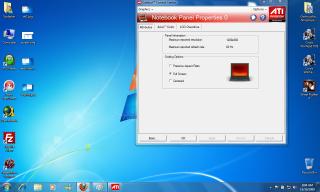
Attached Image

6. after done, set back you screen resolution to the one that recomended
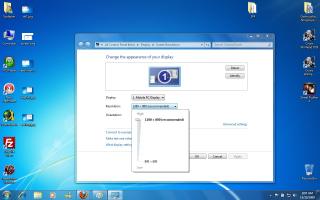
Attached Image

7. Enjoy you game at full sreen scaling..  rclxm9.gif  rclxm9.gif
*
why this link cant use http://www.donotargue.com/page.php?id=1104
i wan ask if i using dell studio 15 laptop and my grafic card is ati4570 also use this method to fix the problem??
or i need to dowload a new driver?if i use the new version of ati driver i need to choose which??
iRonTech
post Dec 9 2009, 03:51 PM

Access Denied
*******
Senior Member
8,621 posts

Joined: Nov 2004
there is another simple way modify for all.


HKEY_LOCAL_MACHINE\SYSTEM\ControlSet001\Control\GraphicsDrivers\Configuration\ , inside Scaling change to 3 instead of 4(original)

eg: HKEY_LOCAL_MACHINE\SYSTEM\ControlSet001\Control\GraphicsDrivers\Configuration\ACR000CLAT0C0324015_33_07D7_18^E97A5E7CB00401634CCF8B5A63AC50A8\00\00\Scaling

The ACR000CLAT0C0324015_33_07D7_18^E97A5E7CB00401634CCF8B5A63AC50A8
will show different from various machine
TSsyahpian
post Dec 12 2009, 03:47 PM

Enthusiast
*****
Junior Member
813 posts

Joined: Jul 2008
From: Kota Kinabalu <-> Kuala Lumpur


QUOTE(chernsian6377 @ Dec 8 2009, 12:50 PM)
why this link cant use http://www.donotargue.com/page.php?id=1104
i wan ask if i using dell studio 15 laptop and my grafic card is ati4570 also use this method to fix the problem??
or i need to dowload a new driver?if i use the new version of ati driver i need to choose which??
*
cause the website no longer available.. this is the new link for all ati modded driver..

Collection Of Ati Modded Driver

hope this will help you..

This post has been edited by syahpian: Dec 12 2009, 03:50 PM
andrekua
post Dec 12 2009, 05:29 PM

NO!!! IT'S HIM!!!
*******
Senior Member
3,887 posts

Joined: Jun 2008


QUOTE(iRonTech @ May 22 2009, 11:53 AM)
syahpian
I din't use the DNA 9.2 (as I only use default win 7 ATI & upgrade to official ATI  9.5, both facing the full image scaling black bars), instead I use some 'magic' allow the full screen.
1 - reduce  & apply screen resolution down to 1024 x 768

2 - go to ATI CCC scaling options select Centered

3 - go to ATI CCC scaling options select Full Screen

4 - now run ur games  & quit (full screen at this stage but win 7 still 1024 x 768)

5 - apply screen resolution back to max (on my laptop max is 1280 x 800) now, run ur games again... see the full image scaling?
I believe this same apply to NVidia. Later will try out on NVidia 9100M G  biggrin.gif
*
Si beh sweet....
It really works....

Been quite frust with the way Win7 works. The control panel is even worse than Vista. The text is the most horrible thing I ever seen.


Change to:
| Lo-Fi Version
0.0251sec    0.37    6 queries    GZIP Disabled
Time is now: 2nd December 2025 - 01:28 PM