Outline ·
[ Standard ] ·
Linear+
** HTC Touch HD LYN's Official Thread **, ** Ver. 2.0 **
|
rstusa
|
 Oct 13 2009, 01:13 PM Oct 13 2009, 01:13 PM
|

|
How I use my Touch HD phone to connect to the internet as a modem to my laptop? As I know i tried before to use Nokia N95 to connect it via USB cable & its software, but how about HTC phone?
|
|
|
|
|
|
rstusa
|
Oct 13 2009, 05:39 PM
|
|
|
QUOTE(evilpuppy @ Oct 13 2009, 03:10 PM) while you plugin to your pc will be a popup screen asking for 3 options Activesync DiskDrive InternetSharing << just select internetsharing.... btw, be sure you have subscribe to data ulimited package. also,your device temperature will rise.
Added on October 13, 2009, 5:02 pmcheck this.Thanx bro! |
|
|
|
|
|
rstusa
|
Oct 14 2009, 08:12 AM
|
|
|
How we can upgrade to the latest version of windows mobile OS? Since HTC don't have software provided like Nokia which got a software to handle all stuff.
About the Touch HD cable, can i find this kind of USB cable anywhere in the Low Yat computer shop like SRI computer instead of going to the HTC retail shop?
|
|
|
|
|
|
rstusa
|
Oct 14 2009, 01:41 PM
|
|
|
QUOTE(evilpuppy @ Oct 14 2009, 01:06 PM) Officially HTC HD wont be able to Upgrde WM6.5 latest OS. but most of the HD user here has already running WM6.5 OS. yes, you can do alot more with WinMo compare to Nokia Apps. just go to www.xda-developers.com search for HTC BlackStone Section. Sync Cable is a standard miniUSB cable. very easier to get around lowyat shop or any computer shop. Thanx! |
|
|
|
|
|
rstusa
|
Oct 19 2009, 10:53 PM
|
|
|
Only on WIFI, can last for 2 days plus.
|
|
|
|
|
|
rstusa
|
Oct 21 2009, 12:17 PM
|
|
|
Wow, saw the HTC TOUCH HD2 very nice too with 4.3" touch screen. 448MB RAM & 1 GHZ processor. 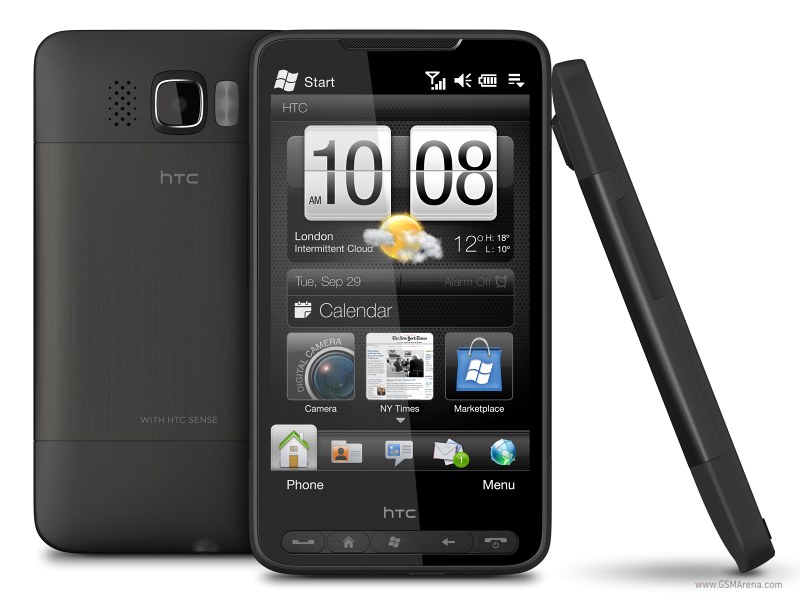 |
|
|
|
|
|
rstusa
|
Oct 22 2009, 08:43 PM
|
|
|
RM2399 is AP set? HK selling HKD4080=RM1800++
|
|
|
|
|
|
rstusa
|
Oct 23 2009, 09:15 AM
|
|
|
QUOTE(evilpuppy @ Oct 22 2009, 11:01 PM) RM1800 + RM600 (Malaysia TAX + Sirim Sticker)  I mean when you go travel to HK, buy there with cheaper price take back no need tax. My HD bought from HK with price RM2400++ when malaysia selling RM3K.
Added on October 23, 2009, 9:18 amQUOTE(maesus @ Oct 22 2009, 11:45 PM) and NO VIDEO CALL (no front camera). If you can live with this mis-feature, then this is definitely a great phone. Huh?? No front camera, so bad? Can't be happen in HD2. This post has been edited by rstusa: Oct 23 2009, 09:18 AM |
|
|
|
|
|
rstusa
|
Oct 23 2009, 07:42 PM
|
|
|
QUOTE(alive6 @ Oct 23 2009, 08:23 PM) hi,everyone. im using mapking 2007 for my htc touch hd. but sometime I cannot load my map when one is cheras location and other is subang jaya. can anyone recommend me any other version or gps software ?thank you so much Google Maps or Garmin |
|
|
|
|
|
rstusa
|
Oct 23 2009, 08:04 PM
|
|
|
QUOTE(evilpuppy @ Oct 23 2009, 08:45 PM) not many ppl are like what you said willingly travel to HK for the 2.4k HD and how much $ you could save? i mean how bout all your traveling expenses and hotel..etc.. try to sum up i bet it would be more than 3k. Unless ppl who travel alot to HK. Again if something when wrong you need a warranty claim ..? Fly back to HK for warranty?  I mean just when you got travel to hk, not ask you purposely buy the air ticket just to get HD there. For warranty then really no choice for AP set. |
|
|
|
|
|
rstusa
|
Oct 27 2009, 08:34 AM
|
|
|
If you guys want to buy extra htc USB transfer cable, can buy in lowyat computer shop, it just cost RM7 compare to mobile shop RM20.
This post has been edited by rstusa: Oct 27 2009, 08:35 AM
|
|
|
|
|
|
rstusa
|
Dec 9 2009, 03:19 PM
|
|
|
Anybody can get maxis broadband sim card settings for the HD phone?
|
|
|
|
|
|
rstusa
|
Dec 9 2009, 04:49 PM
|
|
|
QUOTE(roticanai92 @ Dec 9 2009, 05:36 PM) juz put in the sim card and htc hd will auto configure! Are you sure? Last time I use the mobile internet won't auto configure and taken to maxis branch let the staff configure for me. |
|
|
|
|
|
rstusa
|
Dec 9 2009, 10:08 PM
|
|
|
You mean auto configure for data service or roaming? Definitely not the hardware problem, htc not like nokia receive the settings then save it can use, if really auto configure, why maxis website still wanna show the htc settings step by step?
If you said auto configure, how you make it? How you see the data service auto configure itself? Pls clarify more, thanx!
|
|
|
|
|
|
rstusa
|
Dec 9 2009, 10:49 PM
|
|
|
QUOTE(evilpuppy @ Dec 9 2009, 11:37 PM) you may let the device auto configure it self once you slot in your simcard. or using the setting>connection>setup connection tool to set up your data services. as for maxis web setting is for those who doesn't really into setting stuff and they prefer to done by maxis. but sometime manual setting is useful too IF auto configure fail. Where can i see "auto configure"? After i slot in sim card, open power then just normal, nothing happen or showing auto configure. |
|
|
|
|
|
rstusa
|
Dec 9 2009, 11:09 PM
|
|
|
QUOTE(benny888 @ Dec 9 2009, 11:58 PM) When you put in a new simcard, the phone will show you message it will auto configure settings. I repeat since you are using HTC HD - this function is definately there ; this feature is there since the earlier htc models released at least 2-3 years back. I can only conclude is either your phone problem or simcard problem. Why don't you ask for a new simcard ? I have been using Maxis 5 years already and on all my previous Dopod/Treo PRo/HTC pdaphones I need not do such settings manually - is all auto configure. And it will also autoconfigure for roaming data too. I want to clarify first, I'm not using mobile internet package but i'm using maxis broadband package. I just called maxis broadband toll free and they told me the HTC phone can't set by itself and need to go to the nearest branches ask the staff there set for me. |
|
|
|
|
|
rstusa
|
Feb 1 2010, 10:22 PM
|
|
|
Is there got update for HD from windows mobile 6.1 to 6.5?
|
|
|
|
|
|
rstusa
|
Feb 4 2010, 11:44 AM
|
|
|
Can anyone get the Papago GPS map for windows mobile?
|
|
|
|
|
|
rstusa
|
Apr 19 2010, 05:29 PM
|
|
|
Hi, those ROM upgrade & application shown in htc.com are not allow for AP phone to download? Because it needs to enter S/N verify.
|
|
|
|
|
|
rstusa
|
Apr 19 2010, 06:39 PM
|
|
|
QUOTE(lhongwuh @ Apr 19 2010, 07:35 PM) S/N is located behind your phoine under the battery. Doesnt matter AP or ori, u still can find the sticker there AFAIK. I had entered the S/N for Touch HD, the ROM is for Touch HD but error msg shown not suitable for my device, I doubt that htc.com allow for original buyer only. |
|
|
|
|



 Quote
Quote

 0.0423sec
 0.37
0.37
 7 queries
 GZIP Disabled