Welcome Guest ( Log In | Register )

Outline · [ Standard ] · Linear+

 The Hidden Command in a BlackBerry, Check ur Up Time, Voice/Data Usage, etc

views
     
TSR4yMoNd
post May 1 2009, 03:00 AM, updated 17y ago

Regular
******
Senior Member
1,139 posts

Joined: Aug 2006
Hi Guys...

Perhaps some of you already know theres a built in hidden command shortcut in a blackberry which can check your uptime, voice/data usage, etc
For who didn't know it i share it with you here. and i hope it will be usefull

To Check Your Device General Information:


At the home screen of your Berry
press: alt + shift + h


this is what gonna appear
user posted image

Your PIN will be shown, but If the PIN: Suspended, means u can't use BlackBerry Internet Service. Don't Buy it!!!


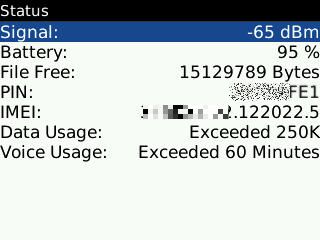
To Check Your Device Voice/Data Usage:


A Brand New item should not exceed the limit

Go to: Options > Status > Type: BUYR (for qwerty KeyPad)

Go to: Options > Status > Type: BUZR (for qwertz KeyPad)

user posted image
Definitely Brand New Device

user posted image
Not Brand New

If The usage not exceed, perhaps is just for testing purposes


To Check Your Device Locked or Unlocked:


Go to: Options > Advanced Options > SIM CARD > Type: MEPD


user posted image
Device Locked by Provider

user posted image
Device Fully Unlocked


rolleyes.gif Well I hope it will be usefull for you guys... Happy Berry Hunting icon_rolleyes.gif

This post has been edited by R4yMoNd: May 25 2009, 04:28 AM
TSR4yMoNd
post May 3 2009, 02:31 AM

Regular
******
Senior Member
1,139 posts

Joined: Aug 2006
QUOTE(fingercrackg @ May 2 2009, 05:35 PM)
in deep ..u can check a person data in complete...sometimes user cant use as the BB error cause of typo error such username or detail of user...

can view in BB provisioning system...authorised login needed..most from technical ppl in network provider...
*
mmm... quite interesting but i dont really get it bro, mind to elaborate further? thanx.. notworthy.gif
TSR4yMoNd
post May 6 2009, 02:23 AM

Regular
******
Senior Member
1,139 posts

Joined: Aug 2006
QUOTE(leealex @ May 6 2009, 02:02 AM)
if u all got Vaild sim card...can pm me...i can help u for do tat...
*
what do u mean bro? u mean locked?
TSR4yMoNd
post May 6 2009, 02:37 AM

Regular
******
Senior Member
1,139 posts

Joined: Aug 2006
QUOTE(leealex @ May 6 2009, 02:35 AM)
Unlock...
*
Software unlock or by unlock code?
TSR4yMoNd
post May 6 2009, 02:41 AM

Regular
******
Senior Member
1,139 posts

Joined: Aug 2006
just curios.. mine maxis set so no need to unlock, n normally when i bought phone its already unlock
TSR4yMoNd
post May 6 2009, 03:08 AM

Regular
******
Senior Member
1,139 posts

Joined: Aug 2006
yeah using bold, i already have my own selfmade theme, n i have installed software to vibrate n sound together, thank you smile.gif
TSR4yMoNd
post May 6 2009, 11:06 PM

Regular
******
Senior Member
1,139 posts

Joined: Aug 2006
QUOTE(lwb @ May 6 2009, 10:38 PM)
raymond,

nice to know that you did installed the vibrate+ring apps.
do you also happen to install the auto keypad lock apps?
*
Yeah i'm using AutoLock for the auto keypad lock.

ps: once installed it will appear in the options

This post has been edited by R4yMoNd: May 6 2009, 11:07 PM
TSR4yMoNd
post May 15 2009, 02:36 AM

Regular
******
Senior Member
1,139 posts

Joined: Aug 2006
QUOTE(butters @ May 14 2009, 09:15 PM)
hey raymond,
Regarding the "Options > Status > Type: BUYR" to check the usage right, if new device should be zero mah. But is it possible to reset this to become zero ?? Thanks.
*
No matter u reinstall, wipe or reset all settings, the BUYR still will show the actual one and will not reset to zero. Unless someone found a way to reset this BUYR
TSR4yMoNd
post May 24 2009, 02:34 AM

Regular
******
Senior Member
1,139 posts

Joined: Aug 2006
QUOTE(sonyclie77 @ May 24 2009, 01:43 AM)
This is good stuff, R4yMoNd!

I've pinned this thread for easy reference.
*
thank you...

we still waiting for ur item, hopefully no problem with the delivery smile.gif
TSR4yMoNd
post May 25 2009, 01:54 AM

Regular
******
Senior Member
1,139 posts

Joined: Aug 2006
QUOTE(Kagaya @ May 24 2009, 09:13 PM)
Doesn't seems to work with my pearl flip on Suretype.
*
ur pearl is not qwertz so type: BUYR instead and not BUZR


Added on May 25, 2009, 1:55 am
QUOTE(samyueru @ May 24 2009, 06:38 PM)
just adding some info..for those who buy BB not in the QWERTY but in QWERZ..

u need to type BUZR not BUYR to check ur BB stil new or used..

options>status>BUZR
*
Thank you.. myself never hands on QWERTZ so overlook on this one.. thumbup.gif i will add the info notworthy.gif

This post has been edited by R4yMoNd: May 25 2009, 01:55 AM
TSR4yMoNd
post May 29 2009, 07:20 PM

Regular
******
Senior Member
1,139 posts

Joined: Aug 2006
QUOTE(kimi @ May 29 2009, 02:20 PM)
still dun get it, in status i can see signal, battery, file free, pin and imei - where supposed to type in BUYR?
*
type anywhere inside status: BUYR

remember all capital


Change to:
| Lo-Fi Version
0.0254sec    0.74    7 queries    GZIP Disabled
Time is now: 18th December 2025 - 10:38 PM