Welcome Guest ( Log In | Register )

Bump Topic Topic Closed RSS Feed
197 Pages « < 43 44 45 46 47 > » Bottom

Outline · [ Standard ] · Linear+

 AMD® Socket AM2&AM3 Overclocking V17, The secret is yet to be unleashed...

views
     
wch5274
post May 8 2009, 02:25 AM

On my way
****
Validating
532 posts

Joined: Nov 2007
QUOTE(XiuKeong @ May 8 2009, 02:20 AM)
The hsf is depends on your budget. Tell us so we can give you some recommendation nod.gif
*
below rm200...
planning to OC my 7750 but the stock hsf noise too loud...
my gc already done oc but for proc, still checking the suaitable hsf..

what is the max temp for 7750 (or other amd proc)?
antonio
post May 8 2009, 02:29 AM

AMD Phenom II & Intel i7 Overclocker
Group Icon
VIP
4,032 posts

Joined: Jan 2003
From: MSR Headquaters
QUOTE(XiuKeong @ May 8 2009, 02:20 AM)
The hsf is depends on your budget. Tell us so we can give you some recommendation nod.gif
*
Looking something like me?? biggrin.gif

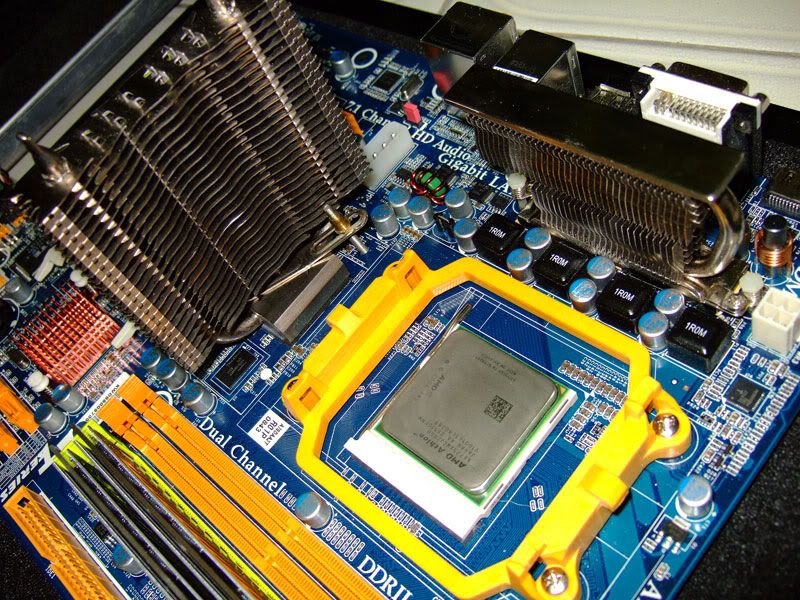
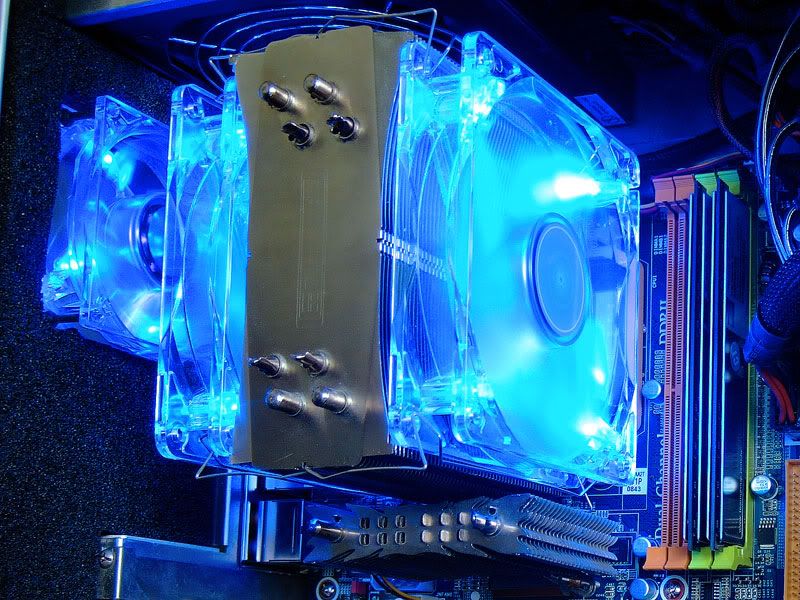
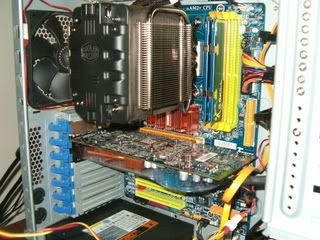
Here are some ideas....
user posted image
user posted image


The one I'm eyeing....the airflow direction is perfect...some heatsinks blow above not suitable since the right direction for TA970GX type mobo is blowing towards the mosfets...
user posted image

Original link:---> http://www.rebelshavenforum.com/sis-bin/ul...45;t=000081;p=2

This post has been edited by antonio: May 8 2009, 02:30 AM
wch5274
post May 8 2009, 02:29 AM

On my way
****
Validating
532 posts

Joined: Nov 2007
QUOTE(antonio @ May 7 2009, 09:29 PM)
Seriously, the TMPIN 1 and 3 gone haywire...where does this TMPIN located, mobo or proc...I got to send either one for replacement or RMA lar like this...

TMPIN 1 is stuck at 45 no matter what and TMPIN 3 has a maximum of only 60...

During my last Priming session I noticed the temps weren't moving even after I stop prime nearly 1 hour and manually touched heatsink both Proc and Northbridge which clearly indicates that if the TMPIN readings were to be true, my finger didn't felt any excessive hear at all...

And during Priming the temps readings on TMPIN 1 and 3 are both non-reflect the temps of the Proc and NB which I also manually touch and feel.... hmm.gif

Another thing when I enable in Bios regarding temp shutdown at 75c....my PC shuts off even when the readings in HWMonitor and Overdrive during priming never showed 75c  doh.gif

sad.gif
*
hehehehe... same my case...
TMPIN0 ---> 44C mobo temp
TMPIN1 ---> 50C proc temp
TMPIN2 ---> 88C ?????????? dunno where it come from... but sometime the number change +-1C... doh.gif

Then my proc fan..
normal - 5200rpm
max - 8888rpm <--- can my fan reach that????? sweat.gif (stock cooler amd x2 7750 be)

sometime 2nd and 3rd fan reading appear... with 0rpm..... blush.gif
antonio
post May 8 2009, 02:32 AM

AMD Phenom II & Intel i7 Overclocker
Group Icon
VIP
4,032 posts

Joined: Jan 2003
From: MSR Headquaters
QUOTE(wch5274 @ May 8 2009, 02:29 AM)
hehehehe... same my case...
TMPIN0 ---> 44C mobo temp
TMPIN1 ---> 50C proc temp
TMPIN2 ---> 88C ?????????? dunno where it come from... but sometime the number change +-1C...  doh.gif

Then my proc fan..
normal - 5200rpm
max - 8888rpm <--- can my fan reach that?????  sweat.gif  (stock cooler amd x2 7750 be)

sometime 2nd and 3rd fan reading appear... with 0rpm.....  blush.gif
*
Yap...sometimes HardwareMonitor would suddenly popup its emergency screen and disrupt my gaming sessions (which is sim-racing) and thats really frustating... doh.gif

wch5274
post May 8 2009, 02:33 AM

On my way
****
Validating
532 posts

Joined: Nov 2007
QUOTE(antonio @ May 8 2009, 02:29 AM)
Looking something like me?? biggrin.gif

Here are some ideas....
user posted image
user posted image
The one I'm eyeing....the airflow direction is perfect...some heatsinks blow above not suitable since the right direction for TA970GX type mobo is blowing towards the mosfets...
user posted image

Original link:---> http://www.rebelshavenforum.com/sis-bin/ul...45;t=000081;p=2
*
nice setup la...
what price and brand...
performance?????

ehhh i see black thinggy at background... insulfex????... soundproofing??? may i suggest use dynamat... biggrin.gif
antonio
post May 8 2009, 03:11 AM

AMD Phenom II & Intel i7 Overclocker
Group Icon
VIP
4,032 posts

Joined: Jan 2003
From: MSR Headquaters
QUOTE(wch5274 @ May 8 2009, 02:33 AM)
nice setup la...
what price and brand...
performance?????

ehhh i see black thinggy at background... insulfex????... soundproofing??? may i suggest use dynamat...  biggrin.gif
*
Not mine ler....mine not as nice as the one I posted... sad.gif

Summore using stock cooling only...


XiuKeong
post May 8 2009, 03:16 AM

[OMG] Sweetie™
*******
Senior Member
9,436 posts

Joined: Oct 2006
From: Oz


QUOTE(wch5274 @ May 8 2009, 02:25 AM)
below rm200...
planning to OC my 7750 but the stock hsf noise too loud...
my gc already done oc but for proc, still checking the suaitable hsf..

what is the max temp for 7750 (or other amd proc)?
*
Got CCF, AC Extreme, Xigmatek...So many to choose from.

For stock hsf, I got 5*C @ full load.

This post has been edited by XiuKeong: May 8 2009, 03:17 AM
noobianz
post May 8 2009, 04:13 AM

Casual
***
Junior Member
479 posts

Joined: Sep 2006
From: Planet Earth


user posted image

Can anyone tell me the temperature reading in the red box referring to which part of my mobo?is it pwm?Im pretty sure the 2 readings below the red box is for CPU n mobo icon_question.gif

btw im using biostar ta780g m2+

This post has been edited by noobianz: May 8 2009, 04:33 AM
wch5274
post May 8 2009, 04:27 AM

On my way
****
Validating
532 posts

Joined: Nov 2007
If u already idle around 30min
i believe TMPIN0 is ur proc temp and others are your mobo...
u use stock cooler?

if modded one maybe TMPIN1.. smile.gif


Added on May 8, 2009, 4:30 am
QUOTE(XiuKeong @ May 8 2009, 03:16 AM)
Got CCF, AC Extreme, Xigmatek...So many to choose from.

For stock hsf, I got 5*C @ full load.
*
thats y i got pening2
too many hsf need to choose...
already google for review and yet... too many conclusion...
sweat.gif

This post has been edited by wch5274: May 8 2009, 04:30 AM
noobianz
post May 8 2009, 04:39 AM

Casual
***
Junior Member
479 posts

Joined: Sep 2006
From: Planet Earth


theres no doubt tat TMPIN2 is taken from my cpu, ive been experimenting with the temp n ive seen tat when im running any program such as IBT/prime95 TMPIN2 will rose up significantly while TMPIN0 increase but in a small margin which is around 5-8c.. but wut rly confusing is, where is TMPIN0 temperature taken from?Im using arctic freezer 64 pro for my proc =)

p/s:forgot to mention, brisby DST is not reliable.. after browsing thru the web ive found quite alot of discussion regarding brisby DTS. need to add around 10-15c from the reading to get the real temp.

This post has been edited by noobianz: May 8 2009, 04:42 AM
XiuKeong
post May 8 2009, 04:57 AM

[OMG] Sweetie™
*******
Senior Member
9,436 posts

Joined: Oct 2006
From: Oz


QUOTE(wch5274 @ May 8 2009, 04:27 AM)
thats y i got pening2
too many hsf need to choose...
already google for review and yet... too many conclusion...
sweat.gif
*
I suggest CCF or AC Extreme smile.gif
antonio
post May 8 2009, 05:06 AM

AMD Phenom II & Intel i7 Overclocker
Group Icon
VIP
4,032 posts

Joined: Jan 2003
From: MSR Headquaters
QUOTE(noobianz @ May 8 2009, 04:13 AM)

Can anyone tell me the temperature reading in the red box referring to which part of my mobo?is it pwm?Im pretty sure the 2 readings below the red box is for CPU n mobo icon_question.gif

btw im using biostar ta780g m2+
*
Me too having a hard time determining which is which.... hmm.gif

p/s: why can't I upload anything!!!!! vmad.gif

Can't even post the screenie of my temps... sad.gif Wimax is damn today....

Nvm lar...manually put
Current on Prime...

Temps

AMD Overdrive


CPU Core 1: 50c
CPU Core 2: 50c

TMPIN1: 93c shocking.gif sweat.gif doh.gif
TMPIN2: 39c (I think this is the ambient sensor a.k.a mobo temp)
TMPIN3: 57c

CPUID Hardware Monitor


CPU Core 1: 50c
CPU Core 2: 50c

TMPIN1: 93c
TMPIN2: 39c
TMPIN3: 57c

Basically the same as AMD Overdrive

Hardware Monitor (Comes together with the Motherboard CD)


Sys Temp:39c
CPU Temp: 57c


So I'm guessing Hardware Monitor (Biostar Included Software) reads the TMPIN3 and TMPIN2 but not TMPIN 1....But that is only after I flashed to Bios 18/Feb/09...The stock Bios (the Jan 09) didn't have any readings of 93c at all.....and the TMPIN numbers are 0,1,2 as opposed to the newer bios which is 1,2,3 rclxub.gif


This post has been edited by antonio: May 8 2009, 05:22 AM
digswell
post May 8 2009, 08:35 AM

Look at all my stars!!
*******
Senior Member
2,484 posts

Joined: Nov 2007
From: Nilai,N.S.D.K
@antonio

Hope this might give u a help .... I using biostar TA770A2+ mobo

Attached Image

A small wrong reading with -12v ...no sure is win7 problem or not rclxub.gif ...but vista got right reading. hmm.gif

Everest AUX temp = NB temp

Anyone know ACPI THRM temp is reading wat item ?

This post has been edited by digswell: May 8 2009, 08:42 AM
cloudwan
post May 8 2009, 11:44 AM

- Knob -
*******
Senior Member
8,524 posts

Joined: Jan 2003
From: The Jungle Of Pahang


Why most biostar users has high tmpin meh??

This is my MSI mobo temp screenie:
user posted image
I have never seen it gone sooo high, the highest around 4xc sweat.gif
digswell
post May 8 2009, 12:09 PM

Look at all my stars!!
*******
Senior Member
2,484 posts

Joined: Nov 2007
From: Nilai,N.S.D.K
QUOTE(cloudwan @ May 8 2009, 11:44 AM)
Why most biostar users has high tmpin meh??

This is my MSI mobo temp screenie:
user posted image
I have never seen it gone sooo high, the highest around 4xc sweat.gif
*
Mine also around 4xC during day time and below 40c during night time....
cloudwan
post May 8 2009, 12:19 PM

- Knob -
*******
Senior Member
8,524 posts

Joined: Jan 2003
From: The Jungle Of Pahang


QUOTE(digswell @ May 8 2009, 12:09 PM)
Mine also around 4xC during day time and below 40c during night time....
*
Yup i see that, maybe it's just a prob with the TA790GX series kot..
Coz like urs the older model series it's not affected.. hmm.gif
kuntawakaw
post May 8 2009, 12:32 PM

imma tag fag!
*******
Senior Member
3,795 posts

Joined: Nov 2008
From: Varies....


QUOTE(XiuKeong @ May 8 2009, 12:29 AM)
The ACC only available on certain mobo.

Edit : Anyone knows where to get those sound dampening mat?
*
ta790gx 128 have ths feature or not? y i cant see mine but it the bios manual have..any solution?
is both mobo and proc support then only the feature is on?
cloudwan
post May 8 2009, 12:39 PM

- Knob -
*******
Senior Member
8,524 posts

Joined: Jan 2003
From: The Jungle Of Pahang


QUOTE(kuntawakaw @ May 8 2009, 12:32 PM)
ta790gx 128 have ths feature or not? y i cant see mine but it the bios manual have..any solution?
is both mobo and proc support then only the feature is on?
*
Ur using X2 7750 eh? If yes it should be there in the bios.. It's not in the same page@tab as where u oc though..
U have to look for it.. I can't remember the tab it's set under.. sweat.gif
kuntawakaw
post May 8 2009, 12:43 PM

imma tag fag!
*******
Senior Member
3,795 posts

Joined: Nov 2008
From: Varies....


QUOTE(cloudwan @ May 8 2009, 12:39 PM)
Ur using X2 7750 eh? If yes it should be there in the bios.. It's not in the same page@tab as where u oc though..
U have to look for it.. I can't remember the tab it's set under.. sweat.gif
*
nope..older 4000+
i search everywhere still cant find..if from the bios manual, it will be at the sb config.. but still cant find..
da la mobo baru rosak..gc rosak gak...xle la nk tuka proc....baru pk nk tuka proc...

any feature i have to disable? cuz seems my limit will be 287mhz.... even low but not so low multi..hard to go further...
ah_khoo
post May 8 2009, 12:47 PM

- No Action Talk Only -
Group Icon
Elite
8,103 posts

Joined: Jan 2003
From: Tanah Lot @ Dungun, Terengganu.


QUOTE(wch5274 @ May 8 2009, 02:33 AM)
nice setup la...
what price and brand...
performance?????

ehhh i see black thinggy at background... insulfex????... soundproofing??? may i suggest use dynamat...  biggrin.gif
*
that's bro Entropy (from vrz)'s previous setup b4 he switch to ddr3 platform w/ msi gd70. smile.gif

QUOTE(cloudwan @ May 8 2009, 12:19 PM)
Yup i see that, maybe it's just a prob with the TA790GX series kot..
Coz like urs the older model series it's not affected.. hmm.gif
*
either bios issue, onboard sensor or dts for me. bios issue can be determined by tryin other version, onboard sensor can be verified either usin d chip on other board or pop in another chip into d board in use, while for dts can use coretemp to check.

user posted image

tested 01/13/2009 bios on 790gx3, no problem, even my old 790gx a2+ & 790gx 128M have zero issue w/ d temp readin. was a bit surprise few users to have face such problem. sweat.gif

QUOTE(kuntawakaw @ May 8 2009, 12:32 PM)
ta790gx 128 have ths feature or not? y i cant see mine but it the bios manual have..any solution?
is both mobo and proc support then only the feature is on?
*
u need atleast an agena, toliman or kuma to have d acc feature provided ya board come w/ sb750 & a bios which support that feature. if ur runnin of brisbies, windsy or older am2 chips, u won't see it in bios evan ya board come w that feature. smile.gif

197 Pages « < 43 44 45 46 47 > » Top
Topic ClosedOptions
 

Change to:
| Lo-Fi Version
0.0296sec    0.50    6 queries    GZIP Disabled
Time is now: 2nd December 2025 - 06:33 PM