

hi people,
Just got my VAIO CW16FG. What should I do next?
This post has been edited by jasmine_09: Jan 4 2010, 01:33 PM
VAIO Club V2, Video Audio Intelligence Organizer
VAIO Club V2, Video Audio Intelligence Organizer
|
|
 Jan 4 2010, 01:10 PM Jan 4 2010, 01:10 PM
Return to original view | Post
#1
|
 
Junior Member
103 posts Joined: Nov 2009 
|
hi people,
Just got my VAIO CW16FG. What should I do next? This post has been edited by jasmine_09: Jan 4 2010, 01:33 PM |
|
|
|
|
|
Jan 4 2010, 03:32 PM
Return to original view | Post
#2
|
|
Junior Member
103 posts Joined: Nov 2009
|
QUOTE(lethalyellow @ Jan 4 2010, 02:14 PM) Jasmine, welcome to the club! Suppose you wanna be included in the owners list? Yeah. Sure!  |
|
|
Jan 5 2010, 06:55 PM
Return to original view | Post
#3
|
|
Junior Member
103 posts Joined: Nov 2009
|
QUOTE(V12Kompressor @ Jan 5 2010, 04:13 PM) "Be sure to create recovery discs" Haha. Okay. But, may I know what's that for? When do we have to use it?  QUOTE(lethalyellow @ Jan 5 2010, 04:19 PM) I havent create the recovery disc. Its been almost a month. Wow. Is it okay if we don't create the disc? |
|
|
Jan 5 2010, 07:08 PM
Return to original view | Post
#4
|
|
Junior Member
103 posts Joined: Nov 2009
|
QUOTE(NismoSTI @ Jan 5 2010, 07:00 PM) Hello every VAIO member, helloo! Welcome to the club. I'm a new member too! I just bought VAIO NW25GF...nice to see and meet you all here...i'm happy to share with everything and any directives come from you guys whatever i should do in VAIO.. all the best to VAIO!!!  PM maxizanc if you wanna be included in the owner's list as mentioned by lethalyellow. Hehe This post has been edited by jasmine_09: Jan 5 2010, 07:10 PM |
|
|
Jan 5 2010, 10:17 PM
Return to original view | Post
#5
|
|
Junior Member
103 posts Joined: Nov 2009
|
QUOTE(lethalyellow @ Jan 5 2010, 08:45 PM) Hey Jasmine..the recovery disc is needed if the F10 button doesnt work. I haven't really start using it since I haven't create recovery disc, afraid something bad might happen to it Hows ur Vaio treating u?...  Are any DVDs will do to create the recovery disc? What model are you using right now? How's your Vaio treating you? |
|
|
Jan 5 2010, 11:04 PM
Return to original view | Post
#6
|
|
Junior Member
103 posts Joined: Nov 2009
|
QUOTE(DalphinuS @ Jan 5 2010, 10:32 PM) I created the recovery discs using 2 DVDr. okay. thanks It's ok to use ur lappy right away, as I heard the recovery data are stored in the HDD inside. Pls correct me if I'm wrong~~  so, are there any other things that I need to do after creating the recovery disc? How's your VAIO functioning? How does your VAIO perform?  |
|
|
|
|
|
Jan 7 2010, 07:51 PM
Return to original view | Post
#7
|
|
Junior Member
103 posts Joined: Nov 2009
|
QUOTE(hangy2k @ Jan 5 2010, 11:35 PM) have you registered your vaio in mysony website for extra 3 month warranty? yeap. registered! http://mysony.sony.com.my/myhome.aspx |
|
|
Jan 8 2010, 03:59 PM
Return to original view | Post
#8
|
|
Junior Member
103 posts Joined: Nov 2009
|
I've bought DVD-R, planning to create the recovery disc. However, because I did not create the recovery disc immediately after I brought it home, I would like to restore everything back to it's original condition, like how the Sony Style give it to me before creating the recovery disc. Do you guys have any idea on how to restore it back?
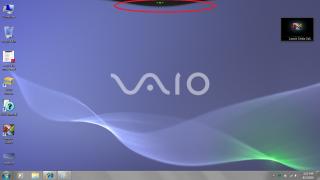
 Another thing, I've attached 2 pictures. As you can see, the desktop of the show units in Sony Style/Centre are as the attachment2. However sometimes, my desktop showed as attachment1. I've circled the difference between attachment 1 and attachment 2. Do you guys have any idea why is it like that? Oh, by the way, is it okay for my one-week old laptop to produce some soft sound (but you'll be able to hear it) when your laptop is switched on? It's like "z z z" sound. Okay, that's all for now. I'm sorry to trouble you guys with so many questions but I'm such a noobie when it comes to computing stuff. Ha ha. thanks for answering my question in advance! This post has been edited by jasmine_09: Jan 8 2010, 05:04 PM Attached thumbnail(s) 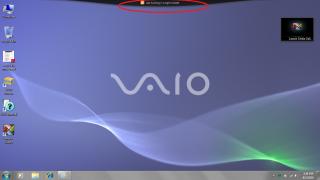
|
|
|
Jan 8 2010, 10:00 PM
Return to original view | Post
#9
|
|
Junior Member
103 posts Joined: Nov 2009
|
QUOTE(DalphinuS @ Jan 8 2010, 08:20 PM) The z z z sound I believe is the fan being turned on while it's hot. It'll switch off once the laptop is cool down. Better check with other sifu here. but i just switch on my laptop for few minutes and the sound can be heard. But it stops for awhile and appear again. omg. I'm still waiting for other sifu here to reply me By the way, My FW dun have such bar, what do u call that? VAIO something?? I 4got the name. Why my VAIO isn't equipped with that? Where should I get that? I'm now using stardock instead for the time being~ I've no idea what's the bar's name. Haha. Maybe you should check with sony staff |
|
|
Jan 11 2010, 11:20 AM
Return to original view | Post
#10
|
|
Junior Member
103 posts Joined: Nov 2009
|
my laptop is using wireless modem right now. Sometimes, the internet explorer can't seem to open the web page. According to network and sharing centre, it is connected to internet. Why is this happening? is it the modem problem or laptop problem?
|
|
|
Jan 26 2010, 11:14 PM
Return to original view | Post
#11
|
|
Junior Member
103 posts Joined: Nov 2009
|
may i know which free anti-virus you guys using for your VAIO?
|
|
|
Jan 28 2010, 11:32 AM
Return to original view | Post
#12
|
|
Junior Member
103 posts Joined: Nov 2009
|
QUOTE(freedom2912 @ Jan 27 2010, 12:48 AM) originally vaio was pre-installed with McAfee.. Thanks. But, may I know how do I activate it? LOL. Sorry for the noob-ness i remove McAfee and now using Kaspersky AV.. the best AV for me  |
|
Topic ClosedOptions
|
| Change to: |  0.0192sec 0.0192sec
 0.59 0.59
 7 queries 7 queries
 GZIP Disabled GZIP Disabled
Time is now: 11th December 2025 - 11:20 AM |
 Quote
Quote