Welcome Guest ( Log In | Register )

Bump Topic Topic Closed RSS Feed
102 Pages « < 25 26 27 28 29 > » Bottom

Outline · [ Standard ] · Linear+

 VAIO Club V2, Video Audio Intelligence Organizer

views
     
Miyabi
post Jul 25 2009, 08:01 AM

馬鹿じゃない
******
Senior Member
1,592 posts

Joined: Jul 2005
From: Poland
QUOTE(aza_360 @ Jul 25 2009, 12:13 AM)
i got a prblem after update VAIO UPDATE.i cant read my vaio manual..show the warning..i have allowed software from vaio update... anybody know?
*
what kind of problem and the warning? elaborate it.
if you did get the update from VAIO Update Program (e.g VAIO Update 4), try check at the following folder C:\Update. some update require manual installation.

QUOTE(se7enhafiz @ Jul 25 2009, 02:21 AM)
m using sony vaio sr12G..can i join this club..n my vaio is on the way as well..yeay!!!
*
welcome aboard!
allen89firedragon
post Jul 25 2009, 11:07 PM

New Member
*
Junior Member
23 posts

Joined: Jun 2009
Guys im in a mist...of choosing either FW43 or CS model....VAIO....can anyone help suggest me the best one?

fookiat
post Jul 26 2009, 12:42 PM

Getting Started
**
Junior Member
234 posts

Joined: Jul 2007


QUOTE(allen89firedragon @ Jul 25 2009, 11:07 PM)
Guys im in a mist...of choosing either FW43 or CS model....VAIO....can anyone help suggest me the best one?
*
I'm eyeing for a FW series..

CS not a bad choice though.. I prefer a larger screen though.. haha
playoff90
post Jul 26 2009, 01:10 PM

~.~ Scouting ~.~
*****
Senior Member
756 posts

Joined: Sep 2007
From: Subang Jaya


i will also get FW 43 compare to cs model =).. bigger screen hehe
slanderesk
post Jul 27 2009, 01:22 AM

New Member
*
Junior Member
20 posts

Joined: Nov 2006


i m planing to get a vaio this coming pc fair, choosing between VGN-SR46GD/B and VGN-FW46GJ/B. does anyone have this model and review about it?
i quite like the FW46 but is heavy. Does anyone know wats the sony promotion for pc fair?
fookiat
post Jul 27 2009, 04:40 PM

Getting Started
**
Junior Member
234 posts

Joined: Jul 2007


do tell us about the pcfair promotion for vaio

I am planning to get one too.. haha
playoff90
post Jul 27 2009, 09:38 PM

~.~ Scouting ~.~
*****
Senior Member
756 posts

Joined: Sep 2007
From: Subang Jaya


YO i just bought my FW43 white hehe... can i noe how to do the recovery disc? what type of disc needed... how big is the file... pls n thx u
fookiat
post Jul 27 2009, 10:50 PM

Getting Started
**
Junior Member
234 posts

Joined: Jul 2007


congrats... going to get one next month...
TSmaxizanc
post Jul 27 2009, 11:43 PM

Look at all my stars!!
*******
Senior Member
5,909 posts

Joined: Jan 2006
From: 06.02.58.44.23.08.03


QUOTE(se7enhafiz @ Jul 25 2009, 02:21 AM)
m using sony vaio sr12G..can i join this club..n my vaio is on the way as well..yeay!!!
*
Welcome. Added your name to the list already.

QUOTE(fookiat @ Jul 27 2009, 04:40 PM)
do tell us about the pcfair promotion for vaio

I am planning to get one too.. haha
*
Will update you guys about the PC Fair Promo later


Added on July 27, 2009, 11:45 pm
QUOTE(playoff90 @ Jul 27 2009, 09:38 PM)
YO i just bought my FW43 white hehe... can i noe how to do the recovery disc? what type of disc needed... how big is the file... pls n thx u
*
open Recover Centre to check on every thing. Choose Create Recovery Disc.

Everyone please comment about the topic's thumbnail. tongue.gif

This post has been edited by maxizanc: Jul 27 2009, 11:45 PM
V12Kompressor
post Jul 28 2009, 12:30 AM

No carrots here
*******
Senior Member
2,141 posts

Joined: Sep 2008
From: Muddy Banks


QUOTE(playoff90 @ Jul 27 2009, 09:38 PM)
YO i just bought my FW43 white hehe... can i noe how to do the recovery disc? what type of disc needed... how big is the file... pls n thx u
*
It'll need 4 DVD discs. Takes about 3 hours to burn.


As for PC Fair Promotion, all I know is CS got free mouse, from what I heard lah. And one of my friend (CS13 user) said that the PC Fair promo in KLCC is the same with PC Fair promo at all Sony direct stores. Both sides will be offering the same things and same freebies at the same price.

This post has been edited by V12Kompressor: Jul 28 2009, 12:30 AM
playoff90
post Jul 28 2009, 03:52 PM

~.~ Scouting ~.~
*****
Senior Member
756 posts

Joined: Sep 2007
From: Subang Jaya


QUOTE(maxizanc @ Jul 27 2009, 11:43 PM)
Welcome. Added your name to the list already.
Will update you guys about the PC Fair Promo later


Added on July 27, 2009, 11:45 pm
open Recover Centre to check on every thing. Choose Create Recovery Disc.

Everyone please comment about the topic's thumbnail. tongue.gif
*
QUOTE(V12Kompressor @ Jul 28 2009, 12:30 AM)
It'll need 4 DVD discs. Takes about 3 hours to burn.
As for PC Fair Promotion, all I know is CS got free mouse, from what I heard lah. And one of my friend (CS13 user) said that the PC Fair promo in KLCC is the same with PC Fair promo at all Sony direct stores. Both sides will be offering the same things and same freebies at the same price.
*
thx i done d =) took around 1 hour plus ....

Btw did any1 try to play game using FW 43??? i realise something... i cant hold 3 key.... for eg play counter strike.... i can press W and D which means can walk side ways... but when i wan try to hold 3 key which means W and D and also Q for changing weapon... Q seems cant press T_T

This post has been edited by playoff90: Jul 28 2009, 05:31 PM
pristina
post Jul 28 2009, 10:54 PM

Getting Started
**
Junior Member
223 posts

Joined: Dec 2007
CS16G solution required!

i bought for one year only.. it is lagging sometimes. i have no idea of this problem when it comes with sound. sad.gif seems like the fan running rush or ???
what should i do to against the problem??
playoff90
post Jul 28 2009, 11:21 PM

~.~ Scouting ~.~
*****
Senior Member
756 posts

Joined: Sep 2007
From: Subang Jaya


a noob question by me... how to activate my microphone and webcam? i cant press the video button at msn....
V12Kompressor
post Jul 28 2009, 11:50 PM

No carrots here
*******
Senior Member
2,141 posts

Joined: Sep 2008
From: Muddy Banks


There's a webcam program called "Webcam Companion".
fookiat
post Jul 29 2009, 11:27 AM

Getting Started
**
Junior Member
234 posts

Joined: Jul 2007


Manage to find the leaflet for the upcoming pc fair..

Vaio PC Fair Promotion a
Vaio PC Fair Promotion b


This post has been edited by fookiat: Jul 29 2009, 11:28 AM
playoff90
post Jul 29 2009, 05:16 PM

~.~ Scouting ~.~
*****
Senior Member
756 posts

Joined: Sep 2007
From: Subang Jaya


QUOTE(V12Kompressor @ Jul 28 2009, 11:50 PM)
There's a webcam program called "Webcam Companion".
*
i noe but i dunno how to put it in my msn..... my msn seems like cant activate it
TSmaxizanc
post Jul 30 2009, 12:06 AM

Look at all my stars!!
*******
Senior Member
5,909 posts

Joined: Jan 2006
From: 06.02.58.44.23.08.03


Sony Style VAIO PC Fair Promotion:

AW37 Rm10,999,
IRSP, PWP Office Small Business @RM599, Blu-ray title Celine Dion (While stock lasts)

Z47 RM8999, Z46/U RM8099, Z46/B RM7999
IRSP, PWP Office Small Business @RM599, VGP-BMS55/t (brown color BT mouse), VAIO Bag

TT35 RM5999
IRSP, PWP Office Small Business @RM599, VAIO Bag, PSP 3006 Black color.

SR46 RM5499, SR43 RM3999
IRSP, PWP Office Small Business @RM599, Blutooth mouse, VGP-CKSR1 pouch

FW47 RM7499, FW46 RM5599
PWP Office Small Business @RM599, VAIO Backpack, Blu-ray title Celine Dion (While stock lasts)

FW43 RM3599,
PWP Office Small Business @RM599, VAIO Backpack, 60 pieces of DVDR.

CS36 RM3999,
IRSP, PWP MS Office Home & Student @RM199, VAIO Backpack, Bluetooth Mouse.

CS23 RM2999,
PWP MS Office Home & Student @RM199, VAIO Backpack, 2GB DDR2 RAM.

P23 RM2999, P25 RM3999,
IRSP, PWP MS Office Home & Student @RM199, Sony Micro Vault Pen Drive 4GB, Starbucks Vouchers (While Stock Last)

JS25 RM3999,
Free MS Office Home & Student

JS35 RM4499

Free MS Office Home & Student

This post has been edited by maxizanc: Jul 30 2009, 01:46 PM
Miyabi
post Jul 30 2009, 02:51 AM

馬鹿じゃない
******
Senior Member
1,592 posts

Joined: Jul 2005
From: Poland
Tutorial:
Enable VT on InsydeH20 BIOS EFI way for VAIO or any supported notebook.
Credits goes to: Bernhard Froemel

As we all know, current Intel Core 2 Duo on mobile notebook do support Virtualization Technology (VT) but unfortunately it has been disabled by Sony in BIOS. VT is useful for running virtual machine and also its let the user to use Windows XP Mode for coming Windows 7.

I got the method from Enable VT for InsydeH20 based VAIO, the EFI way.

Just a reminder, the method is critical as for any mistake may brick the BIOS. So follow the guideline properly.

I will just summarize the method and share with you guys the way I'm doing on my VAIO Z.
Anyway, lets started.

1. First of all ensure that you are using latest BIOS available from Sony website. In my case, Ive to get the BIOS updated, so Ive updated to latest version namely R2168M3.
2. Download the EFI file from the link above or here: http://luna.vmars.tuwien.ac.at/%7Efroemel/...efi/BOOTX64.EFI and place the files in formatted FAT32 USB Thumbdrive inside BOOT folder which is inside the EFI folder. Create the folder first if you haven't done yet The file path should have looks like this: \EFI\BOOT\BOOTX64.EFI
3. Go into your BIOS (pressing F2). Make External Drive as first priority in boot priority, and save setting in BIOS.
4. Plug in USB drive, restart. There will be menu stating below:
> Welcome to GRUB!
>
> Entering rescue mode...
> error: file not found
> grub rescue>
5. After that, type: setup_var
Press enter, and you will see the license text and the warning etc. See at the bottom line, and ensure the GUID match the expected GUID.
6. Then type: setup_var 0x25a , (notes: value 0x25a enable advance menu in BIOS which let you access the VT option.)
Check if its at 0x00 (Default), if its not at this value, do not continue.
7. Next, type: setup_var 0x25a 0x1
8. Verify the value of 0x25a, it should read as 0x01
9. ctrl + alt + del, remove the USB drive after that.
10. Access BIOS by pressing F2. Go to advanced option and select Enable for Intel VT option. Save and exit BIOS.
11. Done.

Worked BIOS version so far:
1. R2168M3
2. R3052M3
3. R3054M3
3. R4040M3

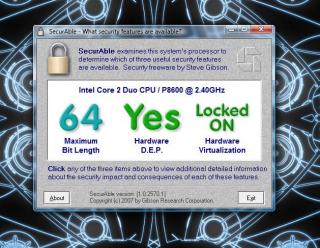
Check with Securable to know if VT is enable in your machine. Download Securable here: http://www.grc.com/securable.htm
If the result is YES or Locked ON, congratulations, you've just enable VT on your notebook.

** maxizanc, not bad for forum thumbnail smile.gif

This post has been edited by Miyabi: Jul 30 2009, 03:08 AM


Attached thumbnail(s)

Attached Image
TSmaxizanc
post Jul 30 2009, 03:19 AM

Look at all my stars!!
*******
Senior Member
5,909 posts

Joined: Jan 2006
From: 06.02.58.44.23.08.03


Thanks Miyabi. Already copied the tutorial in the first page under VAIO Tips Section. and the PC Fair Promotion under Current/Upcoming section. smile.gif


This post has been edited by maxizanc: Jul 31 2009, 12:44 AM
TSmaxizanc
post Jul 31 2009, 12:45 AM

Look at all my stars!!
*******
Senior Member
5,909 posts

Joined: Jan 2006
From: 06.02.58.44.23.08.03


I am helping a friend selling his SZ483, anyone interested? tongue.gif

http://forum.lowyat.net/index.php?showtopic=1113509&hl=

102 Pages « < 25 26 27 28 29 > » Top
Topic ClosedOptions
 

Change to:
| Lo-Fi Version
0.0331sec    0.52    6 queries    GZIP Disabled
Time is now: 12th December 2025 - 05:08 AM
