

Hahaah... Confirmation here by V12Kompressor...
Thanks!
VAIO Club V2, Video Audio Intelligence Organizer
VAIO Club V2, Video Audio Intelligence Organizer
|
|
 Dec 22 2009, 02:04 PM Dec 22 2009, 02:04 PM
|
 
Junior Member
133 posts Joined: Jul 2009 
|
Hahaah... Confirmation here by V12Kompressor...
Thanks! |
|
|
|
|
|
Dec 22 2009, 04:13 PM
|

Junior Member
96 posts Joined: Dec 2008 
|
Guys,
I still cant figure out why we get the force shutdown message. Which application do u think that caused it? Or izzit the normal behavior of Win7? |
|
|
Dec 22 2009, 10:20 PM
|
|
Junior Member
133 posts Joined: Jul 2009
|
QUOTE(lethalyellow @ Dec 22 2009, 04:13 PM) Guys, I got exactly the same situation as u... I posted here for quite some times, but seems no one can solve that for me.I still cant figure out why we get the force shutdown message. Which application do u think that caused it? Or izzit the normal behavior of Win7?  It seems not every Wins7 encounter this. At least miyabi is not facing such prob as I concern. So can't help us here...  |
|
|
Dec 22 2009, 10:49 PM
|

Senior Member
2,955 posts Joined: Sep 2009
|
QUOTE(DalphinuS @ Dec 22 2009, 10:20 PM) I got exactly the same situation as u... I posted here for quite some times, but seems no one can solve that for me. hey guys, before shutting down your windows make sure you"ll close all the programs that are running.It seems not every Wins7 encounter this. At least miyabi is not facing such prob as I concern. So can't help us here... btw, where can i get a screen protector for my vaio? |
|
|
Dec 22 2009, 11:26 PM
|

Senior Member
2,141 posts Joined: Sep 2008 From: Muddy Banks
|
QUOTE(lethalyellow @ Dec 22 2009, 04:13 PM) Guys, Always pops out or only sometimes?I still cant figure out why we get the force shutdown message. Which application do u think that caused it? Or izzit the normal behavior of Win7? Coz I do get it sometimes when I shut down my Windows 7 in my desktop. QUOTE(shankar_dass93 @ Dec 22 2009, 10:49 PM) btw, where can i get a screen protector for my vaio? Sri Computers.Look for 16.4 inch; 16:9 aspect ratio ones. |
|
|
Dec 23 2009, 12:19 AM
|
|
Senior Member
2,955 posts Joined: Sep 2009
|
QUOTE(V12Kompressor @ Dec 22 2009, 11:26 PM) Always pops out or only sometimes? are there any online stores selling screen protectorsCoz I do get it sometimes when I shut down my Windows 7 in my desktop. Sri Computers. Look for 16.4 inch; 16:9 aspect ratio ones. |
|
|
|
|
|
Dec 23 2009, 12:36 AM
|
|
Junior Member
133 posts Joined: Jul 2009
|
QUOTE(V12Kompressor @ Dec 22 2009, 11:26 PM) Always pops out or only sometimes? Alwiz pop out!Coz I do get it sometimes when I shut down my Windows 7 in my desktop. Sri Computers. Look for 16.4 inch; 16:9 aspect ratio ones. When I left my MSN there, it's pop with MSN running behind. If I manual close the MSN b4 shutting down, it oso pop out with no program running behind, as I shown in screenshot earlier. 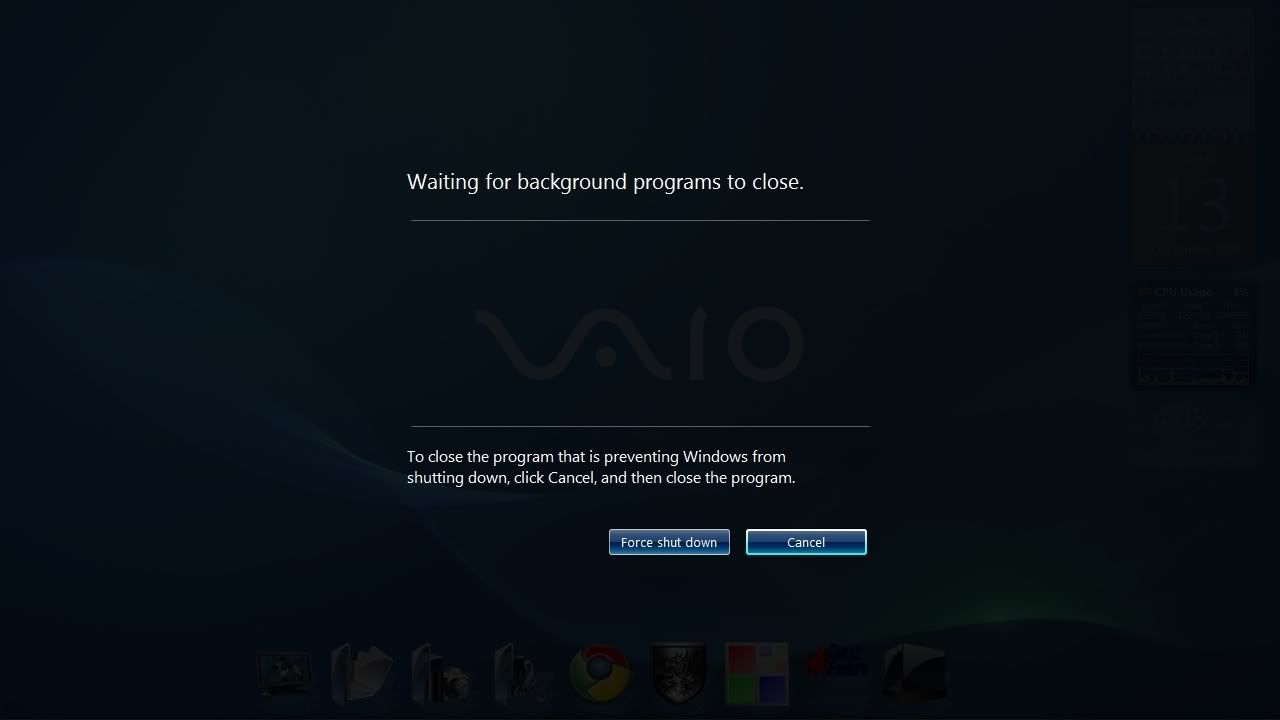 See... Nothing's there to be forced shut down~ This post has been edited by DalphinuS: Dec 23 2009, 12:37 AM |
|
|
Dec 23 2009, 12:53 AM
|
|
Senior Member
2,955 posts Joined: Sep 2009
|
QUOTE(DalphinuS @ Dec 23 2009, 12:36 AM) Alwiz pop out! i guess you should call up sonyWhen I left my MSN there, it's pop with MSN running behind. If I manual close the MSN b4 shutting down, it oso pop out with no program running behind, as I shown in screenshot earlier. See... Nothing's there to be forced shut down~ |
|
|
Dec 23 2009, 01:04 AM
|

Junior Member
480 posts Joined: Feb 2006 From: Perak
|
QUOTE(shankar_dass93 @ Dec 21 2009, 08:07 AM) Added on December 21, 2009, 8:10 am thanks lol  should i upgrade my windows 7 home premium to windows 7 ultimate ? if sony gave u other version than Ultimate, use it unless u r realli realli not satisfy with it..me? i'm different story..Windows XP, i started with XP Pro since day1 and even same to win7 as i'm started with Ultimate version.. but frankly, Ultimate version do hav lots more function than any other version of win7.. http://www.microsoft.com/windows/windows-7...re/default.aspx |
|
|
Dec 23 2009, 01:27 AM
|
|
Senior Member
2,955 posts Joined: Sep 2009
|
QUOTE(cynical66 @ Dec 23 2009, 01:04 AM) well, i'm using Windows 7 Ultimate 32Bit now..gonna upgrade to 64Bit once i can get a hold of it...I'm using Ultimate cos i dun wan any restiction or lack of function which i MAY encounter one day..so far i'm using Ultimate, no trouble or problem that i encountered...just hav to get used to win7 from XP Pro conversion..that's all.. hey bro, how much does windows 7 ultimate cost ?if sony gave u other version than Ultimate, use it unless u r realli realli not satisfy with it..me? i'm different story..Windows XP, i started with XP Pro since day1 and even same to win7 as i'm started with Ultimate version.. but frankly, Ultimate version do hav lots more function than any other version of win7.. http://www.microsoft.com/windows/windows-7...re/default.aspx whats the extra features in windows 7 ultimate compared to windows 7 home premium? btw,if i am going to burn a recovery disc using a dvd, how many empty dvd"s will i need ? i called up sony and the guy told me to prepare about 3 to 4 empety dvd"s. how many do i actually need ? |
|
|
Dec 23 2009, 01:28 AM
|
|
Senior Member
2,141 posts Joined: Sep 2008 From: Muddy Banks
|
name already Ultimate of coz more function than other windows lah.
 My point is, really need all the features in Win7 Ultimate or not. Win XP mode - Most programs used in home also at least is Vista certified now. BitLocker - Really got something so important that needs encryption and decryption? A lot of features in Win7 Ultimate is actually for those directors who manage two or more office and most applications in Win 7 Ultimate is more suited for businessman. QUOTE(DalphinuS @ Dec 23 2009, 12:36 AM) Alwiz pop out! if its really annoying, then try recover your laptop. When I left my MSN there, it's pop with MSN running behind. If I manual close the MSN b4 shutting down, it oso pop out with no program running behind, as I shown in screenshot earlier. See... Nothing's there to be forced shut down~ Boot up ur VAIO > Spam "F10" key > "Restore complete system" or Press "Start" > Type "Vaio Recovery Center" > Select "Restore complete system" Back up ur data first oh.  Added on December 23, 2009, 1:29 am QUOTE(shankar_dass93 @ Dec 23 2009, 01:27 AM) hey bro, how much does windows 7 ultimate cost ? Some models requires only three like the SR55. Some requires four. Just prepare four pieces.whats the extra features in windows 7 ultimate compared to windows 7 home premium? btw,if i am going to burn a recovery disc using a dvd, how many empty dvd"s will i need ? i called up sony and the guy told me to prepare about 3 to 4 empety dvd"s. how many do i actually need ? This post has been edited by V12Kompressor: Dec 23 2009, 01:29 AM |
|
|
Dec 23 2009, 01:34 AM
|
|
Junior Member
133 posts Joined: Jul 2009
|
QUOTE(V12Kompressor @ Dec 23 2009, 01:28 AM) name already Ultimate of coz more function than other windows lah. Thanks... Will try it 1 day if I really gone crazy.My point is, really need all the features in Win7 Ultimate or not. Win XP mode - Most programs used in home also at least is Vista certified now. BitLocker - Really got something so important that needs encryption and decryption? A lot of features in Win7 Ultimate is actually for those directors who manage two or more office and most applications in Win 7 Ultimate is more suited for businessman. if its really annoying, then try recover your laptop. Boot up ur VAIO > Spam "F10" key > "Restore complete system" or Press "Start" > Type "Vaio Recovery Center" > Select "Restore complete system" Back up ur data first oh. Added on December 23, 2009, 1:29 am Some models requires only three like the SR55. Some requires four. Just prepare four pieces. Hahaah! So far I'm satisfy with my genuine Wins7 HP. Fulfil my daily needs. As long as it can go for office use & gaming, why bother if it isn't the ultimate version. Unlike previous Vista, only Ultimate have the feature of ".mpg" as wallpaper. So far, juz lovin' my FW590! All latest game run on highest graphic setting! Give all out~ |
|
|
Dec 23 2009, 01:39 AM
|
|
Senior Member
2,955 posts Joined: Sep 2009
|
QUOTE(DalphinuS @ Dec 23 2009, 01:34 AM) Thanks... Will try it 1 day if I really gone crazy. hey bro,how r u ?Hahaah! So far I'm satisfy with my genuine Wins7 HP. Fulfil my daily needs. As long as it can go for office use & gaming, why bother if it isn't the ultimate version. Unlike previous Vista, only Ultimate have the feature of ".mpg" as wallpaper. So far, juz lovin' my FW590! All latest game run on highest graphic setting! Give all out~ what games u play on your vaio ? i just realised that my vaio" forward and backward key are not working. when i press it nothing happens. is it faulty ? but the volume,pause,stop av mode and s1 buttons are working |
|
|
|
|
|
Dec 23 2009, 01:49 AM
|
|
Senior Member
2,141 posts Joined: Sep 2008 From: Muddy Banks
|
forward and backward key?
The up down left right key ah? |
|
|
Dec 23 2009, 01:55 AM
|
|
Senior Member
2,955 posts Joined: Sep 2009
|
QUOTE(V12Kompressor @ Dec 23 2009, 01:49 AM) forward and backward key? no i mean the media keysThe up down left right key ah? |
|
|
Dec 23 2009, 02:51 AM
|
|
Junior Member
480 posts Joined: Feb 2006 From: Perak
|
shankar - then, u must check it with the place u bought yours to make sure its all right...i dun think we wanna say bad to this...
Ultimate - u dun need a business man to use Ultimate version of Win7..like me, i dun own any large business...but most of my software are are those comes from old times, windows XP..starcraft, heroes of might and magic, etc..not to scare those using alternate version of win7, some of my frens using other version of win7 cant load software that are not vista certified..besides, really...not all people do change their software frequently when newer version dont proof better function and less bugs... so as i said, it depends on your needs, if u feels like wanna change, change it...i use ultimate version just to make sure i dun need do upgrade or sumthing when needed..dat's y v12kompressor, no need to talk like Ultimate version is useless to normal user...thanks This post has been edited by cynical66: Dec 23 2009, 02:52 AM |
|
|
Dec 23 2009, 03:06 AM
|
|
Junior Member
96 posts Joined: Dec 2008
|
QUOTE(DalphinuS @ Dec 23 2009, 12:36 AM) Alwiz pop out! Its really frustrating to encounter the issue, considering that the spec of the machine that we have.When I left my MSN there, it's pop with MSN running behind. If I manual close the MSN b4 shutting down, it oso pop out with no program running behind, as I shown in screenshot earlier. See... Nothing's there to be forced shut down~ What I did was uninstall MSN and put the CPU meter on the gadget. I will only shut down the machine when the CPU usage is around 8% and below. So far it works and fingers crossed it stays that way...  One more thing, the McAfee antivirus that was bundled with Vaio is pretty useless, any recommendation from you guys which one is good? I went to lowyat and I can only see kaspersky with jackie chan on it..is it any good? This post has been edited by lethalyellow: Dec 23 2009, 03:12 AM |
|
|
Dec 23 2009, 09:39 AM
|
|
Senior Member
2,141 posts Joined: Sep 2008 From: Muddy Banks
|
QUOTE(cynical66 @ Dec 23 2009, 02:51 AM) shankar - then, u must check it with the place u bought yours to make sure its all right...i dun think we wanna say bad to this... I never said it was useless to normal users. Ultimate - u dun need a business man to use Ultimate version of Win7..like me, i dun own any large business...but most of my software are are those comes from old times, windows XP..starcraft, heroes of might and magic, etc..not to scare those using alternate version of win7, some of my frens using other version of win7 cant load software that are not vista certified..besides, really...not all people do change their software frequently when newer version dont proof better function and less bugs... so as i said, it depends on your needs, if u feels like wanna change, change it...i use ultimate version just to make sure i dun need do upgrade or sumthing when needed..dat's y v12kompressor, no need to talk like Ultimate version is useless to normal user...thanks I never said you need to be a businessman to use Win7 Ultimate. Since you have softwares from the stoneage, then by all means go ahead for Ultimate since you'll need the XP Mode to run those softwares. QUOTE(lethalyellow @ Dec 23 2009, 03:06 AM) One more thing, the McAfee antivirus that was bundled with Vaio is pretty useless, any recommendation from you guys which one is good? I went to lowyat and I can only see kaspersky with jackie chan on it..is it any good? Kapersky is a very popular alternative, alongside with Avira. Make sure to completely remove McAfee before installing or else you'll encounter errors. |
|
|
Dec 23 2009, 10:30 AM
|
|
Junior Member
133 posts Joined: Jul 2009
|
QUOTE(V12Kompressor @ Dec 23 2009, 01:49 AM) forward and backward key? I think he is refering to the next & previous chapter button... The up down left right key ah? [|<<] & [>>|] Should I say he dunno how exactly these buttons work? Not every video is supported by this button, right? Added on December 23, 2009, 10:32 am QUOTE(V12Kompressor @ Dec 23 2009, 09:39 AM) I never said it was useless to normal users. Like me, I dun use Wins Xp for like ages, so I dun need the MS-Xp to run those application I'm using now. Maybe that's why I dun see the point for installing an Ultimate.I never said you need to be a businessman to use Win7 Ultimate. Since you have softwares from the stoneage, then by all means go ahead for Ultimate since you'll need the XP Mode to run those softwares. Kapersky is a very popular alternative, alongside with Avira. Make sure to completely remove McAfee before installing or else you'll encounter errors.  This post has been edited by DalphinuS: Dec 23 2009, 10:32 AM |
|
|
Dec 24 2009, 01:42 AM
|
|
Senior Member
2,141 posts Joined: Sep 2008 From: Muddy Banks
|
 Try this: Press 'Start' > Type in 'VAIO Recovery Center' > Select 'Reinstall Programs and Drivers' > In the Programs tab, reinstall 'VAIO Event Service' and 'Setting Utilities Series'. If problem still persist, please seek help at your nearest Sony Style outlet.  |
|
Topic ClosedOptions
|
| Change to: |  0.0296sec 0.0296sec
 0.58 0.58
 6 queries 6 queries
 GZIP Disabled GZIP Disabled
Time is now: 9th December 2025 - 10:00 PM |
 Quote
Quote