Lowyat.NET Forums

Welcome Guest ( Log In | Register )

Kopitiam Ops in progress - Trolls be warned.
29 Pages  1 2 3 > »  
RSS feedReply to this topicStart new topicStart Poll

Outline · [ Standard ] · Linear+

> Beginners Guide to Desktop Modding (Guide)

fariz
post Feb 3 2005, 09:09 AM


Kelab Tag Merah
Group Icon

Group: Staff
Posts: 12,221
Joined: January 2003
From: Siberia


Beginners Guide to Desktop Modding

Disclaimer:
1. I'm not responsible if you mess up your registry and your computer decides to no longer work. just so you know, do all of these things at your own hazard.
2. Guides are taken from other guide scattered in the forum and other forums.

Introduction:

So you went to customize.org and you saw the most badass desktop ever and you want to know how it's done right? now that you realize that posting a comment saying "great screenshot, how did you do this?" doesn't get you anywhere, this tutorial will attempt to reveal to you the basic steps of desktop customization in windows and point you in the right direction as to where to achieve more advanced effects.

Enabling WinXP to use 3rd party themes:

Universal UXTheme Patcher:
The UXTheme Patcher allows you to use any 3rd party msstyle theme on Windows XP/SP1/SP2 by patching the uxtheme.dll (dynamic link library).

To simply patch the UXTheme.dll file, run the program, it will determine your operating system, then patch the appropriate file and reboot your PC.
To un-patch the UXTheme.dll file, run the program again, and it will un-patch the .dll and then reboot your PC.
Download Universal UXTheme Patcher

For Windows XP SP3:
Download visual style from any of these site:
- Neowin.net: Completed Visual Styles
- deviantART: Visual Styles
- Customize.org: XP VisualStyles

After you have downloaded the visual styles; usually in zip format; extract it to c:\windows\resources\themes\

Right click desktop > properties > appearance tab, select the visual style you just installed.

Another method is to use WindowBlinds; download here; also 30 days trial.
You can get themes for WindowBlinds from WinCustomize

Wallpaper:

As you may have guessed, your desktop background or "wallpaper" is integral to the overall look of your desktop theme.

A good rule of thumb for wallpapers is to always use one that has a solidly colored area so you can place your icons and other desktop elements without interfering with the wallpaper's focal point. This becomes a problem sometimes when you're using a wallpaper that has a lot of three dimensional work and doesn't really leave room for a blank area. This might require you to edit the wallpaper a bit to your liking and may be more trouble than it's worth.

some good resources for wallpapers are:

- customize.org
- deviantart.com
- Pixelgirl
- Mac OS X wallpapers
- MobiusCo
- Mandolux
- MagnetStudio
- Vladstudio
- WallpaperStock

This post has been edited by fariz: Yesterday, 05:59 AM
User is offlineProfile CardPM
Go to the top of the page
+Quote Post
fariz
post Feb 3 2005, 09:14 AM


Kelab Tag Merah
Group Icon

Group: Staff
Posts: 12,221
Joined: January 2003
From: Siberia


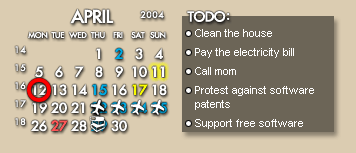
Rainmeter & Rainlendar:
- simple clock and calender on your desktop

user posted image

Download link:
Rainlendar
Rainmeter
(read the manual before asking question)

Skins:
Rainmeter: http://www.skinbase.org/section.php?sections=rainmeter
Rainlendar: http://www.skinbase.org/section.php?sections=rainlendar


Samurize:
- shows your cpu usage, memory and etc
Download link: http://www.samurize.com
Install samurize; then make sure you run the client.exe in order to have the program display on ur desktop. Run config.exe to mod the appearance and add stuffs.
To show the temps; download motherboard monitor at http://mbm.livewiredev.com; make sure you configure all the meters so that it follows your mobo's sensors.
Create shortcut for samurize client and then put it in your startup folder so that it will auto start the next time you restart/turn on your computer.

Samurize tutorial: Samurize Tutorials
To make some adjustment in the settings of the config -> right click samurize icon on your systray, then select edit config.

This post has been edited by fariz: Feb 13 2006, 10:35 PM
User is offlineProfile CardPM
Go to the top of the page
+Quote Post
fariz
post Feb 3 2005, 09:19 AM


Kelab Tag Merah
Group Icon

Group: Staff
Posts: 12,221
Joined: January 2003
From: Siberia


Dock

user posted image

Object Dock: http://www.objectdock.com/
Y'z Dock: (no download link)
RK Launcher: http://home.cogeco.ca/~rklauncher/
Rocketdock: http://www.rocketdock.com/

Download PNGs/icons for docks from these sites:
- Gfxed.com
- InterfaceLIFT
- Wincustomize Objectdock Library

Yz Dock Shortcuts: how-to

All you need to do is drag your applications or folders to the dock! To remove, drag the shortcut out from the dock and Poff!!

Closing the dock and launching a game and restarting the dock:

You could simply do this by assigning the shortcut to a .bat file. Make a text file with the following in it:

taskkill /F /IM YzDock.exe
start /wait C:\Games\UT2003\System\UT2003.exe
start C:\Apps\YzDock\YzDock.exe
exit


Substitute the folder with your own path..

Then save the file and change the extentsion to .bat. Do this for each game. It will even work from the dock. This will close the dock, start the game, then when you exit the game it will start the dock and close the prompt window.

How to delete separator from Y'z Dock:
Hold down Ctrl key and then click and drag it off the dock.

This post has been edited by fariz: May 5 2008, 07:07 AM
User is offlineProfile CardPM
Go to the top of the page
+Quote Post
fariz
post Feb 3 2005, 09:24 AM


Kelab Tag Merah
Group Icon

Group: Staff
Posts: 12,221
Joined: January 2003
From: Siberia


Changing Icons:

The easiest/safest is to use Iconpackager: http://www.stardock.com/products/iconpackager/ (trial)
Download icon packages from: http://www.wincustomize.com/skins.asp?library=2

Sample:
1. G.A.N.T 2: http://www.wincustomize.com/skins.asp?library=2&SkinID=1041
2. iCandy Junior Yellow: http://www.wincustomize.com/skins.asp?library=2&SkinID=1099
3. Gloss: http://www.wincustomize.com/skins.asp?library=2&SkinID=1066
4. Comic Icon 02: http://www.wincustomize.com/skins.asp?library=2&SkinID=1040

Freeware:
Icon Phile

Hiding desk icons
right click on desktop > arrange icons by > uncheck show desktop icons.

Making Desktop Text Transparent
Use D-Color XP: download link
- change the view of your icons on your desktop, allowing you to select from the default large icons view, the small icons view, and the new tile view.

Changing Windows Explorer / Internet Explorer Toolbar Icons

- download Y'z Toolbar: Y'z Toolbar 1.3
- download themes from these sites:Put it in your "startup" folder in Start Menu --> Programs --> Startup to initialized it on startup.
User is offlineProfile CardPM
Go to the top of the page
+Quote Post
fariz
post Feb 3 2005, 09:30 AM


Kelab Tag Merah
Group Icon

Group: Staff
Posts: 12,221
Joined: January 2003
From: Siberia


Using GUIReplacer to replaces AVIs, ICONs and BMPs with ease.

GUI Replacer is a new program from Shacal that replaces AVIs, ICONs and BMPs with ease. With the click of a button your system files resources are changed to those of the module. Your original files are backed up so that you can restore them at any time. You can find version 1.4 of this program HERE.

Here's an explaination from the creator:
QUOTE
it works if your system is in japanese, chinese, english, anything.. it doesnt matter.
let me try and explain again what this program does smile.gif
it takes system file Jalz.dll (just example tongue.gif )
Jalz.dll has spanish language elements inside.
it copies the file and puts into its backup folder.
then with the original jalz.dll file it looks at the script. the script says what resources are going to be replaced within jalz.dll and where they are stored in the module.. eg gant2_guir_module.dll
the script says.. icon resource 12 in jalz.dll must be replaced by System_TimeDate resource in gant2_guir_module.dll which will be an icon.
so lets say its hacking the system file for you. where you might normally have to open reshacker and change each icon one by one so that your spanish files can look nice now you can just apply the module and it will install the resources for you.
guir modules DO NOT contain system files.. they contain resources which are automatically replaced in your original system files.

hope this explaination clears things up. people really need to get into this program its much easier and if you as me its time saving for those who create it. once i've finished making this module my script used in the module will be able to be used by anyone else making a module.

Module available:

1. Gant 2
2. Crystal MX
3. Bluecurve
4. Gant Melancholy
5. iCandy Junior
6. Mac OS X
7. Gant 2 v.2.0 gant2ocean

IMPORTANT!: Use Microsoft TweakUI to rebuild icon cache after you ran the module.

This post has been edited by fariz: Nov 13 2005, 10:49 AM
User is offlineProfile CardPM
Go to the top of the page
+Quote Post
fariz
post Feb 3 2005, 09:31 AM


Kelab Tag Merah
Group Icon

Group: Staff
Posts: 12,221
Joined: January 2003
From: Siberia


Hiding the Recycle Bin

Easy way:
Download, install and run TweakUI for Windows XP. Navigate to Desktop and remove Recycle Bin.


Add Recycle Bin to Folder Options:

Copy and save the following code into notepad and save as Binopt.reg and then double-click it. After importing Binopt.reg into the registry, a new option is listed in the Folder Options dialog box that lets you configure the Recycle Bin icon.
CODE
REGEDIT4

[HKEY_LOCAL_MACHINE\SOFTWARE\Microsoft\Windows\CurrentVersion\Explorer\Advanced\Folder\RecycleBinOnDesktop]
"RegPath"="Software\\Microsoft\\Windows\\CurrentVersion\\Explorer\\HideDesktopIcons\\NewStartPanel"
"Text"="Show Recycle Bin icon on the desktop"
"Type"="checkbox"
"ValueName"="{645FF040-5081-101B-9F08-00AA002F954E}"
"CheckedValue"=dword:00000000
"UncheckedValue"=dword:00000001
"DefaultValue"=dword:00000001
"HKeyRoot"=dword:80000001


user posted image


Making a Transparents Background for Desktop Icons.

By default, Windows XP, can have a transparent background for desktop icons.

System Properties (Win+Pause) > Advanced > Performance > Settings > Visual Effects > enable Use drop shadows for icon labels on desktop

But, if you disable this you can change the text color and background. For this you need D-Color XP. Install it, click on a monitor icon in system tray and you'll get this:

user posted image

This post has been edited by fariz: Sep 22 2006, 10:12 AM
User is offlineProfile CardPM
Go to the top of the page
+Quote Post
fariz
post May 16 2005, 03:46 PM


Kelab Tag Merah
Group Icon

Group: Staff
Posts: 12,221
Joined: January 2003
From: Siberia


I opened this thread so people can ask question directly..
User is offlineProfile CardPM
Go to the top of the page
+Quote Post
maxim.Freaks
post May 30 2005, 12:51 AM


Regular
***

Group: Junior Member
Posts: 339
Joined: January 2003
From: 1-14-19 Equine, EsKaey.


OK.. i have a question here...
i've seen a few desktop that have customize clock in their system tray...
how to do it??

and also...
i've seen a few desktop that have big icons...
how can u make the huge icon + description for it??

This post has been edited by maxim.Freaks: May 31 2005, 02:27 AM
User is offlineProfile CardPM
Go to the top of the page
+Quote Post
Sheonix
post May 30 2005, 07:00 AM


Regular
***

Group: Junior Member
Posts: 329
Joined: January 2003
From: Ipoh


For the big icons, it's AveDesk.
User is offlineProfile CardPM
Go to the top of the page
+Quote Post
maxim.Freaks
post May 31 2005, 02:27 AM


Regular
***

Group: Junior Member
Posts: 339
Joined: January 2003
From: 1-14-19 Equine, EsKaey.


tnx.. Sheonix...
btw..the custom clock in the sys tray...
issit can be done using samurize??
or use other s/w??
User is offlineProfile CardPM
Go to the top of the page
+Quote Post
fariz
post May 31 2005, 09:00 AM


Kelab Tag Merah
Group Icon

Group: Staff
Posts: 12,221
Joined: January 2003
From: Siberia


User is offlineProfile CardPM
Go to the top of the page
+Quote Post
maxim.Freaks
post May 31 2005, 12:00 PM


Regular
***

Group: Junior Member
Posts: 339
Joined: January 2003
From: 1-14-19 Equine, EsKaey.


Thnx alot ace and Sheonix...
biggrin.gif
User is offlineProfile CardPM
Go to the top of the page
+Quote Post
kelvin_hata
post Jun 5 2005, 05:16 AM


Walk On
******

Group: Senior Member
Posts: 1,693
Joined: January 2003
From: Sri Pelangi@Setapak H/P:


a question...
can i change all icon using styleXP?
where do i find the icon...

or i need 1 to 1 change by my own?
User is offlineProfile CardPM
Go to the top of the page
+Quote Post
maxim.Freaks
post Jun 5 2005, 08:58 AM


Regular
***

Group: Junior Member
Posts: 339
Joined: January 2003
From: 1-14-19 Equine, EsKaey.


mmm...u dont need to change 1 by 1...
styleXP use special file format... (.iconset)
it will change all automatically...(depends on the iconset file u dload)...
you can dload most of the iconset at themeXP.org...
also available at wincustomize.com (i think here need 2 register first)...

OR

u can make the iconset urself...
here some example...

CODE

<?xml version='1.0' encoding='ISO-8859-1'?>
<Root>
  <Info Author="xxxx" Email="xxxx@xxx.com" Website="http://xxx.xxxx.com" Comments="xxxxxxxxx"/>
  <Icons>
     <MyDocuments Icon="My Documents.ico,0"/>
     <MyComputer Icon="My computer.ico"/>
     <NetworkPlaces Icon="Network.ico,0"/>
     <TheInternet Icon="Globe.ico"/>
     <RecycleBinempty Icon="Recycle Bin Empty.ico,0"/>
     <RecycleBinfull Icon="Recycle Bin Full.ico,0"/>
     <Explorer Icon="Internet Explorer.ico,0"/>
     <Email Icon="email.ico,0"/>
     <Help Icon="Help.ico,0"/>
     <Find Icon="Windows Explorer.ico,0"/>
     <Run Icon="Run.ico,0"/>
     <ClosedFolder Icon="Folder.ico,0"/>
     <OpenFolder Icon="StFolder.ico,0"/>
     <ProgramGroup Icon="Program Files Folder.ico,0"/>
     <MyMusic Icon="My Music.ico,0"/>
     <MyPictures Icon="My Pictures.ico,0"/>
     <MyVideos Icon="My Videos.ico,0"/>
     <SharedMusic Icon="My Music3.ico,0"/>
     <SharedPictures Icon="My Pictures4.ico,0"/>
     <SharedVideo Icon="My Videos5.ico,0"/>
     <ControlPanel Icon="Control Panel.ico,0"/>
     <AdministrativeTools Icon="Windows Folder.ico"/>
     <DialUpNetworking Icon="Modem.ico,0"/>
     <Printers Icon="Printer.ico,0"/>
     <ScheduledTasks Icon="Clock.ico"/>
     <Favorites Icon="Favourites.ico"/>
     <MyRecentDocuments Icon="Recent Documents.ico"/>
     <FloppyDrive525 Icon="Floppy.ico"/>
     <FloppyDrive35 Icon="Floppy drive.ico"/>
     <HardDrive Icon="Hard drive blue.ico,0"/>
     <CDROMDrive Icon="cd drive.ico"/>
     <ShortcutOverlay Icon="Shortcut Arrow.ico"/>
     <Desktop Icon="Desktop.ico"/>
     <EntireNetwork Icon="Globe 1.ico"/>
     <NetworkService Icon="Internet Connections 1.ico"/>
     <AudioCD Icon="music.ico"/>
     <ConfigurationSettings Icon="Documents &amp; Settings Folder.ico"/>
     <DefaultDocument Icon="Document blank.ico"/>
     <MovieClip Icon="Video.ico"/>
     <TextDocument Icon="Document.ico"/>
     <ZipFile Icon="zip.ico"/>
     <defaultIcon Icon="default.ico"/>
     <GIFImage Icon="gif image.ico"/>
     <PNGFile Icon="png image.ico"/>
     <JpegImage Icon="jpeg image.ico"/>
     <PlayList Icon="play list.ico"/>
     <HtmlFile Icon="html file.ico"/>
     <DefaultApplication Icon="default application.ico"/>
  </Icons>
</Root>


u make the file using any file editor and save it as .iconset...
place all the icons into the same folder as the iconset file...
or if u r using icons on a different folder... specify it in the setting...
eg:
CODE
<WinRarFile Loc=".rar" Icon="C:\Program Files\WinRAR\WinRAR.exe,0"/>


This post has been edited by maxim.Freaks: Jun 5 2005, 08:58 AM
User is offlineProfile CardPM
Go to the top of the page
+Quote Post
ALIAS.JG
post Jun 7 2005, 07:40 AM


Stay Puft Marshmallow Man
******

Group: Senior Member
Posts: 1,820
Joined: February 2005


if i used windows xp x64, can i still be able to customize the com's visual looks ???
i fear that the 32bit files dun go well wit the 64bit

This post has been edited by ALIAS.JG: Jun 7 2005, 08:08 PM
User is offlineProfile CardPM
Go to the top of the page
+Quote Post
hOnGhOnG
post Jun 8 2005, 09:28 PM


Regular
**

Group: Junior Member
Posts: 113
Joined: February 2005


I have a question here.. Hope you guys dont mind to asnwer me.

I am interested in DesktopX. But i cant find any tools in DesktopX to show my temperature. And secondly.. If i have 2 drives, how can i show the Second drive? It only shows me the Primary Drive (C:) but my E: Drive cannot be displayed.

Thanks and have a nice day.
User is online!Profile CardPM
Go to the top of the page
+Quote Post
whoopa
post Jun 10 2005, 02:13 PM


b~o~b~o
*******

Group: Senior Member
Posts: 5,847
Joined: January 2003
From: in ur base killin your d00dz


how do i load the y'z dock automatically when i start my windows ...
thanks for ur help tongue.gif
User is offlineProfile CardPM
Go to the top of the page
+Quote Post
hOnGhOnG
post Jun 10 2005, 07:00 PM


Regular
**

Group: Junior Member
Posts: 113
Joined: February 2005


Move your y'z dock to Startup Section..

Start>Program>Startup
User is online!Profile CardPM
Go to the top of the page
+Quote Post
UnUsUaL
post Jun 10 2005, 07:23 PM


伊巴伊巴安德咧安德咧!
Group Icon

Group: Moderator
Posts: 1,266
Joined: January 2003


QUOTE(hOnGhOnG @ Jun 10 2005, 07:00 PM)
Move your y'z dock to Startup Section..

Start>Program>Startup
*


Do not move it, just create a shortcut and place it into startup folder. Otherwise the YzDock will have trouble to find the assigned icon and applications.
User is offlineProfile CardPM
Go to the top of the page
+Quote Post
catsper
post Oct 28 2005, 04:16 PM


Elite
****

Group: Senior Member
Posts: 557
Joined: January 2003
From: KL


Any good freeware to change .png to .icon?? Thanks
User is online!Profile CardPM
Go to the top of the page
+Quote Post

29 Pages  1 2 3 > » 
Bump TopicReply to this topicTopic OptionsStart new topic
 

Lo-Fi Version Time is now: 30th August 2008 - 06:47 PM
All Rights Reserved 2003-2008 Vijandren Ramadass (~why so serious?~)
Hosting powered by IPServerOne - a Malaysian Web Hosting Company